
Vandaag of morgen in huis

Kwaliteit gegarandeerd

Welkomstaanbiedingen ontgrendelen: GRATIS bezorging | Tot 80% korting | Gratis 30 dagen JoyPlus-proefperiode
Download de app
A gaming headset needs to do more than play sound. You want to hear your teammates, make yourself clearly heard and play for hours without pressure on your ears. Yet many problems only become apparent after a few weeks. A promising headset might not work properly with your console, its microphone might pick up background noise, or it might be less comfortable than the product photos suggest.
So don’t focus only on terms such as “surround sound”, “wireless” or “noise cancelling”. Above all, check the connection, comfort and how the features work in practice.
On gaming headsets, 7.1 surround sound often refers to virtual processing. This can help make the direction of in-game sounds clearer, but it doesn’t guarantee that the feature will work on every platform. For example, some models only offer spatial audio through PC software or a USB connection.
So check:
A wired gaming headset with standard stereo can be a better choice if you want a simple connection and don’t want to install software.
A wireless gaming headset may connect via Bluetooth, a 2.4GHz USB receiver or both. Bluetooth is handy for mobile devices and music, but a dedicated wireless receiver can sometimes be more practical for gaming. Also check whether your console accepts a USB receiver and whether simultaneous connections to multiple devices are genuinely supported.
When choosing a wireless gaming headset, look out for:
A model with a flat battery is unusable until it’s charged. That’s not an issue with a wired gaming headset.
Passive noise isolation comes from the ear cushions surrounding your ears. Active noise cancellation, often called ANC, uses electronics to reduce background noise. A headset with a microphone may also have a noise-cancelling microphone. These are three different features.
According to a brand’s product description, ANC performance and microphone filters may vary depending on the surroundings. Treat such claims as manufacturer specifications, rather than a fixed guarantee for every user. For gaming at home, well-fitting ear cushions are often enough. For train journeys, office work or everyday listening, noise-cancelling headphones may be a better option.
A 3.5mm connection is practical for controllers and often works with PCs, PlayStation, Xbox, Nintendo Switch and mobile devices. For Xbox, check that your controller or adapter has a compatible connection. A USB headset may offer extra features, such as virtual 7.1 audio or RGB lighting, but is less versatile with smartphones and some controllers.
If you’re buying a PS5 headset or PS4 headset, it’s worth checking whether the model is officially licensed for the platform or works through the controller. With a PC gaming headset, software, USB audio and separate microphone settings may be more important.
A good headset with a microphone should ideally have:
According to the product description, a noise-cancelling microphone may reduce background noise. However, how clearly you can be heard also depends on the distance from your mouth, your surroundings and your device settings.
An over-ear headset fits around your ears and usually distributes pressure better than an on-ear model. As well as the material, check the weight, how adjustable the headband is and how freely the ear cups move. Faux leather cushions often provide a good seal, while fabric or breathable cushions may feel less warm during long sessions.
Take regular breaks and avoid listening at high volumes for long periods. Manufacturers warn that prolonged exposure to high sound levels can cause permanent hearing damage.

Why it suits this profile: This wired gaming headset uses a 3.5mm connection and is compatible with PCs, laptops, PlayStation, Xbox and Nintendo Switch. That makes it practical if you use several devices.
The product description clearly states that this is a stereo model without virtual 7.1 audio or ANC. So you won’t pay for features you may not use.
50mm drivers, over-ear ear cushions, a flip-up microphone and a 2-metre cable. The stated weight is 244 grams.
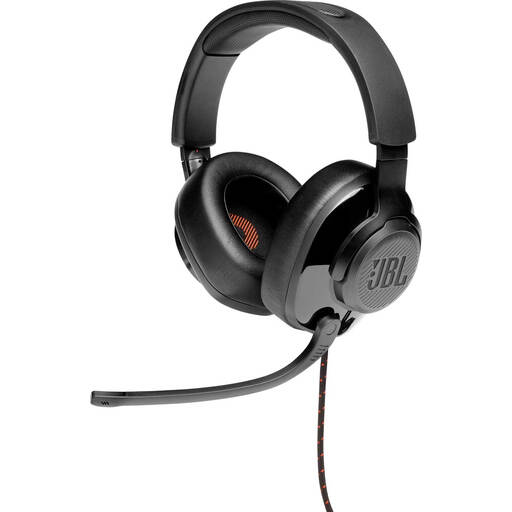
Why it suits this profile: This model combines a 3.5mm connection with a USB audio adapter, making it suitable for several platforms. According to the product description, JBL QuantumSURROUND is available via software on PC.
The product information states that surround sound is only available on PC. That way, you know what to expect when using it with a console.
50mm drivers, memory foam ear cushions, a flip-up directional microphone and a stated weight of 245 grams.

Why it suits this profile: This wireless gaming headset combines 2.4GHz with Bluetooth and, according to the product information, can be used with PC, PS4 and PS5. It’s a good fit for gamers who switch between devices.
The connection options are clearly listed: wireless via USB, Bluetooth and a wired option too. Battery life is stated as up to 22 hours.
50mm speakers, virtual 7.1 audio, a detachable microphone, a detachable cable and USB-C charging. The stated weight is 290 grams.
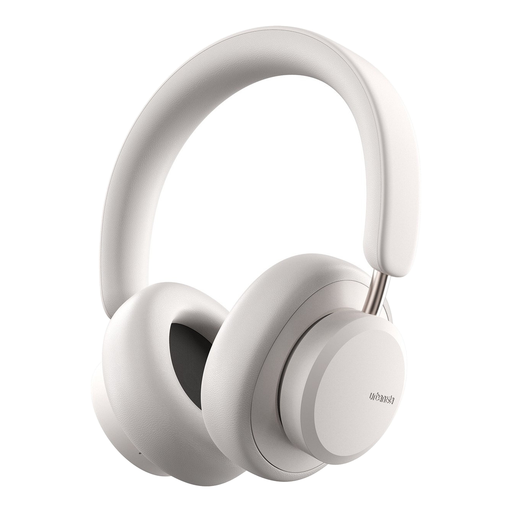
Why it suits this profile: This is primarily a pair of Bluetooth headphones for music, travel, calls and everyday use. The over-ear design and wireless controls are handy beyond gaming.
The product details list both Bluetooth and a 3.5mm cable. So you’re not entirely reliant on a wireless connection or battery.
According to the product description, it has hybrid active noise cancellation, an ambient mode, up to 50 hours of playback and a microphone.
We’ve put together a complete, up-to-date list of products that meet these strict selection criteria and the applicable European safety regulations.
That depends on the connection. A model with a 3.5mm jack usually works with devices that have a combined headphone port. USB models and wireless headsets may be platform-specific. Always check the compatibility list and whether you need a separate splitter, adapter or software for PC.
The electricity used for charging is usually minimal. However, you’ll need to consider the built-in battery and its lifespan. A wired gaming headset doesn’t need a battery and is always ready to use, but gives you less freedom to move around. Choose wireless for convenience and wired for simplicity and a reliable connection.
Its lifespan depends on the hinges, cable, headband, ear cushions and battery. A detachable cable or microphone is handy if a component needs replacing. Keep the headset dry, don’t pull on the cable and clean the ear cushions gently. Also check the statutory warranty of at least two years that applies to many products under EU consumer rules.
