
Vandaag of morgen in huis

Kwaliteit gegarandeerd

Welkomstaanbiedingen ontgrendelen: GRATIS bezorging | Tot 80% korting | Gratis 30 dagen JoyPlus-proefperiode
Download de app
A gaming headset needs to do more than play game audio. You want to hear your teammates clearly, make sure they can hear you and stay comfortable during longer gaming sessions. However, it’s easy to pay too much for features you’ll never use, or choose a headset that isn’t properly compatible with your console.
The most common pitfalls:
For a headset for PS5, Xbox or Nintendo Switch, the connection is crucial. A 3.5mm jack usually works through the controller or console, but some PCs require a splitter or adapter for separate microphone and audio inputs.
A wired gaming headset doesn’t need a battery and is generally easy to connect. A wireless gaming headset gives you greater freedom of movement, but check:
When choosing a multi-platform gaming headset, it’s wise not to rely solely on the product title. Check the complete list of supported devices.
A 40, 50 or 53mm driver doesn’t, on its own, tell you how a headset sounds. The housing, tuning and software also have an impact. Pay particular attention to:
A 7.1 surround sound headset can be useful in games where direction and distance matter. On some models, this feature depends on software. For example, the Logitech G432 uses a USB DAC and Logitech G HUB to access the stated surround function. According to the product description, the Razer BlackShark V2 X supports virtual 7.1 through software and an activation code. This doesn’t mean surround is available in every console mode.
For online multiplayer, streaming and voice chat, a gaming headset with microphone is only practical if the microphone is easy to operate. A flip-to-mute microphone mutes the sound when you raise the boom arm. Other models use a button on the ear cup or cable.
Also check:
A comfortable gaming headset needs more than soft cushions. An adjustable headband, reasonable clamping force and a suitable weight are at least as important during long sessions. Turn the volume down before connecting the headset and take regular breaks.
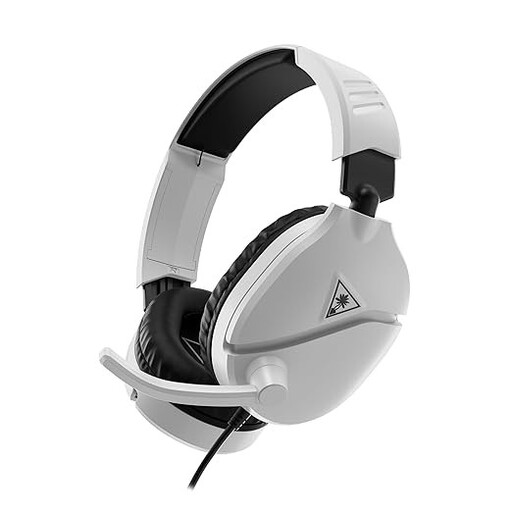
Why it suits this profile: The wired 3.5mm connection is straightforward to use with PS5, PC, Xbox and Nintendo Switch. The flip-to-mute microphone and volume control work immediately, without additional software.
The product specification clearly states that it uses a wired 3.5mm connection and a flip-to-mute microphone. You therefore won’t be paying for a wireless feature you don’t need.
40mm speakers, over-ear ear cushions, volume wheel and compatibility with multiple platforms.

Why it suits this profile: This HyperX gaming headset combines a metal frame and memory foam in the headband and ear cushions with USB-C, USB-A and 3.5mm connections.
The compatibility list and supplied adapters make the connection options easy to verify. DTS Headphone:X 2.0 is listed as a virtual surround function; however, check which device you can activate it on.
53mm angled drivers, detachable microphone, LED mute indicator and a stated weight of 308 grams.

Why it suits this profile: This Razer gaming headset is designed for players looking for a lightweight model with a 3.5mm connection and virtual 7.1 functionality for PC and multiple consoles.
The product specification explicitly states that 7.1 is delivered through Razer software and an activation code. This avoids confusion between a stereo connection and virtual surround.
50mm drivers, a weight of 240 grams, memory foam ear cushions and a HyperClear cardioid microphone according to the product information.
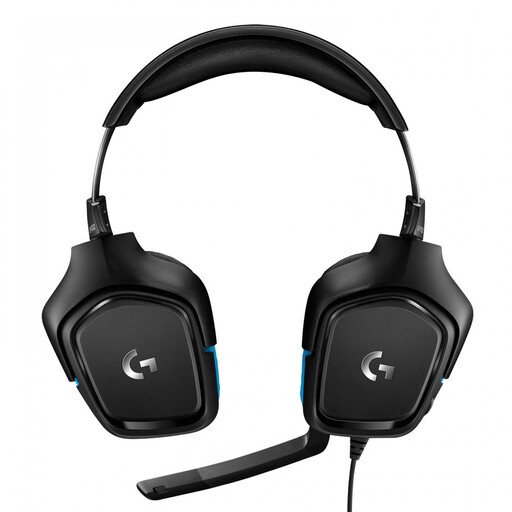
Why it suits this profile: This Logitech gaming headset is suitable for users who want to combine a USB DAC, 50mm drivers and a flip-to-mute microphone with PC and console gaming.
The USB DAC and Logitech G HUB are listed separately in the product specification. This makes it clear that software may be required for the surround function.
7.1 audio channels according to the specification, 50mm drivers, a 2-metre cable and a stated weight of 259 grams.
We’ve compiled a complete, up-to-date list of products that fully meet these strict selection criteria and the applicable European safety regulations.
No. A model with a 3.5mm connection will often work through the controller or console, but USB and wireless models may be platform-specific. Always check the compatibility list. For Xbox, pay particular attention to support for Xbox Series X|S or Xbox One.
A wired gaming headset is ready to use straight away, doesn’t need charging and is usually easy to set up. A wireless gaming headset is more practical if you want to move around freely, but it requires a battery, transmitter or Bluetooth connection. Consider your gaming setup and check the stated battery life.
Its lifespan depends on usage, storage and how the cable is handled. A metal or reinforced frame can help withstand mechanical stress, but even a robust model can be damaged by pulling on the cable or bending the microphone excessively. Store the headset in a dry place, clean the ear cushions carefully and use a moderate volume. The statutory EU conformity guarantee is separate from the expected service life and your rights as a consumer.
