
Vandaag of morgen in huis

Kwaliteit gegarandeerd

Welkomstaanbiedingen ontgrendelen: GRATIS bezorging | Tot 80% korting | Gratis 30 dagen JoyPlus-proefperiode
Download de app
A gaming headset may seem easy to choose at first glance. However, attractive terms such as “surround sound”, “noise cancelling” and “wireless” can create unrealistic expectations. The key differences are often found in the connections, microphone design, wearing comfort and how the features work on your platform.
This buying guide helps you distinguish marketing language from verifiable specifications. That way, you can make a more informed choice between a wired gaming headset, wireless model or Bluetooth gaming headset for PC, PlayStation, Xbox, Nintendo Switch or mobile use.
A 7.1 surround sound headset usually uses virtual audio processing. This may be available via software on PC, but the feature does not automatically work on every platform. Check whether the software is compatible with your operating system and whether surround sound is also available on PlayStation, Xbox or Switch.
A headset with stereo sound may also be suitable if you mainly play music, chat and standard games. So do not just look at the number of audio channels; also consider the connection and platform support.
A 2.4 GHz gaming headset generally uses a USB dongle for a fast, low-latency connection. Bluetooth is useful for smartphones, tablets and everyday use, but it is not directly supported by every console. Some models switch between 2.4 GHz and Bluetooth, while others only work with a specific receiver.
Check the following before buying:
A lightweight headset can be comfortable, but the headband and ear cushions also determine how comfortable it feels after several hours. Look at the adjustability, the shape of the ear cups and the cushion material. A comfortable gaming headset should not clamp too tightly and should not become warm too quickly.
Open designs, such as some headsets with more breathable ear cups, may provide less isolation. Closed ear cups keep out more ambient noise, but may feel warmer.
A wired headset for PC with a 3.5 mm connection often works directly with laptops, controllers and consoles. If your desktop PC has separate connections for audio and the microphone, you may need a splitter. USB headsets can offer additional software features, but are more dependent on the operating system.
For console use, pay particular attention to the official compatibility list. A headset for PlayStation is not automatically an Xbox headset. With a Nintendo Switch headset, the connection may also differ between handheld use and use in the dock.
A gaming headset with microphone is only practical if the microphone can be positioned easily and muted quickly. A flip-to-mute microphone makes muting simple. A detachable microphone is useful if you also want to use the headset while out and about or for listening to music.
Specifications such as a microphone frequency range of, for example, 100 Hz to 10 kHz provide technical information, but do not tell you everything about speech clarity. Also look for a unidirectional or cardioid design, an integrated pop filter and background-noise reduction. Claims about “crystal-clear communication” come from the manufacturer, so treat them as product information and compare them with the specific features.
With a wireless gaming headset, the stated battery life usually depends on the connection method, volume and lighting. RGB lighting can increase power consumption. As a result, a model with a stated usage time of 70 hours may perform differently in practice from a model claiming the same duration without lighting.
Also look out for:
A larger driver, such as a 50 mm driver, is no guarantee of better sound. Tuning, housing and software also play a part. A frequency range of 20 Hz to 20 kHz is a common specification, but does not precisely indicate how the headset sounds within that range.
For competitive games, positioning and clear mid-tones are often more important than extra-heavy bass. For films and single-player games, spacious sound and a wider soundstage may be more appealing.
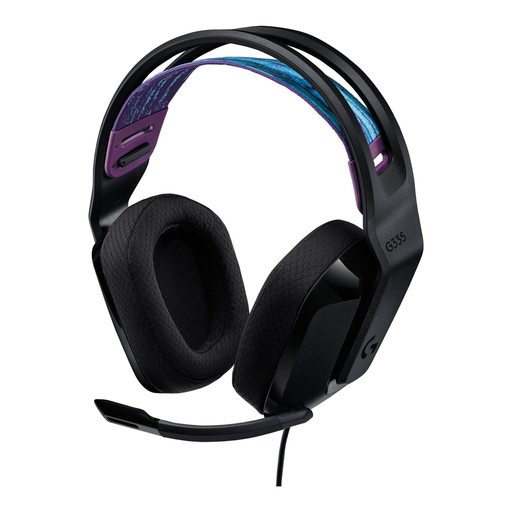
Why it suits this profile: This wired gaming headset uses a 3.5 mm connection and, according to the product specifications, works with PC, PlayStation, Xbox and Nintendo Switch. This makes setup simple, without a battery or wireless receiver.
There is no reliance on battery life or Bluetooth support. The microphone mutes when you flip it up, and the cable is 1.8 metres long.
240 grams, memory foam ear cushions, volume control on the ear cup and 2.0 stereo sound.
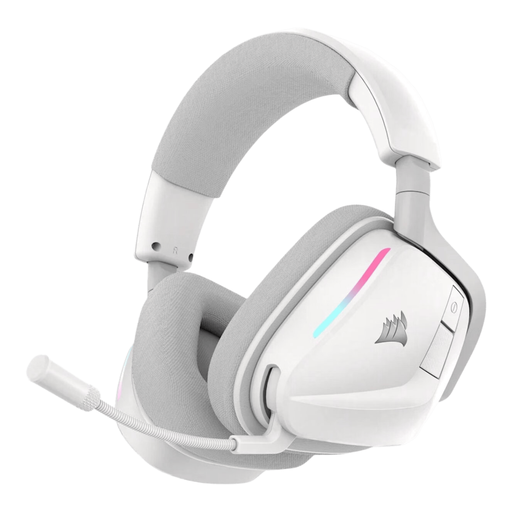
Why it suits this profile: For users who want to combine wireless connectivity, software settings and lighting. According to the product specifications, 2.4 GHz and Bluetooth 5.3 are available.
The different connection modes make it possible to choose a suitable connection for each device. However, check in advance which USB connection your console has.
Stated battery life of up to 70 hours in 2.4 GHz mode, 50 mm drivers, virtual Dolby Atmos sound and customisable RGB lighting.

Why it suits this profile: Designed for long gaming sessions and frequent switching between wireless gaming and mobile use. According to the product information, the model supports 2.4 GHz and Bluetooth.
The stated usage time varies by mode: up to 120 hours via 2.4 GHz and up to 200 hours via Bluetooth. This makes it easier to assess the claim in relation to your own usage.
53 mm drivers, detachable microphone, memory foam ear cushions, USB-A and USB-C connections and virtual DTS sound.
We have compiled a complete, up-to-date list of products that fully meet these strict selection criteria and the applicable European safety regulations.
Use this order when comparing products:
Keep the volume at a safe level and take regular breaks. A headset may limit ambient noise, but it is not suitable for situations where you need to hear traffic or warning sounds.
No. Performance depends on the dongle used, Bluetooth support and the specific console model. Always check the compatibility information. A 2.4 GHz receiver is often intended for PC or console use, while Bluetooth is mainly practical for smartphones and tablets.
Not necessarily. Wired models do not have a battery and can be connected easily via 3.5 mm or USB. Wireless models offer greater freedom of movement, but need to be charged and may work differently with each device. Choose based on your gaming setup and platforms.
Its lifespan depends on cable strain, hinges, ear cushions, battery use and maintenance. Store the headset in a dry place, do not pull on the cable and only charge it with a suitable cable. With wireless models, the built-in battery is an additional component that may provide less capacity over time.
