
Vandaag of morgen in huis

Kwaliteit gegarandeerd

Welkomstaanbiedingen ontgrendelen: GRATIS bezorging | Tot 80% korting | Gratis 30 dagen JoyPlus-proefperiode
Download de app
A gaming headset needs to do more than play game audio. You want to hear your teammates clearly, play comfortably and know that the connection works with your PC, console or mobile device. However, there are a few pitfalls that can cause an appealing model to disappoint in practice.
1. 7.1 surround sound without clear compatibility
The term 7.1 surround sound headset sounds appealing, but check how the feature works. Some models require software. For example, the Logitech G G432 uses a USB DAC and Logitech G HUB to access its 7.1 functionality. Using only the 3.5mm connection does not automatically give you the same features.
2. A wireless headset without a suitable connection
A wireless gaming headset may work via Bluetooth, a 2.4GHz receiver or both. Bluetooth is convenient for mobile use, but not every console directly supports every Bluetooth headset for game audio and chat. So check whether a USB receiver is included and whether it works with your platform.
3. Judging comfort by weight alone
A lightweight gaming headset is not automatically comfortable during long sessions. The shape of the ear cushions, the pressure from the headband and the material all matter too. Synthetic leather can provide a good seal, while mesh or fabric generally feels different. Also look for an adjustable headband and swivelling ear cups.
A wired gaming headset with a 3.5mm jack often works with a controller, laptop, smartphone and Nintendo Switch. However, check whether your PC has one combined socket or separate microphone and audio ports. Some computers may require a splitter or USB adapter.
A headset for PS5 or Xbox should preferably be connected to the controller or a compatible USB receiver. A headset for Nintendo Switch usually works directly through the console or controller connection. Always check the official platform listing, especially if you switch between multiple systems.
For online multiplayer, a gaming headset with microphone is more practical than a separate model. A microphone with flip-to-mute is muted when you raise the microphone arm. This is useful when you need to say something briefly outside the game chat.
A detachable microphone is a good choice if you also use the headset for music or films. Also check whether the microphone is muted via the cable, ear cup or software. The position of the controls determines how quickly you can react during a match.
40mm or 50mm drivers are common in gaming headsets. A larger size does not, by itself, mean better sound. Also consider the frequency range, impedance and available software.
Virtual surround sound can change the sense of space, but the result depends on the game, software and platform. According to Logitech’s product information, the G432 offers DTS Headphone:X and 7.1 sound through the associated configuration. JBL states that QuantumSURROUND is available on PC via JBL QuantumENGINE. Treat these features as an extra option, not a guarantee of better gaming performance.
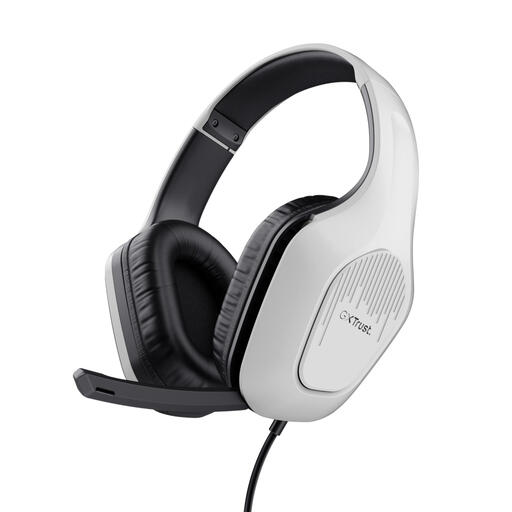
Why it suits this user profile: A straightforward wired gaming headset for players who want to play on PC, laptop, PlayStation, Xbox or Nintendo Switch without having to recharge.
The 3.5mm connection requires neither a battery nor a wireless receiver. The product information also clearly states that this is stereo sound, not a virtual 7.1 system.
50mm drivers, a 2-metre cable, a fold-up microphone and a weight of 244 grams.
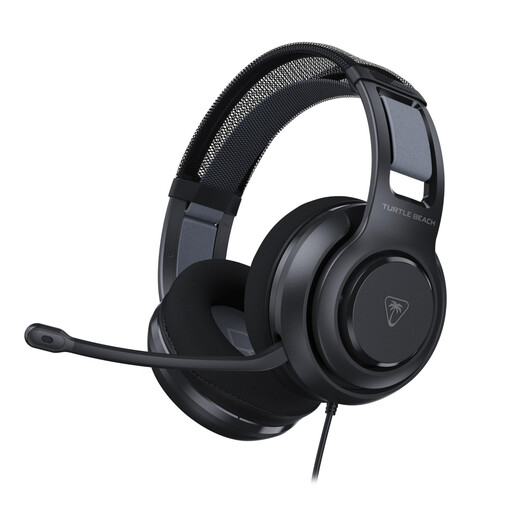
Why it suits this user profile: Designed for PC gamers who want to combine a wired connection, memory foam and additional software settings.
The headset lists both 3.5mm and an included USB adapter. This means you can use the basic connection without relying on wireless compatibility.
50mm Nanoclear drivers, memory foam ear cushions, a flip-to-mute microphone and Turtle Beach Swarm II software for PC.

Why it suits this user profile: Ideal for players who switch between PC, console and smartphone and do not want to be tied to a wired connection.
As well as Bluetooth, this model uses a 2.4GHz USB receiver and can also be connected by cable. According to Trust, the battery lasts for up to 22 hours.
50mm drivers, Bluetooth, 2.4GHz radio, 3.5mm audio and a detachable microphone.
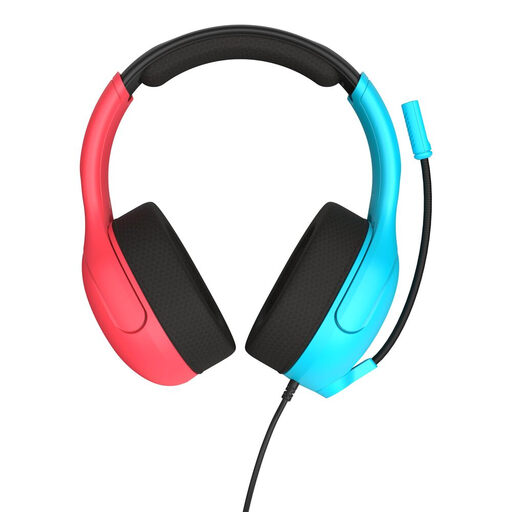
Why it suits this user profile: A practical headset for Switch, Switch Lite and Switch OLED, with a simple connection and direct microphone controls.
The 3.5mm connection prevents charging issues. The flip-to-mute microphone is muted by raising it, with no menu or additional software required.
40mm speakers, mesh ear cushions, a weight of 228 grams and compatibility with PC and mobile devices.
We have put together a complete, up-to-date list of products that fully meet these strict selection criteria and the applicable European safety regulations.
No. A model with a 3.5mm connection often works across multiple platforms, but wireless models can vary from one system to another. Always check the compatibility list and see whether a USB receiver is required.
A wireless model does not need its cable replacing, but it does need to be recharged regularly. Battery life and the charging method are therefore important. A wired gaming headset does not use a battery and is ready to use straight away, but gives you less freedom of movement.
Its lifespan depends on cable use, hinges, ear cushions and storage. Do not put the headset away by its cable, avoid moisture and store it somewhere dry. When buying, also check the warranty and your statutory conformity rights within the European Union. Keep the volume at a moderate level and take regular breaks during extended use.
