Start with the device you use for practice: a wired headset with a 3.5 mm connection never needs charging, while a wireless model gives you more freedom to move but calls for extra checks on compatibility and battery life. Then check the fit and see for yourself whether you can hear game audio and teammates at a comfortable volume. Manufacturer claims about footsteps don’t prove that a headset will give you an advantage in your game.
Who is this choice relevant to?
Players who practise using sound
You want to judge the direction and timing of in-game sounds during movement or positioning drills. Try settings in your own game: presets and manufacturers’ claims about footsteps are not independent performance tests.
Players with multiple devices
You switch between PC and console, or use other devices too. Check the connection and the full model variant, as wireless compatibility can differ within the same product range.
Players with long practice sessions
You’ll want to consider fit and controls, as well as charging if you choose a wireless model. Keep the volume comfortable, especially when listening for long periods.
What should you look for when choosing?
First check the connection required by your gaming device. Then weigh the freedom of movement you want against charging and cable use. Finally, judge the sound, fit and microphone for yourself.
Wired, via 3.5 mm
Choose this if: your device has a suitable 3.5 mm connection and you don’t want to charge a headset battery.
Bear in mind: the cable limits how freely you can move.
Wireless, via a dongle
Choose this if: you want more freedom to move and the dongle supplied with your chosen version works with your device.
Bear in mind: battery life is a manufacturer’s estimate, not a guarantee of how long it will last for you. Check the exact console variant too.
| What to consider |
What should you check? |
Who is this important for? |
| Following in-game sounds |
In your own game, compare a neutral setting with any presets or spatial audio, at a comfortable volume. |
I want to judge the direction and timing of sounds during movement and positioning drills; around 31% of consumers put following in-game sounds first. |
| Connection and compatibility |
Check your device, the connection and the full model name. For wireless use, make sure you choose the exact console variant. |
I want to know in advance that the headset works with my PC, console or controller; around 25% of consumers say compatibility is their main concern when buying. |
| Fit and long sessions |
Try the headset on if possible and check for pressure and how the ear cushions feel. Treat stated battery life as a manufacturer’s estimate. |
I want to practise comfortably and, if I choose a wireless model, plan when to charge it; around 19% of consumers prioritise fit and battery life. |
| Team communication |
Check the microphone connection and mute controls. Make a short test recording where you usually play. |
I want to talk to teammates during practice without taking my attention away from the game; around 13% of consumers say team chat is their main concern when buying. |
| Features you need |
Compare the connections and features you’ll actually use. Read the terms before choosing any extra warranty cover. |
I don’t want to pay for connections or features I don’t need; around 12% of consumers put essential features and costs first. |
Common pitfalls
-
Assuming a footsteps preset or 7.1 label gives you an advantage in every game
How useful it is depends on your game, platform, settings and listening preferences. Razer says the BlackShark V2 X’s 7.1 feature is only available on Windows 11.
Check the platform requirements and compare the settings for yourself at a comfortable volume.
-
Choosing a wireless headset based only on the product family name
SteelSeries says the Arctis Nova 5X is the wireless version for Xbox; a separate 5X dongle won’t make the Nova 5 or 5P compatible.
Match the full model name against the official compatibility information for your console.
-
Comparing stated battery life as if it were based on real-world testing
HyperX gives different maximum battery-life figures for the Cloud III S Wireless: up to 120 hours via 2.4 GHz and up to 200 hours via Bluetooth. The stated figure depends on the mode used.
Compare battery life for the connection you plan to use and schedule charging without treating the maximum as a guarantee.
-
Confusing extra warranty cover with your legal rights
If there’s a problem with a product, contact the retailer to resolve it. Paid-for extra cover is separate from your legal rights.
Check what extra cover includes before choosing it.
Brands and models to compare
Razer
The BlackShark V2 X is a wired option with a 3.5 mm connection; the BlackShark V2 HyperSpeed is a separate wireless range.
- Razer lists a bendable microphone, closed-back earcups and a weight of 240 g for the V2 X.
- Razer’s 7.1 feature for the V2 X is only available on Windows 11, so don’t assume it works with consoles.
SteelSeries
The Arctis Nova 5 range is for players who want a wireless dongle connection and the option to try different presets.
- SteelSeries lists switching between 2.4 GHz and Bluetooth for the Nova 5, with a stated battery life of 60 hours.
- SteelSeries says only the Nova 5X is the wireless version for Xbox. Presets and claims about footsteps are not independent measures of effectiveness.
HyperX
The Cloud III S Wireless is an option if you want to practise wirelessly on a device that matches the stated compatibility.
- HyperX states a maximum of 120 hours via 2.4 GHz and up to 200 hours via Bluetooth. These are separate manufacturer estimates for different modes.
- Check that your device is compatible with the exact version, and don’t judge real-world battery life by the stated maximum alone.
Logitech G
The PRO X 2 LIGHTSPEED is designed for players who want a choice of connection types in one headset.
- Logitech lists LIGHTSPEED wireless, Bluetooth and 3.5 mm, with a stated battery life of up to 50 hours per charge.
- The stated battery life and connection options don’t prove that you’ll hear in-game sounds more clearly. Fit is a personal matter.
Headsets at Joybuy
This selection includes wired headsets with a 3.5 mm connection and wireless gaming headsets for players who want to match the connection and controls to their device.
 No image available
Corsair VOID RGB V2 Wireless Gaming Headset – white
Ideal if you want to game wirelessly and adjust settings to suit the device you’re using. The product information says the Dolby Atmos and EQ features mentioned are for use with a Windows PC; check their availability separately if you’re using a console.
View at Joybuy
 No image available
Turtle Beach Stealth 600 Gen 3 Xbox Wireless Gaming Headset – purple
Ideal if you want to play wirelessly and mute the microphone while gaming. The product title lists Xbox, PlayStation, PC, Steam Deck and mobile as platforms; check that the connection works with your device before buying.
View at Joybuy
 No image available
Turtle Beach Stealth 500 Xbox Wireless Gaming Headset – black
Ideal if you want to practise wirelessly and mute the microphone with a simple movement. The product title lists Xbox, PC, Switch 2 and mobile; check the connection for your specific device.
View at Joybuy
 No image available
Turtle Beach Airlite Fit Wired Gaming Headset (3.5 mm) – blue/red
Ideal if you want to play wired on a device with a suitable 3.5 mm connection. The product title lists Nintendo Switch, Switch Lite, Switch OLED, PC and mobile; check that your device has a suitable connection.
View at Joybuy
 No image available
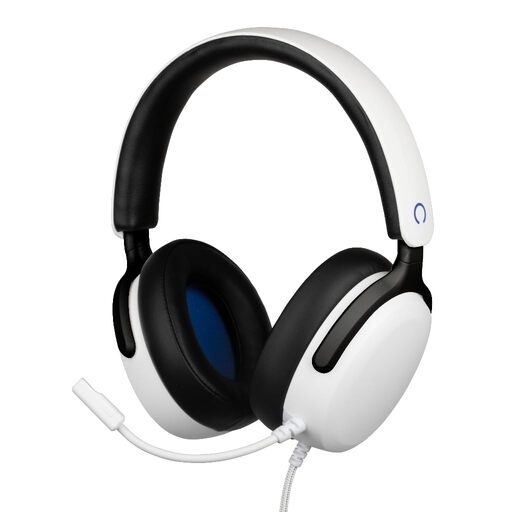
Konix Nexus Over-Ear Wired Gaming Headset for PS5 – white
Ideal if you want to play wired through a PS5 controller and communicate with teammates while gaming. The product name lists 40 mm drivers, a 3.5 mm connection and a 1.5 m cable; check that the cable is long enough for your gaming set-up.
View at Joybuy
Frequently asked questions
Do you need a special headset to set up 3D audio on PS5?
Not just because the packaging says 3D: PlayStation describes an adjustable 3D audio profile for headphones on PS5. Do check that your headset can connect to the console, and compare the setting with stereo for yourself.
Does every Arctis Nova 5 work wirelessly with Xbox?
No. SteelSeries says only the Nova 5X is designed for this. A separate 5X dongle won’t make the Nova 5 or 5P compatible with Xbox.
How can you reduce the strain of long practice sessions with a headset?
The World Health Organization recommends paying attention to volume and listening time. Listen at a comfortable volume and take regular breaks; don’t keep turning the sound up to pick out in-game noises.
What are your rights when buying online or if a headset is faulty in the Netherlands?
According to the Dutch government, online consumer purchases are often covered by a 14-day cooling-off period. You’re also entitled to a product that works properly, and the retailer is your point of contact if something goes wrong. Any manufacturer’s warranty or extra cover is separate from these legal rights.


