Who is this relevant for?

Footage analyst who listens for audio details

You review clips to distinguish speech from relevant audio cues. Assess this using your own recordings: driver size or a surround-sound label alone won’t tell you how details in your footage will sound. RTINGS.com and Megekko Academy also highlight audio reproduction and positional accuracy as factors to consider.

Desk-based viewer listening for long periods

You wear your headset during longer review sessions. Pay attention to the fit of the ear cushions and headband, as well as the seal. VeiligheidNL points out that a good fit can help prevent you from turning up the volume to drown out background noise.

Reviewer recording commentary

You want to record commentary as well as listen to audio. Check that you can position and mute the microphone easily, then listen back to a test recording in your own workspace.

What should you look for when choosing?

Wired

A good fit if: you mainly listen at one desk and don’t want to manage a battery, provided your device has the right 3.5mm or USB connection.

Bear in mind: the cable limits how freely you can move. Also check that any software features you need are available on your device.

Wireless

A good fit if: you want to get up or move around while reviewing footage. Check that the dongle and exact version are compatible with your PC or console.

Bear in mind: you’ll need to charge it and check which connections are available. Switching between 2.4 GHz and Bluetooth doesn’t automatically mean you can play audio from two sources at once.

Factor to consider What should you check? Who is this important for?
Detail and speech Compare familiar clips in stereo and with any available software processing. Check which features work on your platform. If I want to follow voices and relevant audio cues in tournament footage, I compare them using my own clips; around 33% of consumers put following audio cues first.
Comfort during long sessions Pay attention to pressure, warmth and the seal of the ear cushions during a realistic listening session. When reviewing footage for a long time, I want a fit that stays comfortable without needing to turn up the volume; around 25% of consumers prioritise wearing comfort.
Microphone for commentary Check the microphone’s position and mute control, then listen back to a test recording using your own recording or communication software. If I’m recording analysis, I want to be able to check my voice in my own space; around 25% of consumers put recording commentary first.
Freedom of movement and connection Check support for 3.5mm, USB or wireless connections, and make sure the version is suitable for your PC or console. When I want to get up or use multiple devices, I look for a suitable connection rather than making assumptions; around 17% of consumers prioritise mobility and device connectivity.

Buying pitfalls

  • Assuming a surround-sound label means more detail

    Virtual surround sound uses software processing, and available features can vary by platform. Stereo isn’t automatically less suitable for reviewing tournament footage; Megekko Academy also highlights sound quality and positional accuracy as important factors.

    Compare familiar clips on the device you actually use, and check which software features are available on it.

  • Overlooking the version or dongle of a wireless headset

    Compatibility can vary between versions of a model. SteelSeries lists the Nova 5X specifically for Xbox, while Turtle Beach refers buyers to the specifications for each version.

    Before buying, check the full model name, the transmitter included and the connection for the device you’ll use to play back footage.

  • Confusing a two-year manufacturer’s warranty with all your statutory rights

    According to ACM ConsuWijzer, your statutory guarantee depends on what you could reasonably expect from the product; those rights don’t automatically end after two years.

    Consider any additional cover alongside your statutory rights against the seller, not as a replacement for them.

Brands worth considering

HyperX

The wired Cloud III may be worth considering if you want to use different connections with compatible devices. HyperX lists 3.5 mm, USB-C and USB-A.

  • For this model, HyperX specifies memory foam, 53mm drivers and a 10mm microphone.
  • These specifications alone don’t confirm how comfortable the fit will be or how clearly you’ll be heard.

SteelSeries

The Arctis Nova 5 range is worth a look if you want to switch between a 2.4 GHz dongle and Bluetooth. SteelSeries lists the Nova 5X as the Xbox version.

  • SteelSeries lists audio presets and a stated battery life of 60 hours.
  • Check the exact version and software support. Presets don’t prove that you’ll hear more detail in tournament footage.

Turtle Beach

According to Turtle Beach, the Stealth 600 Gen 3 combines 2.4 GHz wireless connectivity with Bluetooth and a flip-up microphone.

  • The manufacturer lists a button for switching between wireless and Bluetooth, and a stated battery life of 80 hours.
  • Compatibility varies by version. The stated battery life and microphone features alone don’t predict how the headset will perform in your workspace.

Razer

The wired BlackShark V2 X is worth considering if your device has a suitable 3.5mm connection.

  • Razer lists a weight of 240 g and a cardioid microphone for this model.
  • Razer says the advertised 7.1 feature is only available on Windows 11. Weight alone doesn’t determine how comfortable the headset will feel.

Logitech G

According to Logitech G Netherlands, the PRO X 2 LIGHTSPEED supports wireless, Bluetooth and 3.5 mm connections.

  • Logitech lists a choice of ear cushions included in the box and up to 50 hours of battery life per charge.
  • The manufacturer’s claims about precision and comfort aren’t independent test results for reviewing tournament footage.

Gaming headsets on Joybuy

This selection of Joybuy products includes wired and wireless gaming headsets for different connections and devices. Check that each model’s version, connection and microphone suit your workspace.

SteelSeries Arctis Nova Pro Wireless for PlayStation, black

SteelSeries Arctis Nova Pro Wireless, PlayStation, black

The title specifies the PlayStation version. The description mentions wireless listening and a microphone for recording commentary.

The description also mentions a base station and microphone controls. Check that this version is compatible with your equipment.

Joybuy

Trust GXT 498W Forta wired gaming headset for PS5, white

Trust GXT 498W Forta, PS5, white

This wired version may suit a fixed listening position if you don’t want to charge a battery; the description lists a 3.5mm connection.

The description lists 50mm drivers, a detachable microphone, volume control and a mute button. The cable limits how freely you can move.

Joybuy

Turtle Beach Airlite Fit wired headset for Nintendo Switch, black and white

Turtle Beach Airlite Fit, Nintendo Switch, black and white

The title lists compatibility with Nintendo Switch, Switch Lite and Switch OLED. Check that this version suits the device you use to review footage.

The description lists a 3.5mm connection, 40mm speakers, volume control and a flip-to-mute microphone.

Joybuy
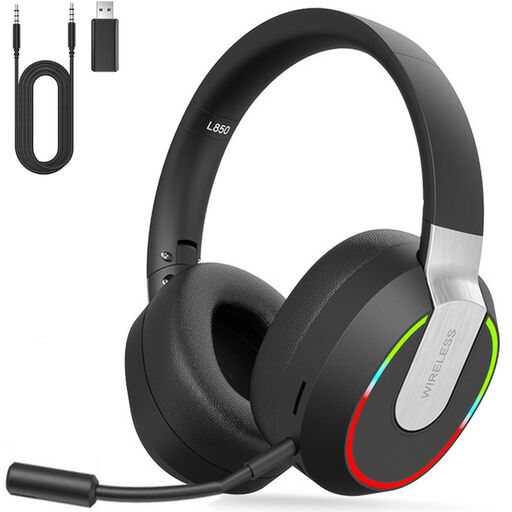
2.4 GHz wireless gaming headset for PC, PS4, PS5, Mac and Switch

2.4 GHz Wireless Gaming Headset for PC, PS4, PS5, Mac and Switch

The description lists 2.4 GHz wireless, Bluetooth and wired modes, plus a detachable microphone for recording commentary.

According to the description, Bluetooth doesn’t work directly with PS4, PS5 or PC; a separate USB Bluetooth adapter is needed. 2.4 GHz or wired connections are listed as alternatives.

Joybuy

Razer Kraken V3 X gaming headset, black

Razer Kraken V3 X, black

The description lists a wired USB headset for PC and PS4, plus a cardioid microphone. These are worth considering if you listen at a fixed workstation or record commentary.

The description also lists stereo audio, 40mm drivers and a weight of 285 grams. It states that the 7.1 surround feature is only available on Windows.

Joybuy

Frequently asked questions

Do I need a 7.1 headset to review tournament footage?

No. A 7.1 label doesn’t prove that you’ll hear more detail. Virtual surround sound processes audio using software, and availability depends in part on the platform and source material. Compare stereo using your own footage too. Razer states that the advertised 7.1 feature on the BlackShark V2 X is only available on Windows 11.

How can I reduce the risk of hearing damage during long listening sessions?

Don’t listen louder or for longer than necessary. VeiligheidNL recommends headphones that fit well, so that background noise doesn’t lead you to turn up the volume. According to VeiligheidNL, the risk depends on both sound level and length of exposure. The volume setting on your PC alone doesn’t measure the sound level reaching your ears.

How should I test a headset before recording commentary?

Make a short test recording in your own workspace and listen back to it. Connect the headset using a supported connection, select the correct input and output in your recording or communication software, and check that the microphone is positioned correctly and the mute control works.

What are my rights when buying online in the Netherlands?

According to ACM ConsuWijzer, online purchases generally come with a statutory cooling-off period of up to 14 days after delivery; check which exceptions apply to your purchase. You also have statutory rights against the seller if, under normal use, the product doesn’t meet what you could reasonably expect from it. These rights don’t have a general fixed two-year limit.

What should I check to ensure a wireless headset meets the requirements?

Check the product information and markings for the specific version. The Dutch Authority for Digital Infrastructure describes CE marking as a requirement for selling equipment that meets the applicable European requirements. A general brand page alone doesn’t prove that a specific offer meets them.
