
Player with limited charging options
You have few spare power sockets and don’t want to rely on a charged headset during ranked matches. A wired connection could suit you, as long as your gaming device supports it.


If you have few spare power sockets and don’t want to think about charging during ranked matches, choose a wired headset with a connection that’s compatible with your PC or controller. A wireless model is a better fit if playing without a cable matters more to you and you can charge it between matches. Also check the microphone, fit and support for features on your platform.
You have few spare power sockets and don’t want to rely on a charged headset during ranked matches. A wired connection could suit you, as long as your gaming device supports it.
You coordinate with your teammates and want to be able to mute the microphone easily. Check the controls and microphone on the specific headset.
You want to play without a cable, but will need to plan charging around your matches. Also consider the fit and compatibility with your platform.
Choose this if: you don’t want to rely on a charged headset and your device supports the connection.
Bear in mind: the cable limits your freedom of movement; features may vary depending on the connection.
Choose this if: you don’t want a cable while playing and can charge between matches.
Bear in mind: battery life and an available USB port; stated battery life depends on the model and how you use it.
Choose this if: switching between game audio and, for example, a phone would be useful to you.
Bear in mind: switching between sources doesn’t automatically mean you can hear them at the same time.
When you have few power sockets, power, team communication, comfort and connection to your gaming device each play their own part.
| Consideration | What should you check? | Who is this important to? |
|---|---|---|
| Playing without a charging point | Check whether your device has a suitable 3.5mm or USB connection, and when you could charge a wireless model. | I have few spare power sockets and want to play ranked matches without having to stop and charge; around 29% of consumers prioritise not needing a charging point. |
| Team communication | Check the microphone type, mute function and how it works with your platform. | I want to communicate clearly during team play and mute the microphone easily; around 23% of consumers give team communication top priority. |
| Comfort | Look at the ear cushions, headband and adjustability; fit is a personal thing. | I want a comfortable headset for longer sessions; around 18% of consumers prioritise comfort. |
| Game audio | Check which audio features are supported by your game, software, connection and platform. | I want to distinguish in-game sounds clearly and use suitable settings; around 18% of consumers put game audio first. |
| Multiple devices | Compare the exact model variant, dongle, available ports and supported features for each device. | If I want to use the same headset with several devices, connections and compatibility are decisive; around 12% of consumers give switching between platforms top priority. |
A dongle provides the connection, but a wireless headset still needs a battery.
Check the stated battery life for the exact model and consider when you could charge it between matches.
Support may depend on the software, operating system and connection. On the Logitech G432, DTS Headphone:X 2.0 and EQ presets are designed for Windows with G HUB.
Before buying, check which features work on your PC or console.
SteelSeries says its wireless dongles are model-specific and can’t simply be swapped between headset models.
Compare the exact model variant with its corresponding receiver before ordering.
The wired Cloud III is an option if you don’t want to charge a headset battery; the Cloud III Wireless is a separate model for wireless play.
The Arctis Nova 5 is worth considering if you want to play wirelessly via a USB-C dongle and also be able to switch to Bluetooth.
The wired G432 and wireless PRO X 2 LIGHTSPEED are different options: the former if you don’t want to plan charging, and the latter if you want to avoid a cable.
The wired Quantum 200 is an option if you’re looking for a headset without a battery and with a flip-up microphone.
The BlackShark V3 Pro is a wireless option for players considering features such as ANC and who are happy to charge a battery.
These Joybuy picks are wired gaming headsets for players who don’t want to charge a headset battery; check the connection and compatibility with your gaming device for each variant.
 No image available
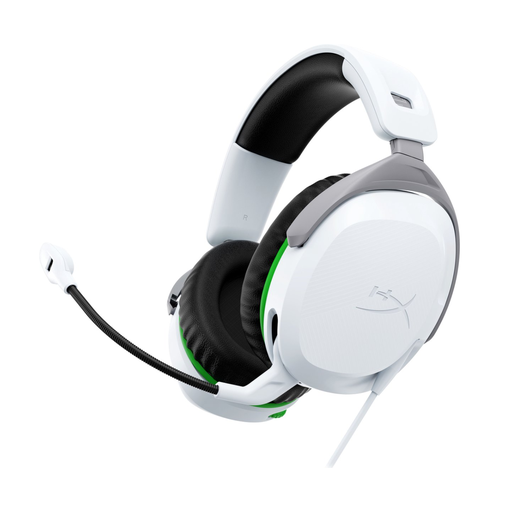
The wired 3.5mm connection suits anyone who doesn’t want to rely on a headset battery; this variant is designed for Xbox Series X|S and Xbox One.
The microphone can be swivelled up to mute it. The description mentions memory foam ear cushions and an adjustable headband.
 No image available
This wired variant with a 3.5mm connection is designed for PS5 and PS4 and doesn’t need a headset battery.
The microphone can be swivelled up to mute it. The description mentions memory foam ear cushions and an adjustable headband.
 No image available
The wired G432 is an option if you want to play without a headset battery; the description lists 3.5 mm and USB-DAC connections.
The microphone can be flipped up to mute it. Logitech says DTS Headphone:X 2.0 and EQ presets are only available on Windows with G HUB.
 No image available
The 3.5mm connection makes this a wired option that doesn’t need a headset battery. The description mentions a cardioid microphone and a mute button.
The description lists 50mm drivers and a weight of 240 grams. It says the full 7.1 surround feature requires software activation and a code included with the headset.
 No image available
This wired Cloud III is an option if you don’t want to charge a headset battery; the description mentions support for multiple platforms.
The listed connections are 3.5 mm, USB-A and USB-C. The description mentions a noise-cancelling microphone with a mute function; DTS Headphone:X Spatial Audio is linked to use on PC.
No, not just because it has that label. Stereo isn’t automatically less suitable; check which audio processing your game and platform support. On the Logitech G432, DTS Headphone:X 2.0 and EQ presets require Windows and G HUB.
Not necessarily. SteelSeries says each headset needs its own compatible dongle. Also check support for your platform; a different dongle won’t automatically add compatibility.
No, there is no fixed statutory warranty period in the Netherlands. According to the Dutch government, a product must work properly for a reasonable period of time; if there’s a problem, the retailer is your point of contact. A manufacturer’s or additional warranty is on top of this.
Pay attention to both volume and listening time. VeiligheidNL recommends headphones that fit well, so background noise is less likely to make you turn up the volume. A good seal doesn’t automatically make loud listening safe.
Take discarded electrical equipment to a suitable collection point. When buying a similar new device, you can also use the old-for-old scheme as a private individual. Don’t put a loose, used battery in the bin.