What should you consider when choosing?
Start by working out what’s most likely to affect your recording: unclear speech, room noise, an unsuitable connection, comfort or the practicalities of using the headset.
| What to consider |
What to look for when buying |
Who is this most important for? |
| Clear speech |
Check the microphone’s position and mute control, then make a test recording with game audio. |
If I want my spoken commentary to come across clearly, I test the microphone with my own recording setup; around 29% of consumers give speech clarity top priority. |
| Background noise |
Record a clip in your room. OBS Project notes that noise suppression is most helpful for mild background noise and generally won’t work well when there’s a lot of noise. |
If other people or room noise might be picked up, I want to hear what my microphone captures in advance; around 23% of consumers put background noise at the top of their list. |
| Connection |
Check the port, any splitter or receiver, and whether your device lets you select the microphone as an input. Logitech states that the G432’s DTS features require Windows and G HUB. |
If I need my headset to work with my own PC or console, I check the microphone input and connection before recording; around 18% of consumers give compatibility top priority. |
| Comfort |
Look at the adjustability and cushion material, and try the fit yourself if possible before planning a long session. |
For a long walkthrough, I want to be able to wear the headset comfortably for an extended period; around 18% of consumers put comfort first. |
| Practicalities |
Check what connection accessories are included and whether a wireless model needs a receiver and regular charging. |
If I want to keep track of my budget and the practicalities of using the headset, I need to know what my setup requires in advance; around 12% of consumers give total costs and practical considerations top priority. |
Joybuy headsets for recording walkthroughs
This selection of Joybuy headsets includes wired models and a wireless option for recording walkthroughs. Check that each model’s connection and microphone input suit your recording device.
 No image available
Trust GXT 498W Forta, white, wired for PS5
A wired option if you want to use physical microphone controls while recording.
The description lists a detachable, flexible microphone, volume control and mute. It connects via 3.5 mm; the cable limits your freedom to move.
View at Joybuy
 No image available
Trust GXT 490 FAYZO, white, USB Type-A
A wired option if you’re looking for a USB Type-A connection and a detachable microphone with controls.
The description lists a 2-metre cable, volume control and mute. The adjustable, swivel earcups and over-ear cushions are worth considering when choosing a comfortable fit.
View at Joybuy
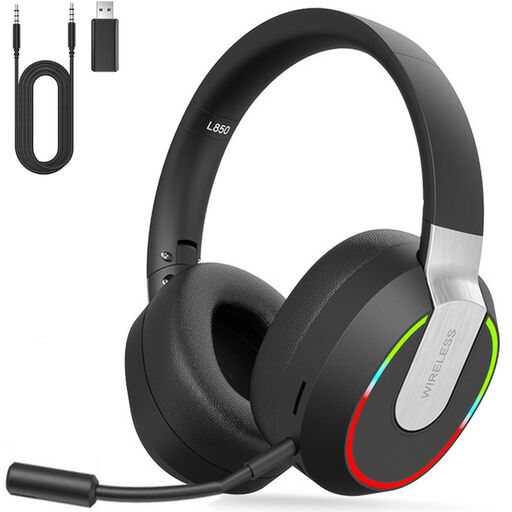 No image available
2.4 GHz wireless gaming headset for PC, PS4, PS5, Mac and Switch
An option if you want more freedom to move and can check the connection with your recording device in advance.
The description lists 2.4 GHz via a USB dongle, Bluetooth and a wired 3.5 mm mode, as well as a detachable microphone and mute switch. Battery life is quoted at up to 9 hours; actual usage time may vary depending on your setup.
View at Joybuy
 No image available
Skullcandy SLYR PRO, wired, Black/Red
A wired option for comparing USB-C and 3.5 mm connection options.
The description lists microphone and volume controls, a lightweight design and memory foam ear cushions. The cable limits your freedom to move.
View at Joybuy
 No image available
Razer Kraken V3 X, black
An option to compare if you’re looking for a cardioid microphone and controls on the headset.
The product description lists 40 mm drivers and a weight of 285 g.
View at Joybuy
Frequently asked questions
Can OBS remove the sound of other people in my room from my recording?
Not reliably when there’s a lot of background noise. OBS Project describes noise suppression as most suitable for mild noise, such as a PC fan. Make a test recording; a setting that’s too strong can distort your voice too.
How can I check that both my voice and the game are being recorded?
Select the microphone you want to use as the input and make a short recording. OBS Project lets you record audio sources on separate tracks for editing later; standard video players usually play only one track at a time. So if you’re not planning to edit first, listen to the combined playback track too.
Will an advertised 7.1 or voice-filter feature also work on my console?
Not unless this has been confirmed for the specific model and platform. Logitech states that the G432’s DTS Headphone:X 2.0 and EQ features require Windows and G HUB, and that the wired PRO X’s Blue VO!CE only works on PC via G HUB. Also check that the connection and microphone input are suitable for your console.
What can I do if a headset I bought online doesn’t work properly?
If the product is faulty, contact the seller. According to the Government of the Netherlands, sellers must supply goods that conform to the contract; free repair or replacement may be available. For online consumer purchases, you’ll also have a 14-day cooling-off period in many cases, subject to applicable terms and exceptions. An additional warranty doesn’t replace your statutory rights.
Can I publish recordings of other people in my room or other players in a walkthrough?
Don’t publish information that identifies other people without careful consideration. The Dutch Data Protection Authority says that consent is almost always required as a legal basis for publishing material publicly on the internet, and notes exceptions for personal or household use and journalism. Whether a particular voice recording falls under these rules depends on how identifiable the person is and the circumstances; ask people in advance and leave out any voices they don’t want published.


