What should you look for?
Start by considering microphone recording and sound leakage in the room, then check device compatibility, your recording workflow and fit.
The percentages below show the main priorities for consumers looking for a gaming headset to record a walkthrough in a shared bedroom.
| What to consider |
What should you look for? |
Who should pay extra attention? |
| Clear voice capture |
Check the microphone position and mute control, and make a test recording with the room’s usual background noise. OBS notes that noise suppression is generally ineffective when there’s a lot of background noise. |
I want my commentary to remain clear while there’s noise in the room, so I want to test the microphone in my own setup. Around 36% of consumers prioritise clear voice recording. |
| Sound leakage |
Assess separately what you can hear from the room and how much of the game your housemate can hear. Razer describes passive isolation on the BlackShark V2 X, but this doesn’t tell you how much sound will leak in your room. |
If my housemate is in the same room, I want to know how much of the game they can hear. Around 29% of consumers give top priority to low sound leakage and isolation. |
| Connection and recording |
Check that the connection and microphone features work with your PC or console. For separate audio tracks, OBS describes a recording workflow that you should also test in the editor and player you plan to use. |
I want to connect the headset to my device and process voice and game audio in the way that suits me. Around 21% of consumers put compatibility or their recording workflow first. |
| Comfort and freedom to move |
Try the fit for yourself, taking into account how long you plan to record. If you’re going wireless, also check the receiver, platform version and battery information. |
If I record for a long time or want to move around while gaming, I pay extra attention to fit or a cable-free setup. Around 14% of consumers prioritise comfort or freedom of movement. |
Gaming headsets at Joybuy
This selection includes wired gaming headsets for a fixed connection, plus a wireless option for anyone who values freedom to move.
 No image available
JBL Quantum 120 Wired Multiplatform Gaming Headset, Black
A wired option to consider if you want to record commentary and need a 3.5mm connection.
The product information lists a cardioid boom microphone, software-based microphone noise suppression, a detachable microphone and a 3.5mm audio cable. This isn’t a test recording in a shared room.
Joybuy
 No image available
Skullcandy SLYR Pro Multi-Platform Gaming Headset, Black/Red
A wired option to consider if you want to be able to mute the microphone at the touch of a button while recording.
The product information lists USB-C and 3.5mm connections, a detachable microphone, a mute button and memory foam ear cushions. Check the connections for your device.
Joybuy
 No image available
HyperX Cloud III S Gaming Headset, Black/Red
A wireless option to consider if you want to avoid a cable. First check that the connection works with your recording device.
The product information lists 2.4GHz and Bluetooth connectivity, a detachable 10mm boom microphone with an LED mute indicator, and memory foam in the ear cushions and headband.
Joybuy
 No image available
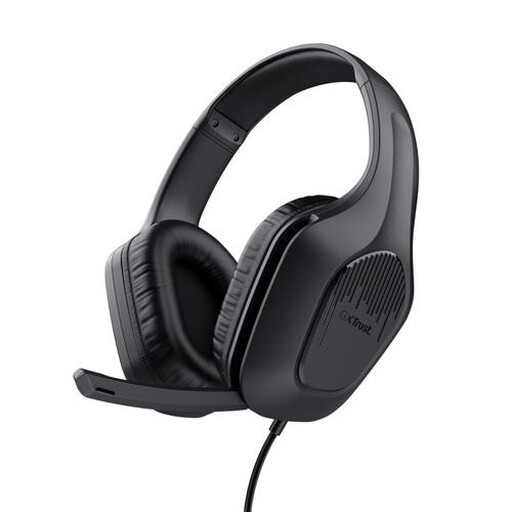
Trust GXT 415 Zirox Wired Gaming Headset, Black
A wired headset to consider if you want to use a mute function on the headset itself.
The product information lists a 2-metre cable with a 3.5mm connection, a foldable microphone and volume control. The stated weight is 244 grams.
Joybuy
 No image available
Razer BlackShark V2 X 7.1 Wired Gaming Headset, Black
A wired option to compare if you’re looking for a boom microphone and a 3.5mm connection.
The product information lists a cardioid microphone, microphone mute, volume control and memory foam ear cushions. Razer describes passive isolation, but this doesn’t show how much sound will end up in your recording or room.
Joybuy
Frequently asked questions
Will noise suppression remove my housemate’s voice?
No, there’s no guarantee. OBS describes noise suppression as generally ineffective when there’s a lot of noise in the room; strong settings can also alter your voice. Make a test recording while your housemate is there.
How can I record game audio and commentary separately?
In OBS, you can assign audio sources to separate recording tracks and enable the tracks you want. According to OBS, standard video players generally play only one track at a time. So check the tracks in the editor and player you plan to use.
What does a noise gate do while recording?
According to OBS, a noise gate can cut out background noise when you’re not speaking. This doesn’t mean the noise will disappear while you’re talking; adjust the thresholds and assess the result with a test recording.
What are my rights if an online headset purchase doesn’t suit me or is faulty?
When you buy from a business online in the Netherlands, you’re often entitled to a 14-day cooling-off period, according to the Government of the Netherlands. Faults are covered by different rules: if there’s a defect, the seller is responsible for providing a solution. Check the terms that apply to your order.
Can I publish a recognisable recording of my housemate’s voice online?
This depends, among other things, on whether the person can be identified and how you publish the recording. The Dutch Data Protection Authority says that consent is usually required to publish other people’s personal data online; the exception for purely personal or household use has strict conditions. If in doubt, leave their voice out of any recording you publish publicly.


