Start with a headset whose microphone and connection work with your recording device, then listen back to a short test recording of your voice and game audio. A wired headset means you don’t have to manage a battery; a wireless one gives you more freedom to move, but you’ll need to check the receiver, charge level and exact model variant.
Who is this choice relevant to?
Walkthrough creator with spoken commentary
You want your voice to come through clearly in the recording. Check the microphone position, select the correct audio input and listen back to a test recording. OBS Project explains how to set audio inputs and outputs as sources.
Recording in a noisy home office
You want to know how much room noise gets into your recording. Test in your usual surroundings: microphone filters and isolating earcups tackle different things.
Creator recording long sessions
Fit and interruptions matter to you. Assess comfort over longer periods, and remember that a wireless headset will need charging.
What should you look for when buying?
Wired headset
A good fit if: you record in one place and don’t want to manage a battery or wireless receiver.
Bear in mind: how the cable runs across your desk, and whether the connection you choose also carries the microphone signal.
Wireless headset
A good fit if: freedom to move while recording commentary is important to you.
Bear in mind: the correct platform variant, receiver, microphone input and battery level. Switching between connections doesn’t automatically mean you can hear both sources at once.
For a walkthrough recording, clear commentary, a working audio connection and checking the recorded file are all important. Before a long session, make a test recording with both your voice and game audio.
| What to consider |
What should you check? |
Who is this most important for? |
| Clear commentary |
Check the microphone position and mute status, select the headset as the audio input, then listen back to a test recording. |
If you record commentary, you’ll want your voice to come through clearly; around 29% of consumers put clarity first. |
| Background noise |
Record a test clip in your usual room, including while you’re speaking. |
If you work in a noisy home office, you’ll want to know how much room noise makes it into your voice recording; around 24% of consumers prioritise this. |
| Connection and recording settings |
Check the platform variant, port or receiver, microphone input, and a test file with both voice and game audio. |
If you don’t want only the sound in your headset to work, check that the microphone is being recorded too; around 18% of consumers put this compatibility check at the top of their list. |
| Comfort |
Assess the headband and ear cushions over longer periods, including with your usual glasses or accessories. |
For long recording sessions, you’ll want to judge pressure and warmth for yourself; around 18% of consumers make comfort their top priority. |
| Suitable total price |
Compare the current total price and check whether the receiver or connection cable you need is included with the exact variant. |
If you’re looking for a suitable setup without unnecessary connections, focus on what you actually need; around 11% of consumers put total cost first. |
Common mistakes when choosing
-
Assuming a noise-reduction feature guarantees clear speech
Your recording also depends on your room, settings and microphone position. According to OBS Project, a noise gate in OBS can remove background noise when you’re not speaking; also test what happens while you’re recording commentary.
Listen back to a test recording in your usual surroundings, with and without any filters you might use.
-
Assuming a working headphone connection also records the microphone
Recording software can select input and output sources separately. So hearing game audio doesn’t confirm that your voice is being captured too.
Check the audio input and make a test recording with voice and game audio before recording the full walkthrough. Depending on your device and the connections supplied, you may need a suitable adapter.
-
Assuming similar model names mean the same product
The wired Razer BlackShark V2 X and the wireless BlackShark V2 HyperSpeed are different models. Even an extra letter in a Cloud III model name can indicate a different version.
Check the full model name, connections and included components of the version you’re considering.
Brands to consider
HyperX
The wired Cloud III is an option for a fixed recording setup.
- HyperX lists a boom microphone, mute indicator, and 3.5 mm, USB-A and USB-C connections for the Cloud III.
- The connections available don’t prove that every port carries the microphone signal on every device; check the audio settings and test a recording.
SteelSeries
The Arctis Nova 5 Wireless is a wireless option with a USB-C dongle.
- SteelSeries lists Quick-Switch for switching between 2.4 GHz and Bluetooth, and gives this model a battery life of 60 hours.
- Switching doesn’t prove that two connections play audio at the same time. Also check that the platform variant is compatible with your equipment.
Razer
The BlackShark V2 HyperSpeed is a wireless model that Razer says can also be used in wired mode.
- Razer lists a bendable microphone, 2.4GHz and Bluetooth connections, and wired USB use for this model.
- Manufacturer claims about voice quality and comfort aren’t an independent recording test in a home office. The wired BlackShark V2 X is a different model.
Logitech G
The PRO X 2 LIGHTSPEED is a wireless option where microphone settings and ear cushion material may be relevant.
- Logitech lists a cardioid microphone, Blue VO!CE and a stated battery life of up to 50 hours.
- Software features and stated battery life don’t tell you how an unedited walkthrough recording will sound; listen to a test recording.
Headsets at Joybuy
This selection of Joybuy products includes wired headsets and models with multiple connection options for a walkthrough setup.
 No image available
Trust GXT 498W Forta wired gaming headset, white
A wired option for a fixed setup; the product description mentions a flexible, detachable microphone.
Wired 3.5 mm connection; microphone with mute control and volume adjustment; stated weight: 253 g.
View at Joybuy
 No image available
Skullcandy Slyr Pro Multi-Platform wired gaming headset, Black Digi-Hype
A wired option to consider if you want to record commentary and are looking for a microphone with a mute control.
The product description mentions USB-C and 3.5 mm connections, a microphone, and mute and volume controls. Check which connection is right for your device.
View at Joybuy
 No image available
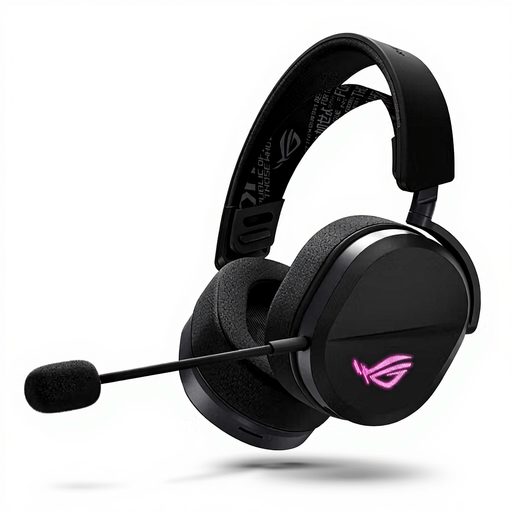
ASUS ROG Pelta gaming headset
An option to consider if you want to choose between wired and wireless connections while recording.
The product description lists wired USB-C, 2.4 GHz via a USB receiver and Bluetooth, plus a unidirectional boom microphone. Check which port and recording input you need.
View at Joybuy
 No image available
HyperX Cloud III S wireless gaming headset
A wireless option to consider if you want a detachable boom microphone and several connection options.
The product description lists 2.4 GHz and Bluetooth, a mute indicator, and USB-A and USB-C connections. Stated battery life is up to 120 hours via 2.4 GHz and up to 200 hours via Bluetooth.
View at Joybuy
 No image available
HyperX Cloud III wired gaming headset
A wired option for a fixed recording setup, with connections you can check against your own equipment.
The product description lists 3.5 mm, USB-A and USB-C connections, a detachable boom microphone and an LED mute indicator. Check which connection carries the microphone signal to your recording device.
View at Joybuy
Frequently asked questions
How can I check that my walkthrough includes both my voice and game audio?
Make a short test recording with the intended microphone and audio sources selected. OBS Project warns that adding the same source twice can cause an echo; standard video players generally play only one track at a time when a recording has multiple audio tracks.
Can a noise gate silence a noisy home office?
No, a noise gate won’t automatically remove all background noise while you’re speaking. OBS Project describes it as a way to remove background noise when you’re not speaking, so test the sound while recording your commentary too.
What are my rights if I’m unhappy with an online headset purchase or it breaks?
According to ACM ConsuWijzer, online purchases generally come with a statutory cooling-off period of up to 14 days after delivery, with some exceptions. You’re also covered by the statutory guarantee if the product doesn’t meet what you could reasonably expect under normal use; the seller must put a valid fault right. A manufacturer’s warranty period isn’t automatically the same as the length of the statutory guarantee.
Can I publish footage of other people from my walkthrough?
If other people can be recognised in the footage, privacy rules may apply. The Dutch Data Protection Authority distinguishes between private use and sharing more widely; when you share footage publicly, the exception for personal or household use doesn’t necessarily apply. Check your recording before publishing it.


