Brands to compare
The models below show a range of connection types and uses. Manufacturer descriptions and product specifications aren’t independent comfort or listening tests.
Logitech G
The wired G335 is a straightforward option to compare if your device has a compatible 3.5 mm socket.
- Logitech G lists a weight of 240 g, an adjustable headband and a flip-up microphone.
- Weight and adjustability alone don’t determine whether a headset feels comfortable; check the fit and connection too.
HyperX
The wired Cloud III is worth comparing if you’re looking for a choice of connection options.
- HyperX lists memory foam, a microphone with a mute indicator, and 3.5 mm, USB-C and USB-A connections.
- Check which connection suits your device; the product specifications aren’t an independent guarantee of comfort or call quality.
SteelSeries
The Arctis Nova 5 Wireless is worth a look if you want to play wirelessly and switch between devices.
- SteelSeries lists a USB-C transmitter, switching between 2.4 GHz and Bluetooth, and a stated battery life of 60 hours.
- Switching between connections doesn’t mean two audio sources play at the same time. Also check that it has the ports and configuration you need.
Sony
The wireless INZONE H5 is an option to compare for a PC or PlayStation set-up.
- Sony describes the INZONE H5 as a lightweight design with a microphone.
- Sony’s 360 Spatial Sound feature requires INZONE Hub software on PC; a gaming feature like this isn’t automatically necessary for visual novels.
JBL
The wired over-ear Quantum 100M2 is worth comparing if you want a detachable microphone.
- JBL lists memory foam ear cushions covered in fabric and a microphone with a mute option.
- Check that the connection suits your device and that the headset feels comfortable to you; the product description isn’t an independent listening test.
Headsets at Joybuy
This selection includes wired and wireless gaming headsets for playing, listening and, if needed, making calls in a home office.
 No image available
Trust GXT 498W Forta, white, wired
A wired option if your device has a compatible 3.5 mm socket.
Detachable 1.2 m 3.5 mm cable and detachable microphone. The product information lists compatibility with PS5 and PS4.
The description mentions soft ear cushions, a padded headband, swivelling ear cups and a weight of 253 g. Fit is a matter of personal preference.
Joybuy
 No image available
Corsair VOID RGB V2 Wireless, white
A wireless option if you want to switch between using it at your desk and listening to audio on the move.
The product description lists 2.4 GHz and Bluetooth, a flexible microphone, and controls for volume and the microphone.
Battery life is stated as up to 70 hours in 2.4 GHz mode; wireless use means you’ll need to recharge it. The description also mentions memory foam ear cushions.
Joybuy
 No image available
Turtle Beach Airlite Fit, black/white, wired
A wired option if you use a Nintendo Switch, Switch Lite or Switch OLED and need a 3.5 mm socket.
The description lists a flip-up mute microphone and volume controls on the ear cup.
Compatibility is listed for Nintendo Switch, Switch Lite and Switch OLED; check that the connection type suits your device.
Joybuy
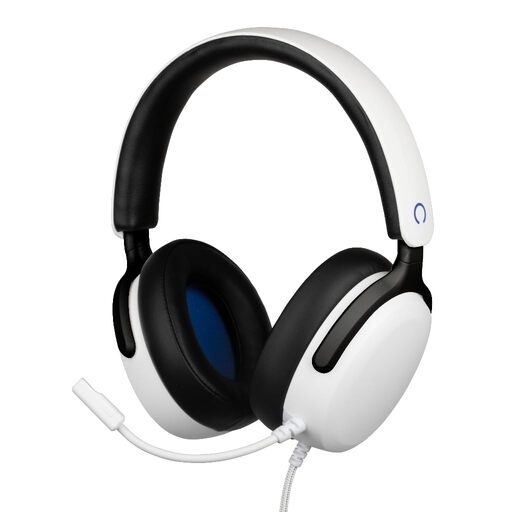 No image available
Konix Nexus, white, wired
A wired over-ear option to compare if you play on a device with a 3.5 mm socket.
The product name lists 40 mm drivers, a flexible microphone, a 1.5 m cable and a 3.5 mm connection.
The description mentions PS5 compatibility; check the connection for your specific device.
Joybuy
 No image available
Skullcandy SLYR Pro Multi-Platform, Black/Red, wired
A wired option to consider if you want to use your headset with a PC or console and choose between the listed connections.
The product description lists USB-C and 3.5 mm, memory foam ear cushions and a microphone mute control.
The description mentions a noise-reducing microphone and volume controls; check that the connection suits your device.
Joybuy
Frequently asked questions
Do you need surround sound for a visual novel?
No, surround sound isn’t essential for using a gaming headset with a visual novel. Some visual novels combine text, voices and music, so focus on the fit and how the audio sounds in the games you play.
How do I connect a headset for both games and calls?
First, check your device’s connections and compare them with the exact version of the headset. Logitech G lists a 3.5 mm connection for the G335; HyperX lists 3.5 mm, USB-C and USB-A for the wired Cloud III. Once connected, test that the microphone and mute function work.
How can I make long listening sessions comfortable and safe?
Adjust the headset for a comfortable fit, keep the volume in mind and take listening breaks. The World Health Organization identifies both sound level and listening time as factors in exposure to loud sound.
What Dutch regulations apply to a wireless headset?
Radio equipment placed on the market in Europe must meet product requirements and carry CE marking, according to the Dutch Authority for Digital Infrastructure. For a faulty product, the Dutch government says the seller is responsible for resolving the issue; in the Netherlands, there is no fixed statutory period for the legal guarantee.
Is it worth paying for an extra warranty?
Not necessarily. The Dutch government advises you to read the terms and check whether additional cover offers more than your statutory rights. Compare the cover and any exclusions before you decide.


