Who is this guide for?

Fan of voice acting and music

You play visual novels with voice acting or music and want a headset to suit your listening preferences. The range of visual novels with voice acting on itch.io shows that spoken dialogue features in some titles, though not every game has the same amount of voice acting.

Player who enjoys long sessions

You read or listen for long stretches and want to assess the headband and ear cushions for yourself. A stated weight can help you compare models, but it doesn’t determine on its own whether a headset will feel comfortable.

Player who switches between devices

You use more than one device and want to check in advance that the connection, any adapter and the wireless connection will work with each one.

What should you consider when choosing?

What to consider What should you check? Who is this important for?
Voice acting and music If possible, listen to familiar speech or music and check whether you can adjust the volume on the headset. If voice acting and music are my main reasons for using a headset, I want a comfortable listening experience above all. Around 36% of consumers put listening experience first.
Fit during long sessions Look at the adjustability and ear cushions, and try the headset on yourself if possible. When I read or listen for long stretches, I want to know whether the headband and ear cushions feel comfortable. Around 29% of consumers give wearing comfort top priority in this situation.
Connection to your device Check which port your device has and which cables or adapters come with the headset. If I play on different devices, I don’t want to find out after buying that the connection isn’t compatible. Around 21% of consumers say connection and device compatibility are their main considerations.
Wireless freedom to move Check that your device supports the connection you want and how to charge the headset. If you’d rather not be tethered by a cable while playing, wireless use may be a high priority. Around 14% of consumers put this freedom to move first.

Common buying mistakes

  • Assuming a low weight guarantees comfort

    The stated weight doesn’t tell you how the headset will fit your head. Logitech G lists the G335 at 240 g, while SteelSeries lists the Arctis Nova 1 at 253 g and with four adjustment points. These details describe the models, not how they’ll fit every user.

    Check the adjustability and ear cushions, and try the headset on yourself where possible.

  • Assuming Bluetooth and the microphone work the same way on every device

    Nintendo says Bluetooth microphones can’t be used with the Switch, and audio lag may occur depending on the Bluetooth device. For wireless headsets from other brands, PlayStation recommends referring to the manufacturer’s instructions.

    Check separately whether your device supports listening and, if you need it, chat.

  • Confusing the manufacturer’s warranty with your statutory rights

    According to ACM ConsuWijzer, the statutory guarantee in the Netherlands doesn’t automatically have a fixed term of two years. What you can reasonably expect from the product under normal use also matters.

    Keep your proof of purchase and contact the retailer if a fault occurs unexpectedly. Don’t treat any additional cover as a replacement for your statutory rights.

Brands to consider as a reference

Logitech G

The wired G335 is one model to consider if you’re looking for a headset with a 3.5 mm connection.

  • Logitech G lists the G335 at 240 g, with an adjustable headband and memory foam and sports mesh ear cushions.
  • The G335 has a cable, and these features don’t tell you whether it will fit comfortably.

SteelSeries

The wired Arctis Nova 1 is another model you can compare for fit during long sessions.

  • SteelSeries lists the Arctis Nova 1 with four adjustment points, a weight of 253 g and a 3.5 mm connection.
  • Check software features for your specific device; the listed features aren’t an independent comfort test.

HyperX

The wired Cloud III is worth considering if you want to compare connection options for different devices.

  • HyperX lists this model with 3.5 mm, USB-C and USB-A connections, as well as memory foam ear cushions.
  • A microphone for chat may not be a priority if you only use the headset for visual novels.

Razer

The Barracuda X is a wireless model to consider if freedom to move is important to you.

  • Razer lists the Barracuda X with a 2.4 GHz dongle and Bluetooth.
  • Check the specific version and connection for your device. Razer’s statements about its audio features are manufacturer claims, not an independent comparison.

PlayStation

The PULSE 3D is a platform-focused model to consider if you play on PS5.

  • PlayStation describes the headset as wireless and lists a USB adapter.
  • PlayStation says 3D audio depends on the game supporting it, so it isn’t essential for every visual novel.

Headsets for visual novels

This selection of Joybuy products includes wired headsets with a 3.5 mm connection and a wireless option. Check that the connection for each model is compatible with your device.

Turtle Beach Airlite Fit wired gaming headset, 3.5 mm, for Nintendo Switch, Switch Lite and Switch OLED, black and white

Turtle Beach Airlite Fit wired gaming headset, 3.5 mm, Nintendo Switch, Switch Lite and Switch OLED, black and white

A wired option for playing on a device with a compatible 3.5 mm connection; check that it fits your device.

View at Joybuy

HYPERX Cloud III S gaming headset, black/red

HYPERX Cloud III S Gaming Headset Black/Red

An option to consider if you want to listen wirelessly; check in advance which connections and devices are supported for your needs.

View at Joybuy

Corsair HS55 stereo gaming headset, white, 3.5 mm

Corsair HS55 Stereo Gaming Headset, white, 3.5 mm

The product name lists this wired stereo headset as having a 3.5 mm connection; check that your device has the same connection.

View at Joybuy
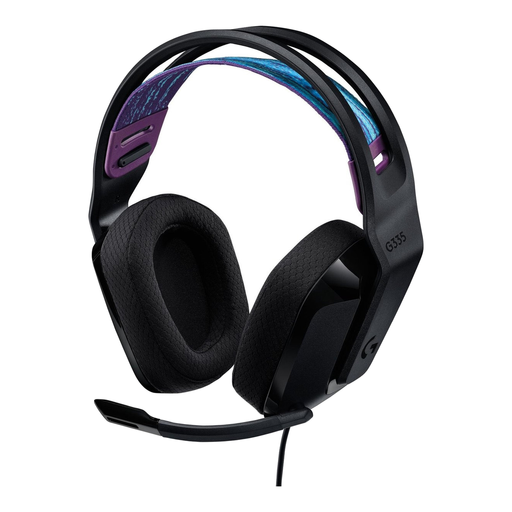
Logitech G G335 gaming headset

Logitech G G335 Gaming Headset

A wired option to compare if you want to play without charging. Logitech G lists the G335 with a 3.5 mm connection and a weight of 240 g; that weight doesn’t guarantee a comfortable fit for you.

View at Joybuy
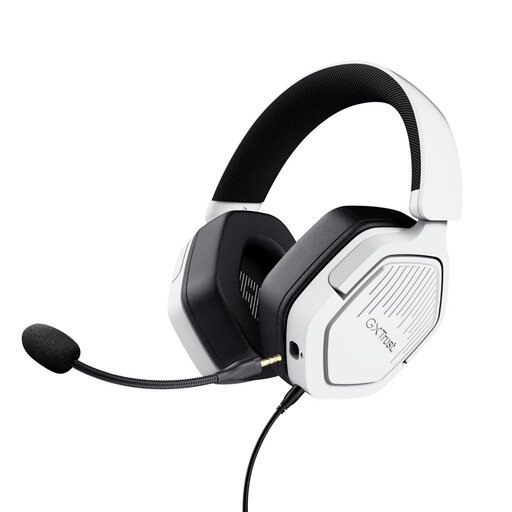
Trust GXT 492W Carus wired gaming headset, 50 mm, white

Trust GXT 492W Carus wired gaming headset, 50 mm, white

A wired headset to consider if your device has a compatible connection; check the connection for your device before choosing.

View at Joybuy

Frequently asked questions

Do I need surround sound for a visual novel?

No, surround sound isn’t a general requirement when buying a headset for visual novels. Check whether your game supports spatial audio and whether you want to use it. PlayStation says the relevant PS5 feature depends on the game supporting it.

How do I connect a headset to my console?

For a wired model, check whether your console has a compatible 3.5 mm connection. PlayStation describes pairing compatible wireless headsets using a USB adapter; for headsets from other brands, refer to the manufacturer’s instructions.

Does a Bluetooth headset’s microphone work with Nintendo Switch?

Not through the Nintendo Switch’s Bluetooth audio connection. Nintendo says Bluetooth microphones can’t be used and audio lag may occur depending on the Bluetooth device. If you need chat, check for another supported option.

How can I listen safely during long sessions?

Keep the volume moderate and be mindful of how long you listen. The World Health Organization explains that both volume and listening time matter: louder sounds over longer periods increase the risk of hearing damage. Without measuring it, a volume setting on a headset doesn’t tell you how many decibels you’re hearing.

What are my rights when buying a headset online in the Netherlands?

According to ACM ConsuWijzer, online purchases generally come with a 14-day cooling-off period from delivery, subject to applicable exceptions. Your statutory rights are separate from any stated manufacturer’s warranty period: what you could reasonably expect from the product under normal use also matters.
