What should you look for when choosing?
First, check that the connection works with your console. Then weigh up wireless gaming against a wired connection, and decide whether comfort, spatial audio or phone audio matters most to you.
| What to consider |
What should you check? |
Who should prioritise this? |
| Platform compatibility |
Check the console, exact model variant, connection and support for any dongle. |
I want to be sure the headset works with my console and preferred connection before choosing. Around 31% of consumers put compatibility first. |
| Comfort and freedom to move |
Assess the fit and adjustability; compare a cable to the controller with wireless gaming and charging. |
For long gaming sessions on the sofa, I want a comfortable headset that doesn’t unnecessarily restrict my movement. Around 31% of consumers put comfort and freedom to move top of their list. |
| Immersive game audio |
Check support for your platform and game, and compare the available audio settings. |
I want the audio to suit adventure games, without assuming that a special surround sound label is essential. Around 23% of consumers prioritise immersive game audio. |
| Phone and voice chat |
Check whether the model plays audio from two sources at once or simply switches between connections. |
If I also need phone audio while gaming, I want to know whether I can hear it at the same time or have to switch sources. Around 15% of consumers make phone or voice chat audio their top priority. |
Gaming headsets at Joybuy
This selection focuses on wireless gaming headsets for console use, with different platform variants and Bluetooth audio options.
 No image available
SteelSeries Arctis Nova Pro Wireless PlayStation Black
Worth considering if you want to play wirelessly on a supported PlayStation platform and listen to Bluetooth audio at the same time.
The product description lists a dual-USB base station, two interchangeable batteries and simultaneous 2.4GHz and Bluetooth audio. Check that the base station connection suits your set-up.
View product at Joybuy
 No image available
Turtle Beach Stealth 600 Gen 3 Xbox
Consider this variant if you want to game wirelessly and switch between game audio and Bluetooth. Before buying, check that the platform variant is right for your console.
The product description lists 2.4GHz wireless, Bluetooth, QuickSwitch and a flip-up microphone. QuickSwitch changes the audio source; it doesn’t mean both sources play at the same time.
View product at Joybuy
 No image available
HyperX Cloud III S Wireless
A wireless option worth considering if you use one of the listed platforms and want to factor in comfort features such as memory foam.
The product title lists PC, PS5, PS4, Switch and mobile. Stated battery life varies by connection: up to 120 hours via 2.4 GHz and up to 200 hours via Bluetooth. Check which connection you need for gaming.
View product at Joybuy
 No image available
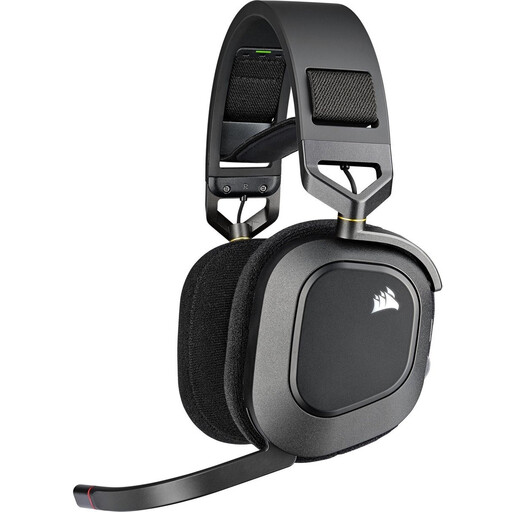
Corsair HS80 RGB Wireless Carbon
Consider this model if you’re looking for a wireless USB adapter for a listed PlayStation platform.
The product description lists PS5 and PS4 compatibility, a floating headband and fabric memory foam ear cushions. Dolby Atmos is listed for PC; don’t assume this feature is available for console gaming without checking.
View product at Joybuy
 No image available
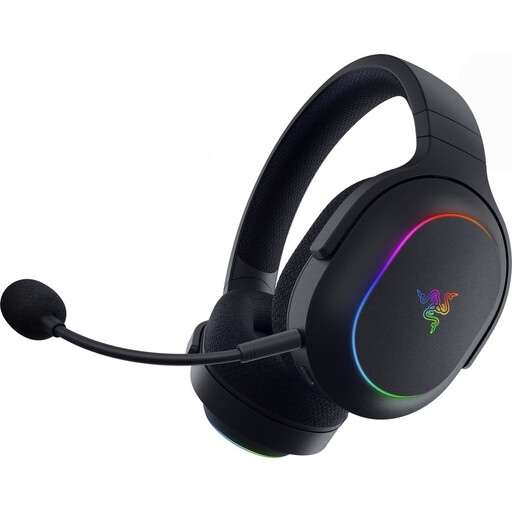
Razer Barracuda X Chroma Wireless Gaming Headset Black
Worth considering if you want to game on a listed platform using a 2.4GHz dongle and also use Bluetooth with a mobile device.
The product description lists PlayStation, PC and Switch for the dongle, and Bluetooth for mobile use. SmartSwitch switches between connections. The stated battery life is up to 70 hours with the lighting off.
View product at Joybuy
Frequently asked questions
Do I need to buy an official PlayStation headset for PS5 3D audio?
No. PlayStation says PS5 3D audio also works with compatible headphones connected via USB or the DualSense controller’s 3.5mm jack. Check whether your game supports the feature, then compare your personal 3D audio profile with the other settings on PS5.
How do I set up headset audio if I normally use my TV speakers?
On PS5, you’ll find the 3D audio settings under Settings and Sound. PlayStation also has separate settings for 3D audio through TV speakers; this is a different listening option from headphone audio.
Can a wireless headset play game audio and phone audio at the same time?
Only if simultaneous audio is listed for the exact model. SteelSeries lists this feature for the Arctis Nova 7 Wireless Gen 2; Turtle Beach describes QuickSwitch on the Stealth 600 Gen 3 as switching between sources.
What should I look out for when charging and using a headset safely?
Before buying, check how your chosen wireless headset charges and what’s included. Microsoft says that a charger isn’t included with the Xbox Wireless Headset. Adjust the headset to fit properly and avoid listening at high volume for long periods, as Sony advises in its manual.
What are my rights in the Netherlands when buying online or if a product is faulty?
For online purchases from a business, you generally have a 14-day cooling-off period, with some exceptions, according to the Dutch government. If a product is faulty, contact the seller: there’s no fixed statutory warranty period in the Netherlands, but you’re entitled to a product that meets reasonable expectations. An extended warranty doesn’t replace those rights.


