
Team player who often practises voice chat
You want to give quick instructions and mute your microphone straight away. Microphone placement and chat controls are key things to consider.


When choosing a headset for practising team communication, focus on the microphone position, mute controls and whether it connects to your PC or console. A wired headset is an option if you practise in one place and would rather not charge a battery. Wireless gives you more freedom to move, but check which extra features work with each device. Daylight alone doesn’t mean you need a particular type of headset.
You want to give quick instructions and mute your microphone straight away. Microphone placement and chat controls are key things to consider.
You want a comfortable fit, even during a longer session. So check the adjustment and material of the ear cushions, not just the stated weight.
You want to check that the connection, microphone and chat controls you need work with each of your devices. Platform support doesn’t automatically mean that every extra feature is available.
Start with your device and the mute controls you want. Then decide whether you really need to move around without a cable while practising. Daylight alone isn’t a reason to choose a particular type of headset.
| What to consider | What should you check? | Who is this important for? |
|---|---|---|
| Voice and mute controls | Check the microphone position and whether you can mute it quickly. If possible, make a short test recording on your own device. | If I want to give quick instructions during practice and mute myself straight away, I’ll focus on those controls. Around 33% of consumers put clear voice quality and quick muting at the top of their buying priorities. |
| Comfort during long sessions | Check the adjustment and material of the ear cushions. If possible, try the headset during a typical practice session. | If you want to practise for a long time, how the headset fits and feels matters. Around 27% of consumers put wearing comfort first. |
| Connection and chat features | Check the exact model, the connection or dongle it uses, and which chat features work with your PC or console. | If I want to use a headset with my own device, I want to know in advance whether the chat controls I need will work too. Around 27% of consumers give platform compatibility top priority. |
| Moving around and charging | Think about whether you’ll leave your spot while practising. For wireless models, check which devices they support and what charging connection they use. | If you want to move around during practice without an audio cable, you could consider a wireless headset and factor in charging. Around 13% of consumers put freedom of movement first. |
A headset may connect to a device even if an extra feature needs different settings. For example, according to SteelSeries, ChatMix works straight away on Xbox with the SteelSeries Nova 7X and Nova 7X Gen 2; on PC, it needs to be configured in Sonar. Razer says the BlackShark V2 X’s virtual 7.1 feature is only available on Windows 11.
Check the requirements for the exact model on every device you practise with.
Extra setup can take time, and a feature may not be available on the device you choose.
Claims about microphone processing come from manufacturers and don’t prove how your voice will sound in your room.
Position the microphone carefully and make a short test recording on your own device.
ACM ConsuWijzer distinguishes between a seller’s or manufacturer’s warranty and your statutory rights if a product doesn’t meet what you could reasonably expect from it.
Check your statutory rights and what any extra cover offers before paying for it.
The wired Cloud III is an option if you’re looking for a visible mute indicator and a choice of included connection options.
The wired BlackShark V2 X is an option if you’re weighing up microphone positioning and a closed-back design.
The Arctis Nova 7X Wireless Gen 2 is worth considering if you want to practise wirelessly and adjust game and chat audio, with Xbox and PC compatibility in mind.
The PRO X 2 LIGHTSPEED is a wireless option if you want to explore different ear cushion materials and connection options.
This selection includes three wired headsets for team communication and two wireless options for anyone who wants to practise without an audio cable.
 No image available
A wired option for team chat, with a mute control on the headset.
3.5 mm connection; the listed PS4 and PS5 compatibility requires a 3.5 mm audio connection.
The product description lists a detachable microphone and soft ear cushions.
 No image available
The flip-up microphone is a handy option if you want to mute yourself during team chat by lifting the microphone.
The product description lists a 3.5 mm connection and a USB audio adapter.
According to the product description, QuantumSURROUND is only available on PC.
 No image available
A wireless option if you want to move around without an audio cable while practising and flip up the microphone to mute it.
The product description lists 2.4 GHz, Bluetooth 5.2 and a QuickSwitch button for switching between connections.
The built-in battery means you’ll need to charge it for wireless use.
 No image available
A wired option if you want to flip up the microphone to mute yourself during team chat.
3.5 mm connection; the product description lists compatibility with Switch, PC and mobile devices.
The product description lists mesh ear cushions and a weight of 0.228 kg. This model doesn’t offer the freedom of movement of a wireless headset.
 No image available
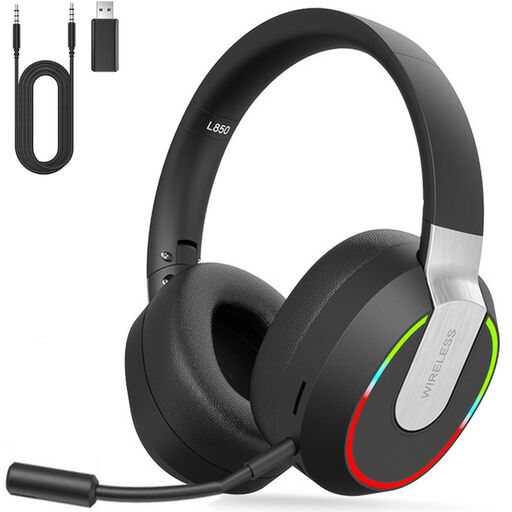
This wireless headset is an option if you want to use different types of connection for team communication.
The product description lists a 2.4 GHz dongle, Bluetooth and a wired 3.5 mm mode.
A detachable microphone is listed. Battery life is stated as up to 9 hours.
No. Daylight alone doesn’t mean you need a particular type of headset. For team communication, start by looking at the microphone, fit and connection; consider background noise separately if needed. A noise-cancelling claim doesn’t automatically tell you how the headset will sound in your room.
According to SteelSeries, the ChatMix control on the Nova 7X and Nova 7X Gen 2 works straight away on Xbox. On PC, you need to configure ChatMix in SteelSeries GG Sonar first. Also check that you have the right model variant.
A wired headset doesn’t need its own battery for listening, but the cable limits how freely you can move. A wireless headset lets you move away from your spot, but needs charging, and you’ll need to check that its connection and features work with your device.
According to ACM ConsuWijzer, online purchases generally come with a cooling-off period of up to 14 days after delivery, although there are exceptions you should check in advance. You also have statutory rights if a product doesn’t do what you could reasonably expect it to under normal use. These rights aren’t automatically limited to any stated manufacturer’s warranty.
Radio equipment placed on the EU market must meet the requirements of the Radio Equipment Directive, including requirements relating to CE marking. The European Commission also lists common charging requirements for headsets covered by the rules from 28 December 2024. For a specific product, check the applicable documentation and charging specifications.