What should you look for when choosing?
Start with a connection that supports both game audio and chat, then compare the microphone controls, how the headset sounds in your room and how much freedom to move you need.
| What to consider |
What should you check? |
Who is this important for? |
| Clear team chat |
Check the microphone position and mute button; make a test recording in the chat app you use. |
When I’m giving quick call-outs during a match, I want my team to understand me and be able to mute my mic straight away. Around 28% of consumers put clear team chat first. |
| Directional and in-game audio cues |
Check whether the game and platform support the stated audio feature; compare the settings in a game you know well. |
When I want to combine in-game audio cues with team call-outs, I want to assess the settings in my own game. Around 22% of consumers prioritise recognising directional audio. |
| Connection and microphone |
Check your exact PC or console, controller port, chat app and model variant. |
I want to know before buying that both game audio and my microphone will work with the device I use. Around 22% of consumers put platform compatibility first. |
| Comfort and room noise |
Assess the fit with your glasses or head shape, and consider listening volume and how long you’ll use it. |
When I’m playing for longer in a room with background noise, I want a fit that feels comfortable to me and doesn’t make distractions worse than they need to be. Around 17% of consumers put comfort and managing room noise first. |
| Freedom to move |
Check the receiver and whether the connection can switch between audio sources or work with a second source at the same time. |
When I want to get up during a game or hear audio from my phone as well, I want to know how the wireless connection works and when it needs charging. Around 11% of consumers prioritise freedom to move. |
Wired gaming headsets at Joybuy
This selection features wired gaming headsets for a fixed gaming setup. For each model, check whether the connection supports both game audio and the microphone on your PC or console.
 No image available
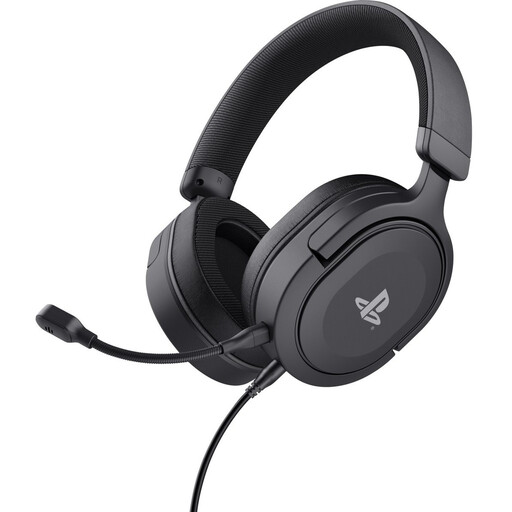
Trust GXT 498 Forta, wired PS5 headset, black, 50mm drivers
Suited to a fixed gaming setup if you’re looking for a wired headset with on-earcup microphone controls. The product information lists a detachable microphone and a 3.5 mm cable; check the connection on your device.
View at Joybuy
 No image available
Logitech G G432 7.1 Surround Sound, wired gaming headset
A wired option for a fixed gaming setup if you want to be able to mute quickly. The product information lists a flip-to-mute microphone and 3.5 mm and USB connections; check that the connection you choose also supports chat on your device. The surround sound label doesn’t prove you’ll be able to pinpoint sounds more accurately in every game.
View at Joybuy
 No image available
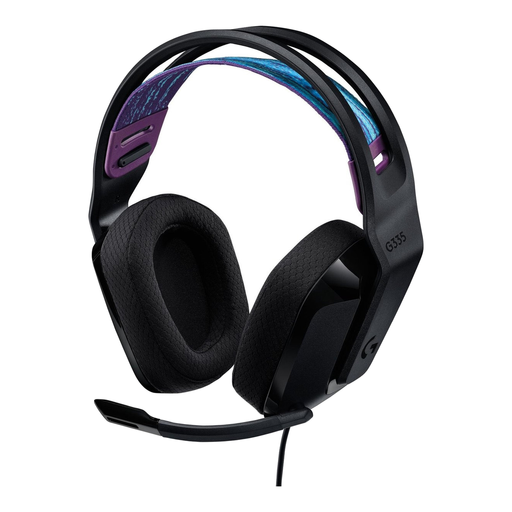
Logitech G G335 gaming headset
Suited to team calls where you want to mute the microphone quickly. The product information lists a flip-to-mute microphone and a 3.5 mm connection; check that it works with your platform and chat app.
View at Joybuy
 No image available
Razer BlackShark V2 X 7.1, wired, multi-platform, black
An analogue 3.5 mm option if you’re looking for a wired connection and a mute switch; Razer also lists a cardioid microphone. According to Razer, the stated 7.1 feature is only available on Windows 11 and doesn’t prove accurate positional audio in your game.
View at Joybuy
 No image available
HyperX Cloud III gaming headset for PC, PS5 and Xbox Series X|S, black
Suited to a gaming setup where you need different wired connections. HyperX lists 3.5 mm, USB-A and USB-C, plus a microphone with a mute indicator; check which connection and microphone features work on your platform.
View at Joybuy
Frequently asked questions
Should I buy a noise-cancelling headset first for a spare room?
Not necessarily: first test the microphone where you play and check your chat app’s settings. Discord says Krisp mainly filters non-human background noise, and that it can reduce voice quality in a quiet environment when you’re using a good microphone. Ear cup isolation mainly affects what you hear.
Will a Bluetooth headset connect directly to an Xbox One?
According to Xbox Support, Xbox One doesn’t support a direct Bluetooth headset connection. A compatible headset with a standard 3.5 mm plug can be connected through an Xbox controller with a suitable port; for other wireless headsets, check support for your specific Xbox model.
How can I use a headset without constantly turning up the volume?
Pay attention to both the volume and how long you listen, and take breaks. The World Health Organization gives an average of 80 dB for up to 40 hours a week as an example; this doesn’t mean that a particular volume setting on every headset equals 80 dB.
What are my rights if the fit isn’t right or the headset breaks too soon?
For an online purchase, ACM ConsuWijzer says you usually have up to 14 days from delivery to change your mind, although exceptions may apply to the specific product. Faulty goods are also covered by statutory rights; a manufacturer’s warranty doesn’t replace those rights.
What should I check about Dutch rules for a wireless headset?
Check the product details and CE marking for the model on offer. The Dutch Authority for Digital Infrastructure outlines European requirements for radio equipment and CE marking for products placed on the market; an advert alone doesn’t confirm that an individual item complies.


