Choose a headset with a microphone and connection that suit the device you use for team chat; then consider the fit and how well the ear cups seal around your ears. A wired headset means no charging, while a wireless one gives you more freedom to move but depends on having the right receiver, battery and, sometimes, console version. Manufacturer specifications alone can’t tell you how clearly your voice will come through in a noisy room.
Who is this guide for?
Team chat player in a shared room
If your housemates make noise too, consider the microphone position and whether the mute control is easy to reach. HyperX and Razer list these features for their respective models, but that’s not a real-world test of how clearly you’ll come through in your room.
Player using multiple devices
If you switch between PC and console, check the connections and supported ways to connect first. For wireless Xbox use, SteelSeries specifically recommends the Nova 5X, so the exact model variant matters.
Player who enjoys long sessions
For extended use, the fit and feel of the ear cushions matter. With a wireless headset, you’ll also need to charge it; a stated weight or battery life doesn’t guarantee a comfortable experience.
What should you look for when buying?
| What to consider |
What should you look for? |
Who should prioritise this? |
| Clear microphone |
Check the microphone position, mute control and connection. Record a test in the room where you normally use it. |
If your team needs to understand quick instructions, you’ll want to assess the microphone in your own setup. Around 29% of consumers prioritise voice clarity. |
| Background noise |
Check how the ear cups fit, and assess separately what you can hear and what the microphone picks up. |
If your housemates make noise, you’ll want to follow team chat without turning the volume up unnecessarily. Around 24% of consumers put blocking out room noise top of their list. |
| Connection and compatibility |
Note which device you use, what ports are available and where you use team chat. Then check the full model name and connection type. |
If you want to use the same headset with a PC or console, game audio and chat need to work on your devices. Around 18% of consumers give compatibility top priority. |
| Comfort |
Consider adjustability, pressure around your ears and the cushion material. Treat stated battery life as a manufacturer’s figure. |
For long gaming sessions, you’ll want a fit that stays comfortable for you; wireless gaming also means you’ll need to charge the headset. Around 17% of consumers start with long-term wearing comfort. |
| Overall cost of use |
Check which connection accessories you need and whether features such as virtual surround work on your platform. |
If you don’t want to pay for features you can’t use, check the connections and platform requirements first. Around 12% of consumers prioritise running costs and the accessories they need. |
Common pitfalls
-
Confusing microphone noise cancellation with blocking noise from your own ears
A directional microphone and closed ear cups do different jobs: one affects how your voice is picked up, while the other affects what you hear from your surroundings.
Check both features separately and try the microphone in your usual room setup.
-
Choosing a wireless headset without checking the console version
Within the Nova 5 series, SteelSeries specifically identifies the 5X for Xbox. A similar model name doesn’t automatically mean every version supports the same console.
Compare the full model name and check which connection and dongle your console requires.
-
Expecting virtual surround sound to work on every platform
Razer says the BlackShark V2 X’s 7.1 feature is only available on Windows 11. The presence of this feature alone also doesn’t tell you how clearly positional audio will come through in your game.
Check the platform requirements and try the sound settings in your own game to see what works for you.
-
Assuming paid extra cover is your only protection if something goes wrong
ACM ConsuWijzer explains that statutory guarantee rights exist alongside any retailer or manufacturer’s guarantee, and that the retailer remains responsible for faulty goods.
Check what additional cover offers before taking it out.
Brands to consider
HyperX
The wired Cloud III is an option if you’re looking for a detachable microphone and a choice of connection options.
- For the wired Cloud III, HyperX lists a 10 mm microphone, a mute indicator and 3.5 mm, USB-C and USB-A connections.
- These stated features aren’t an independent measure of voice clarity or wearing comfort. Make sure you’re comparing the wired version, not a wireless variant.
Razer
The wired BlackShark V2 X is an option for a shared space, with a flexible microphone boom and closed ear cups.
- Razer describes it as having a cardioid microphone and passive noise isolation.
- These descriptions don’t establish how much room noise your teammates will actually hear. Razer says the 7.1 feature is only available on Windows 11.
SteelSeries
The Arctis Nova 5 is a wireless option with a 2.4GHz dongle and the ability to switch to Bluetooth.
- SteelSeries gives the Nova 5 a battery life of 60 hours; this is a manufacturer’s figure.
- According to SteelSeries, Bluetooth and 2.4 GHz can’t be active audio sources at the same time. For wireless Xbox use, the brand specifically recommends the Nova 5X.
Logitech G
The G435 is a wireless option if you want freedom to move and would rather not have a protruding microphone boom.
- Logitech lists LIGHTSPEED, Bluetooth and built-in beamforming microphones.
- The stated weight of 165 g and battery life of 18 hours are manufacturer figures. Check which connection your device supports, and assess how your voice sounds in your own room.
JBL
The Quantum 200 is a wired 3.5 mm option with a flip-up microphone.
- JBL lists 3.5 mm compatibility and a microphone that mutes when you flip it up.
- These connection and control features don’t tell you how precisely positional audio will sound or how much room noise the microphone will pick up.
Wired headsets on Joybuy
These wired gaming headsets are selected for team chat and use at a fixed location. Check that each model’s connection suits your device.
 No image available
JBL Quantum 300 – wired over-ear gaming headset with flip-up microphone
An option to compare if you’re looking for a wired headset with a flip-up microphone for team calls.
The product name describes an over-ear design and a flip-up microphone. Check that the connection suits your device.
Joybuy
 No image available
JBL Quantum 120 – wired multi-platform gaming headset
A wired option to compare if you want to use game audio and team chat on your own devices.
The product name identifies this as a multi-platform model. Check the connection and support for your specific device.
Joybuy
 No image available
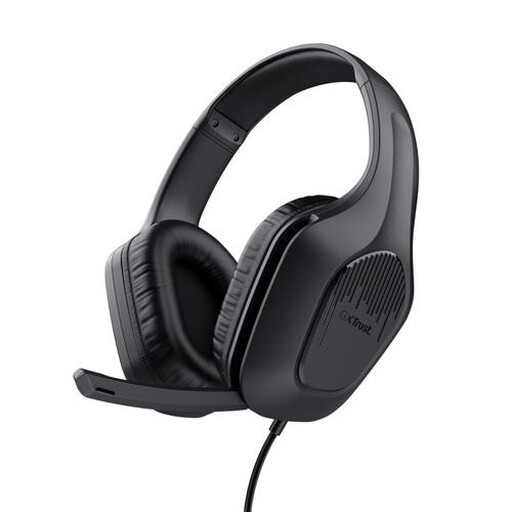
Trust GXT 415 Zirox – wired over-ear headset, 50 mm drivers
A wired headset to compare if you’re looking for an over-ear model for gaming and team chat.
The product name lists 50 mm drivers and an over-ear design; these features alone don’t tell you how clearly positional audio will sound to you.
Joybuy
 No image available
Razer BlackShark V2 X 7.1 – wired gaming headset
An option for team calls in a shared room if you want to compare a directional microphone and closed ear cups.
Razer describes this model as having a cardioid microphone and passive noise isolation. The manufacturer says the 7.1 feature is only available on Windows 11; assess the microphone in your own room.
Joybuy
 No image available
HyperX Cloud III – gaming headset for PC, PS5 and Xbox Series X|S
A wired option to compare if connection options and a detachable microphone matter to you.
For the wired Cloud III, HyperX lists a 10 mm microphone, a mute indicator and 3.5 mm, USB-C and USB-A connections. These specifications aren’t a real-world test of how clearly you’ll come through in your room.
Joybuy
Frequently asked questions
Where should I connect a headset for team chat?
First, check where you use chat and which audio connection your device has. HyperX lists 3.5 mm, USB-C and USB-A for the wired Cloud III; for wireless Xbox use with the Nova 5X, SteelSeries says to set the dongle to Xbox mode.
How can I use a headset in a noisy room without constantly turning the volume up?
Make sure the ear cups fit well, position an adjustable microphone close to your mouth and check your voice with a test recording. The World Health Organization gives an average of 80 dB for up to 40 hours a week as an example; at higher sound levels, the recommended listening time is shorter. Keep an eye on both volume and listening time.
Can I hear game audio through the dongle and phone audio via Bluetooth on the Nova 5 at the same time?
No. According to SteelSeries, you can switch between 2.4 GHz and Bluetooth on the Nova 5, but only one connection can be an active audio source at a time.
What are my rights in the Netherlands if an online headset doesn’t suit me or develops a fault?
Online purchases generally come with a 14-day cooling-off period from delivery, although exceptions depend on the product and how it has been handled. ACM ConsuWijzer explains that the retailer is responsible for offering an appropriate solution if a product doesn’t meet what you could reasonably expect; statutory guarantee rights aren’t automatically limited to two years.


