First, check that both game audio and the microphone work with your PC or console. A wired headset makes sense if you’ll be staying near your device and don’t want to charge it. Wireless gives you more freedom to move, but check whether you want to switch between audio sources or hear them at the same time. A product description can’t tell you how clearly your microphone will pick up your voice among chatting guests, or how the headset will fit your head.
Who is this guide for?
Host who uses online team chat
You’re talking to players remotely while guests are in your room. Look for a well-positioned microphone and an easy-to-reach mute button, and test how your voice sounds in your own room. A manufacturer’s claim about reducing background noise doesn’t guarantee that your voice will come through clearly there. Razer and HyperX describe models with microphone controls or a mute function.
Host who switches between devices
You might use a PC or console as well as a phone. Decide whether you want to switch between connections or hear two audio sources at the same time. SteelSeries distinguishes between these features on its Nova models; for Xbox, check the exact model variant.
Host who cares about cost and comfort
You’re looking for a headset for longer gaming sessions without paying for wireless features you won’t use. Compare the fit and the features you need; the material or weight alone won’t tell you whether a headset will feel comfortable. VeiligheidNL notes that well-fitting ear cups can help you avoid turning the volume up too high in a noisy environment.
What should you look for when choosing?
First, check that the connection supports both audio and chat on your gaming device. Then decide what matters most to you: clear chat, comfort, a lower upfront cost or freedom to move around.
| What matters when buying |
What to look for |
Who is this most relevant to? |
| Clear chat |
Check the microphone position and that the mute button is easy to reach. Test the recording with guests chatting nearby. |
If guests are talking in the same room while you’re gaming online, you’ll want your teammates to hear you clearly. Around 25% of consumers in this situation put clear chat first. |
| Connecting to your device |
Check the exact PC or console, controller port, connection or dongle, and support for microphone chat. |
If you play on a particular PC or console, you’ll want to make sure both game audio and the microphone work. Around 25% of consumers give device compatibility top priority. |
| Fit and room noise |
Look for adjustability and a good fit around your ears; assess the fit during a typical gaming session. |
During a longer gaming night with guests making noise in the room, how the headset fits and how you experience the sound both matter. Around 20% of consumers prioritise fit and listening conditions in the room. |
| Upfront cost |
Compare the exact version and the included connection or dongle with the features you actually need. |
If you mainly want a headset for gaming, you won’t want to pay for features you don’t use. Around 15% of consumers put the greatest weight on upfront cost. |
| Freedom to move and a second audio source |
Check whether the model can switch between audio sources or mix them at the same time, and where the microphone sends your voice during a call. |
If you want to get up during a gaming night or listen to audio from your phone as well, you’ll need to choose between greater freedom to move and the way you want to listen. Around 15% of consumers prioritise these features. |
How to avoid common buying mistakes
-
Assuming Bluetooth and 2.4 GHz can always be used at the same time
According to SteelSeries, the Arctis Nova 5 lets you switch between 2.4 GHz and Bluetooth, but only one connection is active at a time. The Nova 7 can play audio from both sources at once, but it doesn’t send microphone audio to both simultaneously.
Decide in advance whether you want to switch between sources or hear two at once, and check that the exact model supports the feature you need.
-
Assuming every wireless version works with Xbox
Xbox connectivity depends on the model variant and the connection it uses. SteelSeries specifically describes using the dongle in Xbox mode for the Nova 7X. Xbox says that Xbox One doesn’t support Bluetooth for a direct headset connection.
Check the full model name, the receiver included and whether both audio and the microphone work with your console.
-
Confusing microphone noise cancellation with quieter listening
A microphone feature affects the sound that’s picked up; closed ear cups affect what you hear from the room. One doesn’t prove that the other works too.
Test the microphone with guests chatting nearby, then check separately whether the ear cushions fit you well.
Brands to compare
HyperX
The wired Cloud III Wired could suit you if you’re looking for several connection options and controls on the ear cup.
- HyperX lists 3.5 mm, USB-C and USB-A for this model, as well as an LED microphone mute indicator.
- The connections and product materials won’t tell you how the headset fits or how the microphone sounds in a busy room.
SteelSeries
The Nova 5 and Nova 7 offer different ways to use game and phone audio.
- According to SteelSeries, the Nova 5 switches between connections, while the Nova 7 can play two audio sources at once.
- The Nova 7 doesn’t send microphone audio to both sources at the same time. For Xbox, the exact X variant matters.
Logitech G
The G435 is a wireless option for use with devices including PC and PlayStation via LIGHTSPEED.
- Logitech G lists the G435 as weighing 165 g and offering 18 hours of use.
- Those figures don’t tell you how the headset will fit your head or how the microphone will perform in a student room. The platforms listed don’t include Xbox.
Razer
The wired BlackShark V2 X could suit you if you’re looking for a flexible microphone and closed ear cups.
- Razer describes this model as having a directional microphone and passive noise isolation.
- Razer says the 7.1 feature is for Windows 11. Test the voice recording in your own room rather than treating a performance claim as a guarantee.
Xbox
The Xbox Stereo Headset and Xbox Wireless Headset show two connection options for Xbox gamers.
- According to Xbox, the wired Stereo Headset connects via 3.5 mm to a compatible controller, while the Wireless Headset connects wirelessly to the console.
- Xbox One doesn’t support a direct Bluetooth headset connection to the console. This doesn’t tell you how headsets from other brands work.
Joybuy headsets for a gaming night
These product picks focus on wired gaming via a suitable connection, alongside a wireless option for anyone who’d rather play without a cable.
 No image available
Trust GXT 498W Forta wired gaming headset, white, PS5
A wired option for gaming on PS5 or PS4 via a 3.5 mm connection to the controller; the description mentions a detachable microphone and mute button.
The description lists PS5 and PS4 as supported platforms; support for other platforms isn’t confirmed.
View at Joybuy
 No image available
Skullcandy SLYR Pro Multi-Platform Gaming Headset, Black/Red
A good fit for a wired setup if you need USB-C or 3.5 mm and want to mute the microphone or adjust the volume while gaming.
The product information lists PC, PlayStation, Nintendo Switch and Xbox; check the connection for your device. This is a wired headset.
View at Joybuy
 No image available
HyperX Cloud III S Gaming Headset, Black/Red
A wireless option for chat: the product information mentions a detachable boom microphone with a mute indicator.
The description lists 2.4 GHz and PC, PS5, PS4 and Nintendo Switch. Wireless use requires charging; a built-in rechargeable lithium battery is listed.
View at Joybuy
 No image available
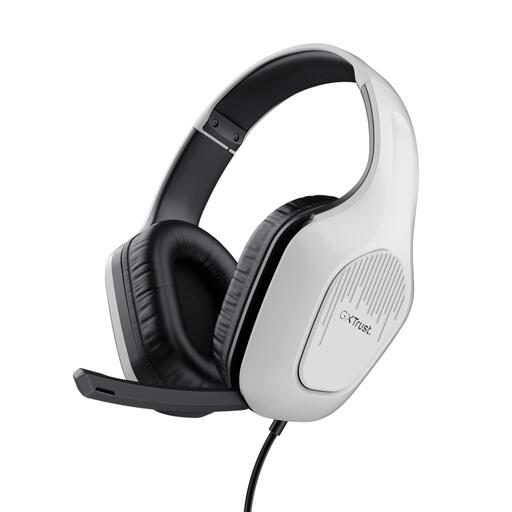
Trust GXT 415W Zirox wired gaming headset, white
According to the product information, this wired headset has a 3.5 mm connection, a foldable microphone and mute controls.
The cable is fixed and 2 m long. The product information lists PC, laptop, PlayStation, Xbox and Nintendo Switch; check the connection for your device.
View at Joybuy
 No image available
Razer BlackShark V2 X 7.1 wired gaming headset, black
A wired option with a 3.5 mm connection and a cardioid microphone with mute controls, according to the product information.
The description lists PC, PS4, Xbox One, Nintendo Switch and mobile devices. According to Razer, the 7.1 feature is limited to Windows 11.
View at Joybuy
Frequently asked questions
Can I connect a Bluetooth gaming headset directly to my Xbox?
Not to an Xbox One console using a standard Bluetooth connection: Xbox Support says this console doesn’t have Bluetooth functionality for that purpose. A compatible wired headset may work via the 3.5 mm connection on a compatible controller or the adapter mentioned; the Xbox Wireless Headset uses its own wireless connection. For another model, check the exact Xbox compatibility.
How do I set up a Nova 7X for wireless use on Xbox?
SteelSeries says that for the Nova 7X and Nova 7X Gen 2, you should connect the included dongle to the Xbox using the USB-A cable and set the dongle to ‘Xbox’. This instruction doesn’t automatically apply to every Nova version.
How can I listen more safely during a long gaming night?
Keep the volume moderate and take listening breaks. The World Health Organization notes that volume, listening time and how often you’re exposed to loud sound all matter. VeiligheidNL says well-fitting ear cups can help you avoid turning the volume up too high in a noisy room.
What are my rights in the Netherlands if a headset I bought online disappoints me or breaks too soon?
Online consumer purchases generally come with a statutory cooling-off period of up to 14 days after delivery; ACM ConsuWijzer explains that exceptions depend on the circumstances. If a product doesn’t meet reasonable expectations under normal use, the seller is responsible under the statutory guarantee. This is separate from a manufacturer’s warranty or a voluntary returns policy.


