What should you look for when choosing?
Start by checking the connection and fit, then decide whether voice chat or the freedom to move around wirelessly matters more to you. Always check that features are available for the exact headset model and your gaming device.
| What to consider |
What should you check? |
Who is this relevant for? |
| Game audio |
Compare stereo or virtual surround sound with the games you play, and check that any software features work on your platform. |
If I want to follow music, dialogue and the game environment clearly, I look beyond the surround-sound label. Around 25% of consumers say game audio is their top priority. |
| Comfort and room noise |
Consider the pressure from the headband, the ear cushions and the seal; if possible, try the headset for a longer period at a moderate volume. |
For long gaming sessions in a shared room, I want a fit that stays comfortable and helps limit distractions. Around 25% of consumers prioritise comfort and a quiet room. |
| Microphone and mute controls |
Test a voice recording on your own PC or console, and try the mute button or flip-up microphone. |
When I’m chatting with friends, I want to be easy to understand and able to mute the microphone quickly. Around 19% of consumers choose mainly based on voice chat and microphone controls. |
| Connection and platform |
Check the port on your device and whether the features you want are available on that platform. |
I want a headset that works with my device, without having to factor in extra features I can’t use there. Around 19% of consumers prioritise connection and platform support. |
| Wireless freedom |
Check which dongle and platform version you need, how to charge the headset, and whether you can switch between connections or use them at the same time. |
If I want to move around without a cable while gaming, I weigh that against charging and managing a dongle. Around 12% of consumers say freedom to move is their top priority. |
Headsets at Joybuy
These headsets are suited to gaming in a student bedroom, with both wired options and models for wireless play.
 No image available
JBL Quantum 300
Suited to anyone who prefers wired gaming and wants to be able to mute the microphone quickly during a chat.
The product information lists a 3.5 mm connection, 50 mm drivers and a flip-up microphone that mutes when you raise it. According to the product information, QuantumSURROUND is only available on PC.
View at Joybuy
 No image available
Turtle Beach Stealth 500 Xbox
Suited to anyone who wants to game wirelessly and mute the microphone quickly during group chat.
The product information lists a 2.4 GHz USB dongle for Xbox, PC and Switch in docked mode, and Bluetooth for mobile devices. You can switch between connections; the microphone mutes when you raise it. The drivers are 40 mm.
View at Joybuy
 No image available
Razer BlackShark V2 X 7.1
Suited to anyone looking for a wired connection, closed-back ear cups and a mute button.
The product information lists a 3.5 mm connection, a weight of 240 g, memory foam ear cushions and 50 mm drivers. Razer describes passive noise isolation; the stated 7.1 feature is limited to Windows 11. The cable may restrict your freedom to move around.
View at Joybuy
 No image available
HyperX Cloud III
Suited to anyone who games with a wired connection and needs a choice of connections or a microphone with a mute function.
HyperX lists 3.5 mm, USB-A and USB-C, memory foam in the headband and ear cushions, and a detachable microphone with a mute function. The cable may restrict your freedom to move around.
View at Joybuy
 No image available
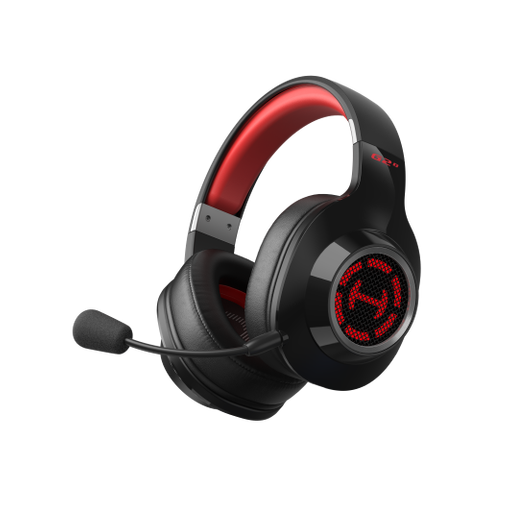
Edifier G2S
Suited to anyone who wants a wireless gaming dongle and the option to use a wired connection too.
The product information lists 2.4 GHz via a USB dongle, Bluetooth 5.4 and a wired Type-C mode. According to that information, Bluetooth isn’t compatible with PS5, PS4 or PC; other connection modes are listed for those devices. You can raise the microphone to mute it.
View at Joybuy
Frequently asked questions
Do I need 7.1 surround sound for fantasy adventures?
No, you don’t need to make 7.1 surround sound a general requirement when buying a headset. Stereo can work well too; virtual surround sound also depends on the game, software and platform. For example, Logitech says DTS surround sound and EQ on the Logitech G432 are only available on Windows with Logitech G HUB.
Can I hear game audio and Bluetooth audio at the same time with the SteelSeries Arctis Nova 5?
No. According to SteelSeries, Quick Switch lets you switch between 2.4 GHz and Bluetooth, and only one connection can be active at a time. If you use Xbox, also check that the Nova 5X version is right for your console.
How should I use a headset during long gaming sessions?
Keep the volume moderate and take regular listening breaks. The World Health Organization identifies both volume and duration of exposure as factors in the risk of hearing damage, and recommends, among other things, keeping the volume at no more than 60% of your device’s setting. This advice doesn’t prove that any particular headset model is safe.
What if the fit isn’t right or the headset breaks too soon during normal use?
For an online purchase in the Netherlands, you generally have a statutory 14-day cooling-off period after delivery, with exceptions that the seller must explain in advance. ACM ConsuWijzer also states that the seller is responsible if a product doesn’t meet what you could reasonably expect during normal use; a manufacturer’s warranty doesn’t replace your statutory rights.


