
Streamers who put clear speech first
You want viewers to hear your commentary over the game audio, and you’re also considering background noise in the room. OBS Project explains how to assess your voice and game audio separately.


For game commentary from a spare room, a well-positioned microphone, some basic sound dampening and a test recording in your own setup matter more than simply choosing a headset. OBS Project recommends assessing your voice and game audio separately; noise suppression is no substitute for positioning your microphone correctly or getting the audio mix right. Choose wired if you stay in one place and don’t want to charge a battery, or wireless if freedom of movement or mixing audio sources matters more to you.
You want viewers to hear your commentary over the game audio, and you’re also considering background noise in the room. OBS Project explains how to assess your voice and game audio separately.
You want to be able to move around while streaming or hear audio from a second device. Check whether simultaneous playback is confirmed for each model; SteelSeries, for example, lists this feature for the Arctis Nova 7 Wireless Gen 2.
You’re particularly interested in fit, ear cushions and controls for longer gaming sessions. HyperX’s product information, for example, describes memory foam in the Cloud III models, but comfort is still a personal matter.
A good fit if: you commentate from a fixed position and don’t want to charge a battery.
Bear in mind: the cable limits your freedom to move; also check that the connector is compatible with your device.
A good fit if: you want to move around while streaming or use a second audio source.
Bear in mind: charging, the receiver you need and whether the exact model plays audio from multiple sources at once.
| What to consider | What should you check? | Who is this important for? |
|---|---|---|
| Clear commentary | Check the microphone mute control and make a test recording with game audio and the sounds in your room. | I want viewers to hear my commentary clearly and be able to assess the recording in my own setup; around 36% of consumers put clear commentary first. |
| Connection and freedom to move | Check the port and platform support; separately confirm whether you can hear both of the sources you want to use at the same time. | If I want to move around or hear a second device, the connection needs to suit my setup; around 29% of consumers give freedom of connection the highest priority. |
| Comfort | Compare the materials and adjustability, and assess the fit where the applicable terms allow you to do so. | For longer sessions, I want a comfortable headset that doesn’t create unnecessary pressure or heat; around 21% of consumers put comfort at the top of their list. |
| Features and simplicity | Check that the software features work on your system and consider which extra features you’ll actually use. | I don’t want to rely on features that my device doesn’t support; around 14% of consumers prioritise simplicity and keeping costs under control. |
OBS Project says that noise suppression can mainly tackle light background noise and is generally ineffective in the presence of a lot of ambient noise. Your recording and its balance with the game audio still matter.
Before going live, listen to a test recording with the sounds you’ll hear in your room and game.
Allow time to position your microphone, make test recordings and adjust your audio mix.
Bluetooth and 2.4 GHz support doesn’t automatically mean a headset can play audio from both sources at once.
If you need this feature, look for explicit confirmation of simultaneous playback for the exact model.
According to Logitech, the G432’s DTS surround and EQ features require Windows and G HUB, so you can’t assume they’ll work on a console.
Check the software and platform support for each model, and consider the microphone, connection and fit when making your choice.
The Cloud III is a wired option for a fixed setup, while the Cloud III S Wireless is a wireless alternative.
The Arctis Nova 7 Wireless Gen 2 is worth considering if you want to use audio from a second device alongside game audio.
The wired G432 is an option if you play from a fixed position and may want to use software features.
The wired BlackShark V2 X is an alternative with a boom microphone and passive noise isolation.
The Quantum 350 Wireless is a wireless option with a detachable boom microphone.
This selection includes wired and wireless gaming headsets for game commentary, with a focus on microphone controls and connectivity.
 No image available
A good choice if you’re looking for a wireless headset with a microphone mute control.
The product description lists a detachable 10 mm boom microphone, a mute indicator, and 2.4 GHz and Bluetooth connectivity.
Memory foam in the headband and ear cushions is also mentioned. Wireless use means you’ll need to charge it; the connectivity options don’t confirm that audio from both sources can play at once.
 No image available
A good choice if you want to use 2.4 GHz and Bluetooth connections at the same time while gaming.
The product description lists simultaneous 2.4 GHz and Bluetooth connections and up to 22 hours of playback.
According to the product description, the detachable microphone has noise cancellation and a mute button. The adjustable headband and rotating ear cups are also listed. Wireless use means you’ll need to charge it.
 No image available
A good choice if you play from a fixed position and want a wired connection with a mute button.
The product description lists a 3.5 mm connection and a cardioid microphone.
According to the product description, the microphone has a mute button. The cable limits your freedom to move.
 No image available
A good choice if you stream from a fixed position and want a headset with a microphone mute function.
The product description lists a detachable microphone with a mute function and a mute indicator. It also lists 3.5 mm, USB-A and USB-C connections.
Memory foam in the headband and ear cushions is mentioned. This is a wired headset.
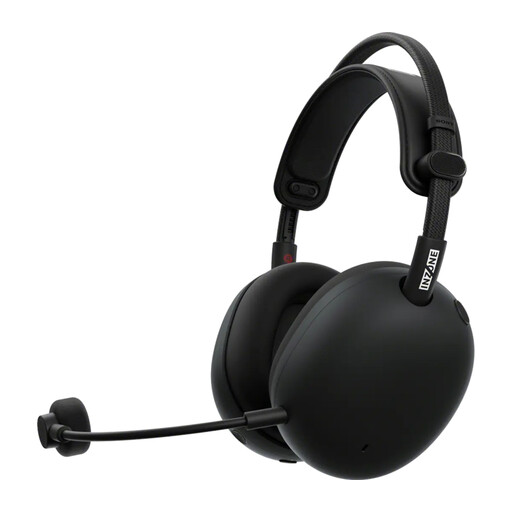 No image available
A good choice if you’re looking for a wireless gaming headset with a detachable boom microphone.
The product description lists a 2.4GHz dongle, Bluetooth and a detachable boom microphone with AI noise cancellation.
Battery life is listed as up to 30 hours; wireless use means you’ll need to charge it.
In OBS, check both the level meters and a test recording of your voice and game audio. OBS Project also explains ducking: desktop or game audio can be turned down when you speak.
According to OBS Project, the filter can reduce light background noise, such as a fan; it’s generally ineffective when there’s a lot of noise. So test it with the sounds you’ll encounter during your stream.
No. Don’t assume this just because both connection types are available. SteelSeries confirms simultaneous sources for the Arctis Nova 7; check this separately for the exact model you’re considering.
Don’t assume they do: according to Logitech, the DTS surround and EQ features mentioned require Windows and G HUB. Before you buy, check that the software works with the device you want to stream on.
According to the Dutch government, distance purchases are often covered by a 14-day cooling-off period, but conditions and exceptions apply. Check the rules for your specific purchase before using or returning the headset.