
Streamer who prioritises clear speech
You provide game commentary and want to assess your voice, game audio and background noise separately in a test stream. OBS Project describes tools for adjusting audio sources and background noise.


Start by checking the connection to your gaming and streaming device, then make a test recording to see how your voice sounds alongside the game audio. Microphone specifications alone won’t tell you how clear your commentary will be for viewers. A wired headset is practical if you have a fixed setup and don’t want to charge a battery, while 2.4GHz wireless gives you more freedom to move around if your platform supports the dongle. If you also want to hear audio from your phone, check explicitly whether the model can play two sources at once and where the microphone sends audio.
You provide game commentary and want to assess your voice, game audio and background noise separately in a test stream. OBS Project describes tools for adjusting audio sources and background noise.
You want to hear game audio while, for example, taking a call or listening to audio from your phone. SteelSeries describes simultaneous playback on the Arctis Nova 7, with a limitation on the microphone.
Look for a comfortable fit, easily accessible mute and volume controls and, if you go wireless, consider charging. Manufacturers’ battery-life claims don’t guarantee how long a headset will last in every streaming setup.
A good fit if: you stream from one spot and don’t want to charge a battery. According to HyperX, the wired Cloud III has 3.5 mm, USB-C and USB-A connections; check which connection on your device also supports microphone input.
Trade-off: the cable limits your freedom to move, and the connection needs to suit your setup.
A good fit if: you want to move around while providing commentary and the dongle works with your platform. HyperX lists PC, PS5, PS4 and Nintendo Switch as supported platforms for the Cloud III Wireless.
Trade-off: you’ll need to charge it and check the full model name and platform variant; the wired Cloud III is a different product.
A good fit if: you want to hear something like phone audio as well as game audio. SteelSeries describes simultaneous 2.4GHz and Bluetooth playback for the Arctis Nova 7X Wireless.
Trade-off: on the Nova 7 setup described by SteelSeries, the microphone doesn’t send audio to both sources at once. Check how microphone routing works for your needs.
| What to consider | What should you check? | Who is it important for? |
|---|---|---|
| Clear commentary | Make a short recording with your voice, game audio and the usual background noise in your room. Check the microphone position and mute control. | If I want viewers to hear my commentary clearly, I listen back to the mix before adjusting any filters. Around 36% of consumers prioritise speech clarity when choosing a headset for this use. |
| Hearing two sources at once | Check that simultaneous 2.4GHz and Bluetooth playback is explicitly supported, and find out which device the microphone sends audio to. | If I want to hear phone audio while gaming, I check separately whether I can speak through the device I want to use. Around 29% of consumers prioritise two simultaneous audio sources. |
| Comfort and controls | Look at the fit, how easy it is to reach the mute and volume controls and, for wireless use, the stated battery life for the relevant connection mode. | For long streams, I want to avoid pressure points and be able to adjust mute and volume straight away. Around 21% of consumers give comfort and controls top priority. |
| Connection and compatibility | Compare the exact model variant with the connections, microphone input and audio sources on your gaming and streaming devices. | If I want to keep using my existing setup, I first check whether the headset will connect to it. Around 14% of consumers prioritise compatibility and a suitable connection. |
A microphone claim doesn’t tell you how your voice, keyboard noise and game audio will sound together in your recording. OBS Project notes that noise suppression doesn’t always work well when there’s a lot of background noise.
Make a test recording and adjust the source volumes and any filters to suit your room.
The HyperX Cloud III, Cloud III Wireless and Cloud III S Wireless differ in model and connection options.
Before buying, compare the full model name and the connections on the variant you need.
With the Arctis Nova 7 described by SteelSeries, you can hear two audio sources at once, but the microphone doesn’t send audio to both simultaneously.
Test microphone routing with your gaming device, phone and streaming software.
HyperX offers the wired Cloud III and a separate 2.4GHz wireless option, the Cloud III Wireless, for supported platforms.
The Arctis Nova 7X Wireless is worth considering if you want to hear Bluetooth audio while gaming.
The PRO X 2 LIGHTSPEED is a wireless option for which Logitech also lists Bluetooth and a 3.5 mm connection.
According to JBL, the wired Quantum 200 has a flip-up boom microphone.
This Joybuy selection includes wired and wireless gaming headsets for commentary, with a focus on microphone controls and connections to suit your streaming setup.
 No image available
An option if you want to game wirelessly while streaming and mute the microphone quickly.
The product information lists 2.4GHz and Bluetooth, a flip-up microphone that mutes when raised, and support for Xbox Series X|S, Xbox One, PC, Switch 2 and mobile devices.
Wireless use means you’ll need to manage the battery.
 No image available
Suited to a fixed setup with a compatible 3.5 mm connection and a microphone you can flip up to mute.
The product name lists Nintendo Switch, Switch Lite, Switch OLED, PC and mobile devices as platforms. This variant is blue/red.
Wired use requires a compatible connection on your device.
 No image available
A wired option for a streaming setup with a compatible 3.5 mm connection.
The product information lists a detachable cardioid boom microphone and fabric ear cushions.
Wired use requires a compatible 3.5 mm connection.
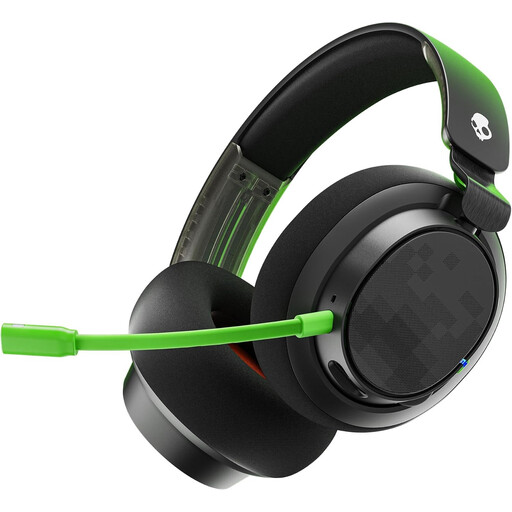 No image available
Suited to a wired setup where you want easy access to the microphone and volume controls.
The product information lists a detachable microphone, mute button and volume control, with 3.5 mm and USB connection options. This variant is black/green.
The connection needs to suit your streaming setup.
 No image available
A wireless option if you want a detachable microphone and a choice of connection options.
The product information lists a cardioid microphone and 2.4GHz, Bluetooth and 3.5 mm connections.
Wireless use means you’ll need to manage the battery.
Make a test recording with your voice and game audio as separate sources, then check the level meters in OBS. OBS Project warns that using the same device as a duplicate audio source can cause an echo.
Not always. OBS Project describes noise suppression as useful for light background noise, but not effective when there’s a lot of background noise. So listen back to a recording made in the room where you stream.
Not with the Arctis Nova 7 setup described by SteelSeries: you can hear two audio sources at once, but the microphone doesn’t send audio to both simultaneously. Check microphone routing separately on other models.
For an online consumer purchase, you generally have a statutory 14-day cooling-off period after delivery, subject to legal exceptions. The product must also meet what you can reasonably expect from it; the seller is your point of contact for your statutory guarantee.
Wireless radio equipment placed on the EU market is covered by the Radio Equipment Directive. The European Commission describes CE marking as the manufacturer’s declaration that the product meets the applicable EU requirements; it isn’t an independent performance test.