
Squad player who chats a lot
You want your teammates to hear you clearly and to be able to mute your microphone quickly when someone comes into your home office. Compare the controls and test how your voice sounds in your room.


First, choose a headset whose microphone and game audio both work with the device you play on. Then consider the mute controls, fit and how well you can pinpoint in-game sounds. A wired headset doesn’t need charging, but restricts your movement, while a wireless one needs charging. To hear game and phone audio at the same time, you’ll need a model that plays both sources simultaneously, rather than simply switching between them.
You want your teammates to hear you clearly and to be able to mute your microphone quickly when someone comes into your home office. Compare the controls and test how your voice sounds in your room.
You want to pinpoint in-game sounds without assuming virtual surround sound guarantees better performance. Tweakers discusses sound positioning in its reviews of individual headsets.
You want the freedom to move without a cable, or you use a console or phone as well as a PC. Connections, receivers and the ability to hear multiple audio sources at once vary by model.
For consumers playing squad matches at a home desk, the connection, team chat and how they want to use game and phone audio are important considerations.
| What to consider | What should you check? | Who is this most important for? |
|---|---|---|
| Team chat and muting | Check the microphone controls, such as a physical mute button or a flip-up microphone, and test your voice in your own space. HyperX and Logitech G describe different ways to mute the microphone. | If I chat with my squad frequently during a match, I want to be able to mute quickly and be heard clearly. Around 25% of consumers say team chat is their top priority. |
| Connection and platform | Check the exact model variant, connection and whether both the microphone and audio work with your device. HyperX lists several connections for the wired Cloud III, but says its included DTS licence doesn’t work on Xbox. | If I play on a specific PC or console, I want to be sure that both audio and the microphone work through the connection I’ve chosen. Around 25% of consumers put platform compatibility first. |
| Directional audio | Where possible, compare reviews or tests of the exact same headset. Settings or a surround sound claim alone don’t prove how well you’ll be able to pinpoint sounds. Tweakers discusses sound positioning in its reviews of specific models. | If I want to hear where a sound is coming from in a survival match, I look for information about the exact headset. Around 20% of consumers make pinpointing in-game sounds their top priority. |
| Comfort and room noise | Consider pressure around your head and ears, and decide whether you want to block out room noise for yourself or limit background noise picked up by your microphone. These are different features; Tweakers notes that the Cloud III Wireless it tested can make your ears feel warm. | If I play long matches or want a quieter listening experience at my desk, I want to know how the headset feels and what sounds it blocks out. Around 15% of consumers put comfort or room noise first. |
| Wireless use and other audio sources | Check whether the exact model plays audio sources simultaneously or simply lets you switch between them, and which receiver works with your device. SteelSeries describes simultaneous audio for the Nova 7X Wireless and switching between sources for the Nova 5. | If I want to hear phone audio while gaming or move around without a cable, I check how the connections work together. Around 15% of consumers give freedom of movement or using a second audio source top priority. |
Listening to both sources at the same time is different from pressing a button to switch between game audio and Bluetooth audio. SteelSeries describes simultaneous playback for the Nova 7X Wireless and switching between sources for the Nova 5.
Check the information for the exact variant to see whether simultaneous audio playback is mentioned. Also check how the microphone works with the different sources.
Microphone noise reduction affects what your teammates hear through your microphone; passive isolation affects the sounds from your room that you hear.
Decide which problem you want to address, then assess the microphone and fit separately.
HyperX lists Xbox support for the wired Cloud III, but its included DTS licence isn’t available on Xbox.
For your exact model, check the connection, microphone and any software features for each platform.
An extended warranty is not the same as your statutory guarantee. ACM ConsuWijzer explains that your statutory guarantee applies in addition to the seller’s guarantee.
Read exactly what an extended warranty adds, and keep its terms separate from your statutory rights.
The wired Cloud III and Cloud III Wireless are different models, designed for different connection and usage needs.
The Nova 7X Wireless and Nova 5 differ in how they handle game and Bluetooth audio.
The G535 is a wireless option for a PC or PlayStation setup, using a USB receiver.
The wired BlackShark V2 X is a model with a 3.5mm connection and closed-back earcups.
The Stealth 600 Gen 3 is a wireless range with different platform variants.
This selection includes wired headsets for a fixed gaming setup and wireless models with a USB receiver. Before choosing, check that the connection and features of the exact version are right for your device.
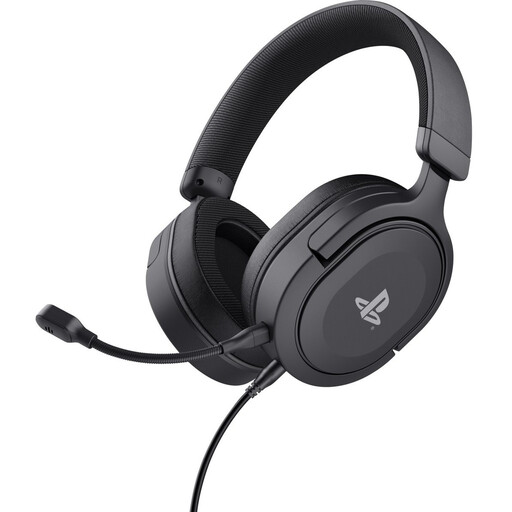 Image unavailable
Wired 3.5mm headset with a detachable microphone and mute controls. The description lists compatibility with PS5 and PS4, and a 1.2 m cable.
 Image unavailable
Wireless model with a 2.4GHz connection, Bluetooth 5.3 and a USB-A receiver. The description lists a microphone, physical mute controls and compatibility with PC, PlayStation and Switch. Wireless use requires charging.
 Image unavailable
Wired 3.5mm headset with 40mm drivers and a flip-to-mute microphone. The description lists compatibility with Nintendo Switch, Switch Lite and Switch OLED.
 Image unavailable
Wired 3.5mm headset with 40mm speakers, volume controls and a flip-to-mute microphone. The description lists compatibility with PC, PS5, Switch 2 and Xbox Series X|S.
 Image unavailable
Wireless model with 2.4GHz, Bluetooth 5.2 and a USB-C dongle. The description lists a detachable microphone and compatibility with PC, PlayStation and Nintendo Switch. The stated weight is 250 g.
No. Check the basic connection and extra features separately for your model. HyperX lists Xbox support for the wired Cloud III, but says the included DTS licence only works on PC.
On your gaming device, select the headset as your playback device and the intended microphone as your recording device, then test the mute function. HyperX describes these separate settings for the Cloud III on PC; menus may differ on other devices.
You can with a model that supports simultaneous playback: SteelSeries describes this feature for the Arctis Nova 7X Wireless. For the Nova 5, the brand describes switching between connections. Also check how the microphone works with your chosen headset.
Consider both the volume and the duration and frequency of exposure. The World Health Organization mentions these factors in its guidance on safe listening.
ACM ConsuWijzer states that online purchases generally come with a 14-day cooling-off period from the date of delivery. Check which terms apply to your purchase. Your statutory guarantee applies in addition to the seller’s guarantee and is separate from any extra warranty package.