What should you look for?
First, check that the microphone and connection work with your gaming platform. Then think about how you’ll use the headset: in one fixed spot, wirelessly with a dongle, or with game and phone audio at the same time.
| What to consider |
What should you check? |
Who is this important for? |
| Team chat |
Check the microphone position and mute function. Also check whether any microphone software works with your device. |
If I want to give my team instructions during survival matches, clear team chat is my priority. Around 26% of consumers in this situation say team chat is their most important buying priority. |
| Background noise |
Check how well the ear cushions fit. Active noise cancellation is an extra listening feature, not a guarantee of quiet team chat. |
In a noisy student bedroom, I want to hear what’s around me without constantly turning up the volume. Around 21% of consumers prioritise blocking out room noise. |
| Comfort |
Check the fit, ear cushion material and how adjustable the headband is. |
If I play for longer, I want a headset that feels comfortable and doesn’t put too much pressure on my head. Around 21% of consumers prioritise comfort during matches. |
| Platform and connection |
Check the exact model variant and connection. Separately, check whether Bluetooth and the gaming connection work at the same time. |
When I play on multiple devices or want to hear phone chat during a match, I choose based on the supported connections. Around 16% of consumers say platform and connection are their most important considerations. |
| Simplicity and features |
Think about whether you want a wired headset or are happy to manage a battery. Check that any extra software features work with your device. |
I don’t want features or set-up I won’t use, and I may play in one fixed spot. Around 16% of consumers prioritise a simple headset without unnecessary extras. |
Gaming headsets at Joybuy
This selection includes wired and wireless gaming headsets for team chat. Some wireless models also list support for connecting to multiple devices.
 No image available
SteelSeries Arctis Nova Pro Wireless, PlayStation Black
A wireless option if you also want to hear phone audio while gaming.
The product description lists a dual-USB base station, Bluetooth audio, replaceable batteries and a retractable microphone with a mute function.
View at Joybuy
 No image available
Turtle Beach Recon 70, PlayStation, white
A wired option for team chat if your device has a 3.5 mm connection.
The description lists a 3.5 mm connection, over-ear cushions and a flip-up microphone that mutes when raised. The cable stays connected while you play.
View at Joybuy
 No image available
Turtle Beach Stealth 500, Xbox, black
A wireless option if you want to use a 2.4GHz dongle for game audio and Bluetooth for mobile devices.
The description lists a flip-up microphone with a mute function and QuickSwitch for switching between the 2.4GHz and Bluetooth sources. The stated battery life of up to 40 hours is a product specification.
View at Joybuy
 No image available
Turtle Beach Stealth 600 Gen 3, Xbox, black
A wireless option for team communication if you want a microphone that flips up to mute.
The product description lists 2.4 GHz and Bluetooth with QuickSwitch, separate game and chat volume controls, a closed-back over-ear design and memory foam ear cushions.
View at Joybuy
 No image available
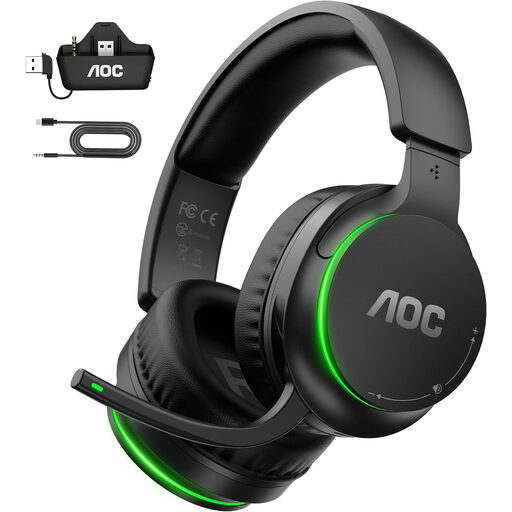
AOC Wireless Gaming Headset for Xbox
A wireless headset worth considering if you want to connect game audio via a 2.4GHz transmitter and need team chat.
The description lists a USB connection, a flip-up microphone with a mute function and memory foam ear cushions.
View at Joybuy
Frequently asked questions
Can I use any wireless gaming headset with Xbox?
No. Check Xbox support for the exact model variant. HyperX lists PC, PlayStation and Nintendo Switch for the Cloud III Wireless, but not Xbox. SteelSeries does list Xbox support for the original Arctis Nova 7X Wireless.
Can I make calls over Bluetooth while the game audio continues?
Only if the exact model supports simultaneous audio sources. SteelSeries lists this for the Nova 7; according to SteelSeries, only one of the two connections can be active at a time on the Nova 5.
How can I set up a headset comfortably in a noisy room?
Check that the over-ear cushions fit snugly and start with the volume at a moderate level. VeiligheidNL recommends a good seal so you can keep the volume lower. Position the microphone according to the adjustment options on your model.
Do I need to charge a wireless headset and install software?
A wireless headset needs battery management; a wired one doesn’t. Software depends on the feature: Logitech says Blue VO!CE and DTS Headphone:X 2.0 for the PRO X Wired are only available via G HUB on PC.
What rights do I have when buying online in the Netherlands?
ACM ConsuWijzer states that online purchases generally come with a 14-day cooling-off period after delivery, subject to legal exceptions. A product must also meet what you can reasonably expect from it under normal use. If the product develops a fault too soon, the seller must put things right under the applicable conditions; this doesn’t mean every headset has a fixed warranty period.


