
Vandaag of morgen in huis

Kwaliteit gegarandeerd

Welkomstaanbiedingen ontgrendelen: GRATIS bezorging | Tot 80% korting | Gratis 30 dagen JoyPlus-proefperiode
Download de app
A gaming headset with a microphone may seem straightforward to choose at first. However, models can vary widely in connectivity, comfort, microphone controls and compatibility. A headset that works well with a PC isn’t automatically suitable for Xbox or Nintendo Switch.
The right choice depends on more than just the brand or the number of features listed on the box. Check how the headset connects, how long you can wear it comfortably and whether the microphone suits the way you game.
A 7.1 surround sound headset often uses virtual processing rather than seven physical speakers. The effect can also depend on the software, platform and game. On some models, spatial audio only works if you install a PC programme.
So check:
A wired headset with good stereo sound may be more practical than a model with features that are only available on one platform.
A wireless gaming headset may connect via Bluetooth, 2.4 GHz with a USB receiver, or both. Bluetooth is handy for a phone, but not every console supports it directly. You may need a USB receiver for PS5, PS4 or PC.
Also check:
A wired gaming headset with a 3.5 mm connection doesn’t need a battery. The cable can get in the way, though, and older PCs may need a splitter for separate microphone and headphone sockets.
RGB lighting, multiple connection modes and software settings aren’t much use if the ear cushions pinch. Check the weight, shape of the earcups, materials and how adjustable the headband is.
An over-ear gaming headset should fully enclose your ears. This can be comfortable during long sessions, but synthetic leather may feel warmer than fabric. Also check whether the microphone is fixed, foldable or detachable.
For a gaming headset for PC, common options include USB, 3.5 mm and, sometimes, wireless USB receivers. Headsets for PS5 or Xbox often connect to the controller via 3.5 mm. If your PC has two separate ports, check whether a splitter is included.
For Nintendo Switch, a headset with a 3.5 mm connection is usually a practical choice. For wireless models, check each product to see whether its USB receiver works with the console. “Multi-platform” doesn’t automatically mean every feature is available on every platform.
A gaming headset with a microphone needs to offer more than just a microphone. Check its position, mute method and flexibility. A flip-to-mute microphone mutes when you flip it up. A detachable microphone is handy if you also use the headset for music.
Also check whether the volume and mute controls are on the earcup, cable or in the software. Physical controls are often quicker to use during a game than opening a menu.
Weight is usually listed in grams, but how it’s distributed matters just as much. According to the product information, the Razer BlackShark V2 X weighs 240 grams and has memory foam ear cushions. The Trust GXT 415 Zirox weighs 244 grams and has a fixed 2-metre cable.
Look out for:

Why it suits this profile: This wired gaming headset has a 3.5 mm connection and, according to the product information, is suitable for PC, laptop, PlayStation, Xbox and Nintendo Switch.
No battery or wireless receiver is needed. The product information clearly states that this model uses stereo and doesn’t have a virtual 7.1 feature.
244 grams, 50 mm drivers, over-ear cushions and a fixed 2-metre cable.

Why it suits this profile: A good choice for players looking for a lightweight headset with a microphone and virtual surround sound for several devices.
The product information specifies the required 3.5 mm connection and says that the 7.1 software must be activated separately. This makes it clear in advance what extra step is needed.
50 mm drivers, 240 grams, a cardioid microphone according to the product information, and compatibility with PC, Mac, PlayStation, Xbox, Switch and mobile devices.

Why it suits this profile: Ideal if you want freedom of movement and switch between a PC, console and phone. According to the product information, the headset supports 2.4 GHz, Bluetooth and a wired connection.
The stated battery life is up to 22 hours. This gives you a clearer idea of charging needs than a general claim about “long playtime”.
50 mm drivers, detachable microphone, USB-C charging and a weight of 290 grams according to the product information.
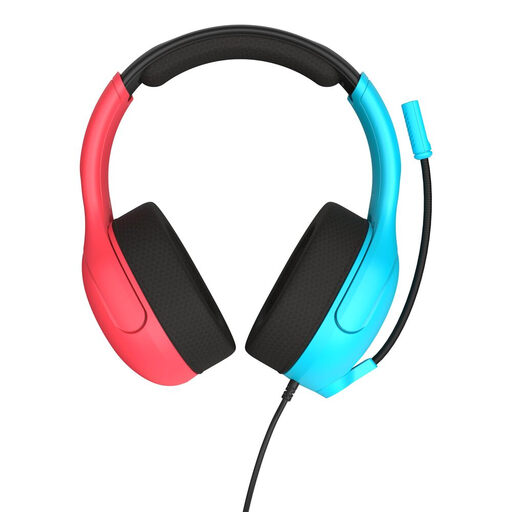
Why it suits this profile: According to the product information, this model is designed for Nintendo Switch, Switch Lite and Switch OLED. It also works with PCs and mobile devices via 3.5 mm.
The connection type and platform support are clearly stated. So there’s no need to assume it can connect wirelessly to a console or that you’ll need an extra adapter.
40 mm speakers, flip-to-mute microphone, fabric ear cushions and a weight of 228 grams according to the product information.
We’ve put together a complete, up-to-date list of products that meet these strict selection criteria and the applicable European safety regulations.
It depends on the connection. A 3.5 mm model will often work via the controller or headphone socket. PCs with separate audio and microphone ports may need a splitter. Always check the platform list for the specific model.
Not necessarily, but you’ll need to think about charging and battery wear. A wired headset doesn’t use a battery. With a wireless model, battery life, the charging cable and the option to keep playing while wired matter more than the purchase price alone.
Its lifespan depends on how you handle the cable, hinges and ear cushions, and how you store it. Don’t pull on the cable of a wired headset, and keep it somewhere dry. Don’t fold a flip-up microphone beyond its adjustment range. Clean the ear cushions with a soft, dry cloth, and check the product information before replacing a damaged cable or loose microphone. Keep the volume moderate and take regular breaks.
