What should you look for?
First decide whether a cable will get in the way of your mouse movements. Then check the platform connection, the features you can actually use and whether the headset will be comfortable during your sessions.
| What to consider |
What should you check? |
Who is this important for? |
| Mouse space |
Check whether the cable can run along or behind your desk, or whether the wireless receiver supplied will fit into a free port. |
If I want to move my mouse freely, I pay particular attention to cables around my hands. Around 25% of consumers rank mouse space as their top buying priority. |
| Audio settings |
Check whether the EQ or surround sound feature you want works on your platform. According to Logitech, DTS Headphone:X 2.0 and EQ on the Logitech G432 require Windows and G HUB. |
If I want to distinguish audio cues during shooters, I check which settings my platform actually supports. Around 25% of consumers rank audio settings as their top priority. |
| Fit and volume |
Check the fit and ear cushions, and keep the volume at a manageable level. VeiligheidNL recommends headphones that fit well. |
For regular or longer practice sessions, I want a headset that fits comfortably without needing to turn the volume up unnecessarily. Around 20% of consumers prioritise comfort and listening volume. |
| Microphone controls |
Check how to mute the microphone and whether the controls suit the way you play. |
If I want to mute quickly during team play, I pay attention to the microphone controls. Around 15% of consumers rank team chat as their top priority. |
| Platform connection |
Compare the exact headset version with the ports on your PC, console or controller; features can vary depending on the connection. |
If I want to use the headset with a specific gaming device, I first check that the connection is compatible. Around 15% of consumers name platform compatibility as their top priority. |
Joybuy products to reduce desk clutter
These Joybuy products are suited to anyone looking to keep a headset cable out of their mouse space. Check that each model’s connection and platform support are right for your gaming device.
 No image available
SteelSeries Arctis Nova Pro Wireless – PlayStation Black
Could suit anyone who wants to keep a headset cable away from their mouse while gaming and be able to mute the microphone.
The described base station connection is for Windows PC and PlayStation and uses a USB-A connection.
View at Joybuy
 No image available
Turtle Beach Stealth 500 Xbox Wireless Gaming Headset
A possible choice if you want to keep cables out of your mouse space and quickly mute the microphone during team chat.
The product name lists Xbox, PC, Switch 2 and mobile; check compatibility with your exact device and version.
View at Joybuy
 No image available
Razer Barracuda X Wireless Headset White
Could suit anyone who wants to keep a headset cable out of their mouse space and values a detachable microphone.
The product description limits virtual surround sound to Windows 10; check that the platform features you need are supported.
View at Joybuy
 No image available
HyperX Cloud III S Gaming Headset Black/Red
Could suit anyone who wants to see whether the microphone is muted during team chat.
The product description lists DTS Spatial Audio for PC; check that the feature is compatible with your platform.
View at Joybuy
 No image available
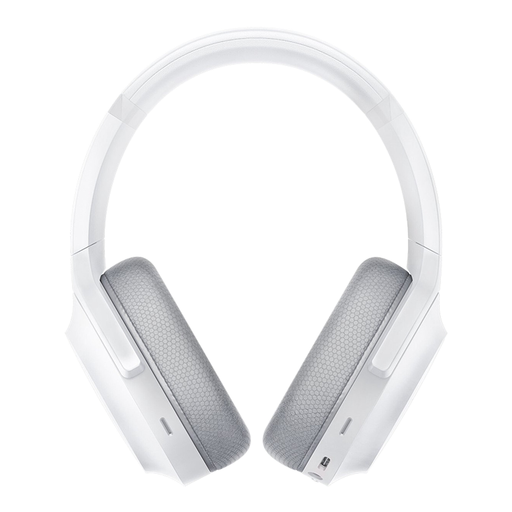
Razer Barracuda Wireless Gaming Headset Mercury White
Worth a look if you’re after a wireless headset and want to tailor audio settings to your game.
According to the product description, THX Spatial Audio is available for Windows 10; check compatibility with your device.
View at Joybuy
Frequently asked questions
Do I need surround sound to practise my aim?
No, surround sound isn’t a general requirement for practising your aim. First check whether the setting you want works on your platform: Logitech says DTS Headphone:X 2.0 and EQ on the G432 require Windows with G HUB. The product specifications listed here don’t show any measured improvement in aiming.
How can I keep headset cables out of the way on a small desk?
Route a wired headset cable along or behind your desk, and check that the connection is compatible with your device. For a wireless model, the receiver supplied needs to fit into a suitable free port; according to SteelSeries, the SteelSeries Arctis Nova 5 Wireless uses a USB-C dongle.
What should I look for during longer practice sessions?
Check the fit and keep the volume at a manageable level. VeiligheidNL recommends headphones that fit well, as reducing background noise can lessen the need to turn the volume up.
What can I do if my headset breaks quickly or doesn’t fit properly?
If a product doesn’t meet what you could reasonably expect during normal use, the seller is responsible for providing an appropriate solution under the statutory guarantee, according to ACM ConsuWijzer. Online purchases generally come with a 14-day cooling-off period from delivery; check which exceptions apply before buying.
What rules apply to wireless headsets sold in the Netherlands?
For radio equipment placed on the EU market, the European Commission describes the Radio Equipment Directive as the applicable framework. EU guidance states that CE marking is mandatory for products covered by harmonised rules that require it. These are product requirements, not a registration or licensing step for ordinary users.


