Start with your gaming device and the space around your desk. A wired headset is a sensible choice if you can route the cable out of the way, while wireless may appeal if a cable gets in the way of your workspace. Next, check that it feels comfortable for longer sessions, and only choose microphone, surround sound and connectivity features if you need them. Manufacturer specifications describe features, but they can’t guarantee how a headset will sound or feel to you.
Who is this choice for?
Story-focused listener
You want to enjoy dialogue, music and ambient sounds, so you’ll choose a suitable connection first before weighing up extra competitive gaming features. MediaMarkt Netherlands’ buying guide and HyperX’s model specifications can help you make that decision.
Player who enjoys long sessions
You play or read for extended periods and pay attention to the fit of the headband and ear cushions. Material and weight specifications can’t predict how a headset will feel on your head; Logitech G and HyperX describe the features of specific models.
Player with limited desk space
You want to keep a cable out of your workspace or make use of an available connection without adding a receiver. Check compatibility with your device and chosen connection mode; HyperX, Logitech G and SteelSeries specify these for each model.
What should you look for when buying?
Wired via 3.5 mm or USB
A good fit if: you usually play in one place, have a suitable connection and can route the cable out of your workspace.
Keep in mind: the cable can get in the way on a small desk. Also check which features work through your chosen connection.
Wireless via receiver or Bluetooth
A good fit if: a cable-free desk matters to you and your device supports your preferred connection mode.
Keep in mind: you’ll need to charge the headset and may need to keep a USB port free for a receiver. Bluetooth doesn’t automatically mean that every feature will work with every device.
| What to consider |
What should you look for? |
Who is this important for? |
| Story audio |
Check the connection and, if possible, listen to familiar speech and music. A surround sound label or driver size alone doesn’t prove how dialogue will sound in your situation. |
If I mainly want to follow dialogue, music and subtle effects, I’ll choose based on my listening needs and a connection that works. Around 31% of consumers give story audio top priority. |
| Comfort |
Look at the ear cushion material and adjustability, and try the headset on if possible. Its stated weight or materials alone won’t tell you how well it will fit you. |
For longer gaming sessions, I want the headband and ear cushions to feel comfortable without distracting pressure. Around 31% of consumers prioritise fit and comfort. |
| Cable and connection |
First decide which device you’ll play on. Then check the available port, whether there’s room for a receiver and whether your chosen connection mode is supported. |
If my desk has limited space, I want to know whether I can keep a cable out of the way or fit a receiver alongside other ports. Around 23% of consumers let available space or connectivity determine their choice. |
| Microphone and aftercare |
Decide whether you use voice chat and check how the microphone is controlled. Also read the applicable returns policy, and distinguish your statutory rights from any optional extra cover. |
If I talk to others while playing or want to know where I stand before buying, I’ll check the microphone controls and my consumer rights. Around 15% of consumers are swayed by communication or aftercare. |
Common buying mistakes
-
Choosing wireless without checking the connection for each device
Support varies by model and connection mode. A Bluetooth feature doesn’t automatically mean every function will work with your console or computer.
Before buying, check your device, available ports and whether you want a 2.4GHz or Bluetooth connection.
-
Assuming surround sound or driver size means better story audio
A stated feature or size doesn’t automatically tell you how dialogue and music will sound to you.
Prioritise a suitable connection, clear speech and a comfortable fit; assess extra features separately.
-
Confusing an extended warranty with your statutory rights
For a consumer purchase in the Netherlands, the retailer is responsible if a product doesn’t meet what you’re entitled to expect from it. The Netherlands Authority for Consumers and Markets describes this responsibility as the statutory guarantee.
Check which statutory rights apply before considering an extended warranty package.
Relevant brands to consider
HyperX
The wired Cloud III is worth considering if you want to compare different connection options and don’t need wireless connectivity.
- For this model, HyperX lists 3.5 mm, USB-C, USB-A, memory foam and microphone mute.
- You’ll need to route the cable out of the way on a small desk. These are specifications for this model, not a guarantee of your listening experience.
Logitech G
The G435 and G432 offer different connection options to consider if weight or connectivity will influence your choice.
- Logitech G gives the G435’s weight as 165 grams and lists LIGHTSPEED and Bluetooth. For the G432, it lists a 3.5 mm cable and USB DAC.
- Check device support for each model and connection mode; brand-level specifications alone aren’t enough.
SteelSeries
The Arctis Nova 3P Wireless is worth considering if you want to use a wireless receiver with ports that are close together.
- For this version, SteelSeries lists an L-shaped nano dongle and switching between 2.4 GHz and Bluetooth 5.3.
- Check whether your device and preferred mode are supported; these features apply to this version.
Razer
The wired BlackShark V2 X is worth comparing if you’d also like a fixed microphone for conversations.
- Razer describes this model as having a fixed cardioid microphone and passive noise isolation.
- These are features from Razer’s product description, not an independent assessment of performance. Consider whether esports features are relevant to your story-focused use.
JBL
The wired Quantum 100 is a useful point of comparison if you usually play alone and are considering a detachable microphone.
- JBL lists memory foam and a detachable microphone for the Quantum 100.
- The specifications are from JBL Belgium and don’t indicate availability in the Netherlands.
Headsets on Joybuy
These models include wired and wireless gaming headsets for interactive storytelling at a small desk. Check that each model’s connection and features suit your device and workspace.
 No image available
JBL Quantum 300 wired gaming headset
An option if you’re looking for a wired headset and can route the cable out of your workspace.
The product information lists a 3.5 mm connection, a USB audio adapter, memory foam ear cushions and a flip-up microphone.
View on Joybuy
 No image available
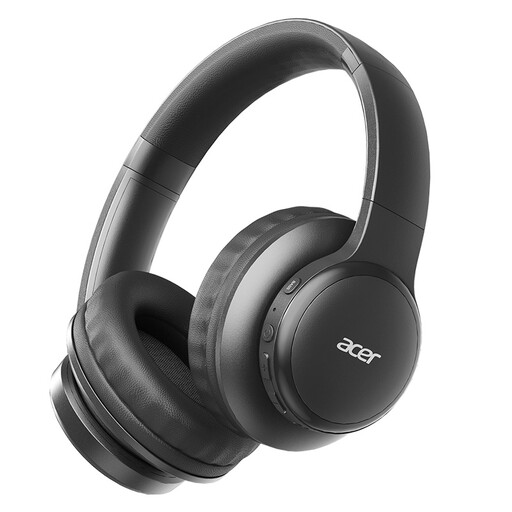
Acer OHR559 OWS wireless headphones
Could suit you if you want to avoid an audio cable on your desk; check first that the connection mode works with your device.
The product name mentions Bluetooth 5.3 and a low-latency gaming mode. The product information also lists a microphone for voice calls.
View on Joybuy
 No image available
Turtle Beach Atlas 200 wired PC gaming headset
A wired option if you have a suitable 3.5 mm connection and can route the cable out of the way.
The product information lists 3.5 mm, a USB adapter, memory foam ear cushions and a microphone with flip-to-mute controls.
View on Joybuy
 No image available
Turtle Beach Stealth 500 wireless Xbox gaming headset
Could suit you if you don’t want an audio cable across your desk; check which connection modes your device supports.
The product information lists 2.4GHz and Bluetooth, a detachable microphone and 53mm drivers. The product name mentions Xbox Series X|S, Xbox One, PC, Switch 2 and mobile.
View on Joybuy
 No image available
Turtle Beach Airlite Fit wired gaming headset, Blue/Red
A wired option for devices with a suitable connection, if you can keep the cable out of your workspace.
The product information lists a 3.5 mm connection, mesh ear cushions, a volume wheel and a flip-up mute microphone. The product name mentions Nintendo Switch, Switch Lite, Switch OLED, PC and mobile.
View on Joybuy
Frequently asked questions
Do I need surround sound or an advanced microphone for interactive fiction?
Not necessarily. First choose a connection that works with your device and a fit that suits you. Then consider surround features and microphone controls based on the game and whether you use voice chat. A stated feature doesn’t prove that dialogue will sound better on your device.
How can I stop a headset getting in the way on my small desk?
With a wired headset, check whether you can route the cable out of your workspace. With a wireless model, see where the USB receiver will fit, which devices support your chosen connection mode and how the headset needs to be charged.
How can I listen safely during longer gaming sessions?
Keep the volume low and pay attention to how long you listen, too. The World Health Organization points out that both sound level and listening duration affect the risk of hearing damage; a volume setting alone doesn’t measure the sound level at your ear.
What are my rights when I buy a headset online in the Netherlands?
For a standard online consumer purchase in the Netherlands, you’ll generally have a statutory cooling-off period of up to 14 days after delivery, although exceptions may apply. The retailer is also responsible under the statutory guarantee if the product doesn’t meet what you’re entitled to expect from it. ACM ConsuWijzer explains the cooling-off period, while the Netherlands Authority for Consumers and Markets explains the retailer’s responsibility. Check the applicable terms before placing your order.


