What should you look for when choosing?
First, check that the sound and microphone work with your PC or console. Then decide whether you can keep the cable clear of your mouse, or whether a suitable spare port for a dongle would be more practical.
| What to consider |
What should you check? |
Who is this important for? |
| Clear space for your mouse |
Wired: consider where the cable will run alongside your keyboard and mouse. Wireless: check that you have a suitable spare USB port for the dongle. |
If I want to move my mouse freely, I’ll make sure there’s no cable across my desk and that the dongle won’t get in the way. Around 31% of consumers mainly want to keep their desk and mouse space clear. |
| Team chat and mute |
Check the microphone connection, where the mute control is and whether it works with your chat platform. |
If my teammates need to hear me during a match, I want a microphone that works with my device and a mute control I can find quickly. Around 25% of consumers prioritise team chat. |
| Compatibility with your platform |
Note which 3.5mm, USB-A or USB-C ports are available, then compare them with the exact headset version and included accessories. |
If I play on my own PC or console, I want to know that both the sound and microphone will work through the connection I choose. Around 19% of consumers mainly look for platform compatibility. |
| Comfort and battery life |
Check the ear cushion material and, if possible, try the fit for yourself. For wireless use, check the stated battery life and charging options. |
If I play for a long time, I want a comfortable headset and a wireless connection that won’t cut out unexpectedly. Around 25% of consumers prioritise long-lasting comfort. |
Joybuy products
The Joybuy products below are wireless gaming headsets with a 2.4GHz connection, suited to gaming at a small desk. Check that each model works with your platform and supports the connection you need.
 Image unavailable
Turtle Beach Stealth 500 Xbox
The wireless connection may suit a desk where a headset cable would get in the way.
The product information lists 2.4 GHz for Xbox and Bluetooth for PC, Nintendo Switch and mobile devices. Check which connection your device needs.
The product information lists memory foam ear cushions and a flip-up microphone that mutes when raised.
View at Joybuy
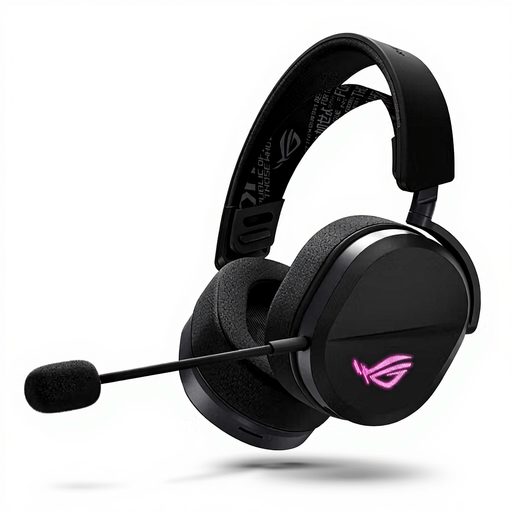 Image unavailable
ASUS ROG Pelta
Its wired and wireless connections give you different options for a small desk setup.
The product information lists a 2.4GHz receiver and Bluetooth. Devices listed include PC, Mac, PS4, PS5, Nintendo Switch and mobile devices. Check which connection you want to use.
The description lists an adjustable headband and a unidirectional boom microphone with a mute control.
View at Joybuy
 Image unavailable
HyperX Cloud III S Wireless
The wireless connection is an option if you don’t want a headset cable running across your desk.
The product information lists 2.4 GHz and Bluetooth, and names PC, PS5, PS4, Switch and mobile as compatible devices. Check which connection works with your platform.
The description lists memory foam in the headband and ear cushions, as well as a detachable microphone with a mute indicator and control.
View at Joybuy
 Image unavailable
Trust GXT 491 Fayzo
The wireless connection can help keep a cable clear of your mouse space.
The product information lists a USB receiver, 2.4 GHz and Bluetooth, as well as a rechargeable battery.
The description lists a microphone and mute control. Check which connection is compatible with your device.
View at Joybuy
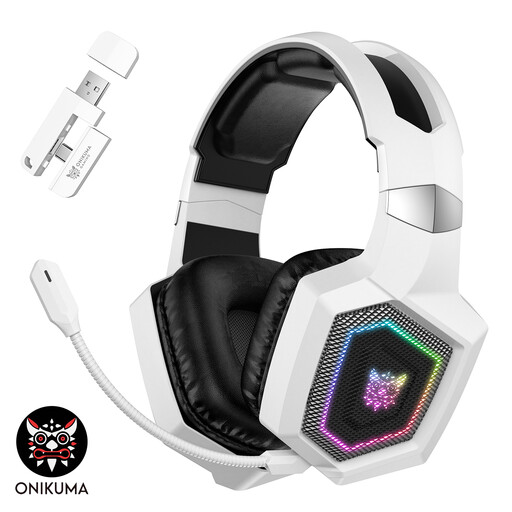 Image unavailable
ONIKUMA GT806 White
The different connection modes listed may be useful if you want to use a headset with several devices.
The product information lists 2.4 GHz, Bluetooth and Type-C, and names PC, Mac, PS5 and PS4 for the 2.4GHz connection.
The description lists leatherette ear cushions and a detachable microphone. According to the product information, Bluetooth isn’t compatible with PS4 or PS5; use 2.4 GHz or Type-C instead.
View at Joybuy
Frequently asked questions
Do I need 7.1 surround sound to pinpoint cues in arena matches?
No. That label alone doesn’t determine whether a headset is suitable. Megekko Academy says virtual surround sound can depend on the software, game and platform; a stereo headset may also be suitable. Check the features available with your setup and assess the sound in the game you play.
How should I set up a headset at a small desk?
With a wired headset, route the cable clear of your mouse and check that the plug and microphone work with your device. With a wireless headset, plug the dongle into a suitable spare port and test the sound, microphone and mute control before a match.
How can I protect my hearing during long sessions?
Keep the volume down and take breaks. The World Health Organization gives an average of 80 dB for up to 40 hours a week as an example, and notes that at 90 dB this falls to four hours a week. These are listening guidelines, not a guaranteed safe volume setting for a particular headset.
Do I need an extended warranty, and what about returns?
In the Netherlands, you have statutory rights if a product is faulty; according to the Dutch government, there is no fixed statutory warranty period. For online purchases from a business, you generally have 14 days to change your mind. Check what extra cover a paid warranty provides and which terms apply to your purchase.
What product rules apply to wireless headsets in the Netherlands?
Radio equipment must comply with European product rules when it is placed on the market. The European Commission says CE marking is mandatory when applicable harmonised EU rules require it. Check the marking and product information for the version you’re buying; a product listing alone doesn’t confirm compliance.


