What should you look for?
Start by checking the connection for your PC or console and the microphone controls. Then consider how much room you have for a cable or whether you’re happy to manage charging.
| What to consider |
What should you check? |
Who should give this more weight? |
| In-game audio and compatibility |
Check that the connection and any audio profiles work with your platform; a surround sound label doesn’t guarantee better positional audio. |
If I prioritise direction and relevant in-game audio, I want to know which connection and settings my game supports. Around 31% of consumers put in-game audio and platform compatibility first. |
| Team chat and muting |
Check that the microphone works with your device and that the mute control is easy to reach. |
If I make lots of call-outs, I want my squad to hear me and to be able to mute the microphone quickly. Around 25% of consumers give team chat and muting top priority. |
| Desk space and connectivity |
Consider where the cable will run, or check which port and receiver a wireless model needs. |
If my desk offers limited room for mouse movement, I want to avoid a cable getting in the way without choosing an unsuitable receiver. Around 25% of consumers prioritise clear desk space and connectivity. |
| Fit for long sessions |
Try the headband and ear cushions for yourself where possible, including if you wear glasses, and keep the volume at a manageable level. |
When I play for a long time, I want to know whether the headset feels comfortable rather than relying only on a product description. Around 19% of consumers prioritise comfort during long sessions. |
Joybuy product picks
This selection focuses on wireless gaming headsets with team communication features. For each model, check that the receiver or Bluetooth connection works with your PC or console.
 No image available
HyperX Cloud III S, black and red
An option if you want to game wirelessly and mute quickly during team chat.
The product description lists 2.4 GHz and Bluetooth, a detachable microphone, mute controls and a mute indicator.
The description mentions memory foam ear cushions and memory foam in the headband.
View at Joybuy
 No image available
Trust GXT 491 Fayzo, wireless, black
An option if you want wireless team communication and a detachable microphone.
The description lists a 2.4 GHz USB receiver, Bluetooth, a microphone, and volume and mute controls.
The product description lists up to 22 hours of play time; treat this as a stated figure. The headset has a rechargeable battery.
View at Joybuy
 No image available
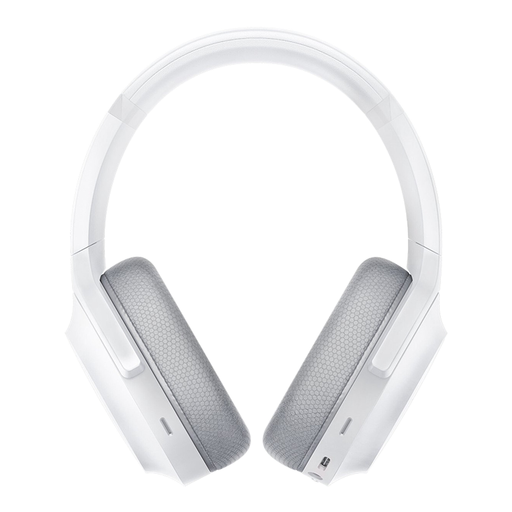
Razer Barracuda, Mercury White
An option if you want to game wirelessly and need a microphone with mute controls.
The product description lists 2.4 GHz and Bluetooth, built-in microphones and mute controls on the ear cup.
The title lists PC, PlayStation, Switch and Android; check which connection your device supports. The description says it charges via USB-C.
View at Joybuy
 No image available
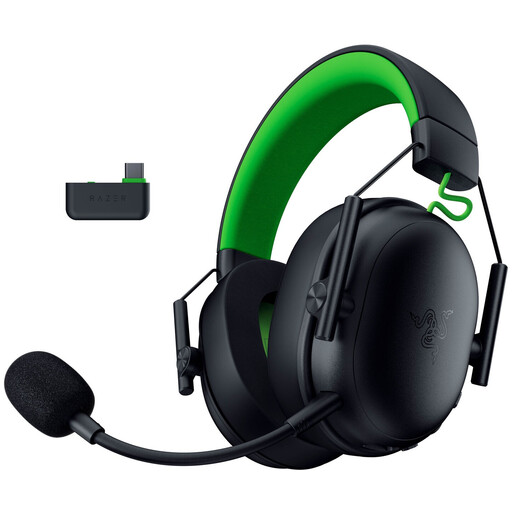
Razer BlackShark V3 X HyperSpeed for Xbox, black
An option if you’re looking for a wireless headset for Xbox and want to check whether it works with your PC too.
The product description lists 2.4 GHz, Bluetooth 5.3, a detachable microphone, and mute and volume controls.
The description mentions memory foam ear cushions and a weight of around 270 g. Surround sound is specifically listed for compatible Windows PCs; check whether your device supports it.
View at Joybuy
 No image available
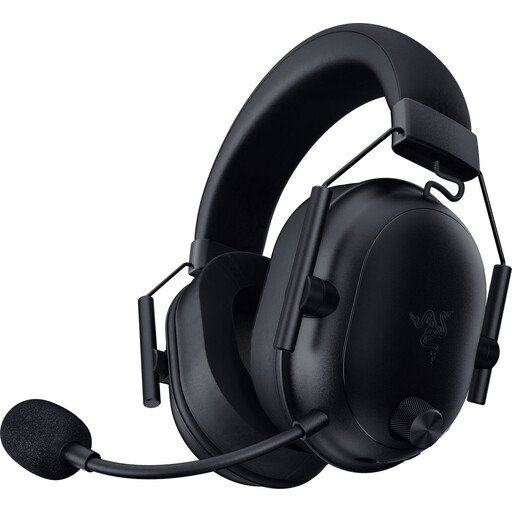
Razer BlackShark V2 Wireless, black
An option if you want to game wirelessly and need a microphone with mute controls.
The description lists 2.4 GHz, Bluetooth, a USB-C dongle and microphone mute controls.
Razer states up to 70 hours of battery life; this is a manufacturer’s figure. The description lists a weight of 280 g and USB-C charging.
View at Joybuy
Frequently asked questions
Will a Bluetooth gaming headset connect directly to my PS5 or Xbox?
Don’t assume it will: whether it works depends on the specific console and connection. PlayStation Support says that, in the compatibility error described, a Bluetooth audio device isn’t compatible with PS5; Xbox Support states that Xbox One doesn’t have Bluetooth functionality. A suitable 3.5 mm connection via an Xbox controller is a separate option.
How do I set up a headset for team chat?
Use a connection supported by your platform and, if needed, select the headset as your input and output device. Ask your squad to check that they can hear your microphone, then check its mute status. HyperX lists a mute button and LED indicator for the Cloud III.
How can I listen more safely during long matches?
Keep the volume low and take regular breaks. The WHO gives 80 dB for up to 40 hours a week as an example of exposure; this doesn’t guarantee a safe volume setting for every headset.
Do I automatically get a two-year legal guarantee in the Netherlands?
No. According to the Dutch Government, there is no fixed legal guarantee period in the Netherlands. You are still entitled to a product that meets reasonable expectations; if it develops a fault, the seller must offer a solution, depending in part on what you could reasonably expect from the product.
Can I return a headset bought online within 14 days?
For online purchases, you generally have a statutory 14-day cooling-off period after delivery, with some exceptions. ACM ConsuWijzer explains this period. Before opening the product, check whether an exception applies to it, and don’t assume that every opened headset is excluded.


