Start with a headset whose microphone, mute control and connection suit your platform and chat app. Wired gaming means no charging, but you’ll need room for a cable. Wireless keeps your desk clearer, but requires a suitable connection and time to recharge. A 7.1 label alone doesn’t prove that you’ll be better at pinpointing opponents in-game.
Who is this relevant to?
Team player who often gives call-outs
You want to give clear, concise directions about enemy positions and be able to mute your microphone quickly. Check the boom microphone’s position and the balance between chat and game audio. RTINGS and Logitech Support describe factors that may help.
Gamer with limited desk space
You’re choosing between a cable you can put away and a wireless connection with a receiver and battery. Check which ports your device has and how much room the cable or receiver will take up. Megekko Academy and manufacturers explain these differences in connectivity and use.
Player who uses multiple platforms
For example, you might switch between PC and console and want to know whether both audio and the microphone will work on each device. Check the compatibility list for the exact model; HyperX lists different platforms for the wired Cloud III and wireless Cloud III S.
What should you look for when choosing?
Wired via 3.5 mm
A good fit if: your device has a suitable 3.5 mm socket and you don’t want to use a battery or USB receiver.
Bear in mind: the cable will need to run past your keyboard and mouse; some PCs may require a splitter.
Wired via USB
A good fit if: you want to use a compatible USB port rather than an analogue audio socket.
Bear in mind: the cable will stay on your desk, and some software features may depend on your platform.
Wireless via 2.4 GHz
A good fit if: fewer audio cables on your small desk are a priority and the receiver works with your platform.
Bear in mind: you’ll need space for the receiver and will have to charge the headset.
| What to consider |
What to look for |
Who is this important to? |
| Clear team chat |
Check that the model includes a boom microphone and mute control, then make a test recording in your chat app. |
If I often give brief directions about enemy positions, I want my voice to come across clearly and be easy to mute. Around 25% of consumers give clear team chat top priority. |
| Game audio and team voices |
Test with your own game to see whether you can still identify directional sounds and whether the balance with chat works well. |
When I need to follow call-outs over game audio, I want to hear both clearly. Around 20% of consumers prioritise being able to make out game audio alongside team chat. |
| Desk space |
Check where the cable will run or where the receiver will sit. If you’re going wireless, remember to allow for charging too. |
With little room beside my keyboard, I want a setup that gets in the way as little as possible. Around 20% of consumers prioritise desk space and cable routing. |
| Connection and platform |
Compare the exact model name, connection and platform list with your PC or console, including voice chat functionality. |
If I switch between devices, I want to be sure that the audio and microphone work on my chosen platform. Around 20% of consumers prioritise platform compatibility. |
| Comfort |
Check the adjustability, materials and stated weight. If possible, try the fit for yourself. |
For longer gaming sessions, I want a fit that stays comfortable for me; the stated weight can’t guarantee that. Around 15% of consumers give comfort top priority. |
Common buying pitfalls
-
Assuming the platform list for a different model applies
The wired HyperX Cloud III and wireless Cloud III S have different stated platform lists. HyperX lists Xbox for the wired model, but not in the Cloud III S Wireless compatibility list.
Before buying, check the full model name, connection and platform list for the exact version you’re choosing.
-
Treating a 7.1 label as proof of better positional audio
A surround sound feature alone doesn’t prove that you’ll be better at locating sounds in your game. Razer also states that the BlackShark V2 X’s 7.1 feature is only available on Windows 11.
Check which features work on your platform and test the sound positioning in the game you play.
-
Choosing wireless without factoring in the receiver and charging
Fewer audio cables while you play doesn’t mean you won’t need a suitable connection or time to recharge.
Check that you have a suitable port and space for the receiver, and look at the battery details for the exact model.
-
Confusing an extended warranty with your statutory rights
According to ACM ConsuWijzer, you have statutory rights even without an extended warranty. The retailer must offer an appropriate solution if a product doesn’t perform as you could reasonably expect under normal use.
First check which statutory rights apply, then compare any additional cover.
Brands to consider
HyperX
HyperX offers both wired and wireless versions of the Cloud III; the stated connections and platform lists vary by model.
- For the wired Cloud III, HyperX specifies 3.5 mm, USB-C and USB-A, with controls on the earcup.
- According to HyperX, the Cloud III S Wireless has 2.4 GHz and Bluetooth connectivity, plus a detachable boom microphone.
- The wireless version needs charging; don’t assume compatibility based on the wired model.
SteelSeries
The wired Arctis Nova 3 is a USB-C option with a retractable boom microphone.
- SteelSeries describes microphone settings available through Sonar software.
- Check which software and chat features are available on your platform; claimed improvements to positional audio aren’t an independent performance measurement.
Razer
The wired BlackShark V2 X is a 3.5 mm option with a flexible cardioid boom microphone.
- Razer specifies a weight of 240 grams for this model.
- According to Razer, the 7.1 feature is only available on Windows 11; don’t assume it will work on a console.
Logitech G
The wired G335 combines a 3.5 mm connection with an adjustable headband and flip-up microphone.
- Logitech G specifies a weight of 240 grams for the G335, with controls on the earcup.
- These specifications don’t tell you whether the fit or microphone will work better for every user.
Turtle Beach
The Recon 70 is a wired 3.5 mm option with a flip-to-mute microphone.
- Turtle Beach specifies 40 mm speakers and a flip-to-mute microphone.
- Check the platform version; speaker size alone doesn’t prove better positional audio or voice quality.
Headsets at Joybuy
This selection includes wired headsets with a 3.5 mm connection, as well as wireless models for anyone looking to reduce the number of audio cables on their desk. Check that each model’s connection and microphone work with your platform.
 No image available
JBL Quantum 120 Wired, black
A wired option to consider if you don’t want to use a wireless receiver or battery.
The stated connection is 3.5 mm; check that it suits your device and chat setup.
The product information lists a detachable cardioid boom microphone. Make a test recording to check how clearly you come across in your chat app.
Joybuy
 No image available
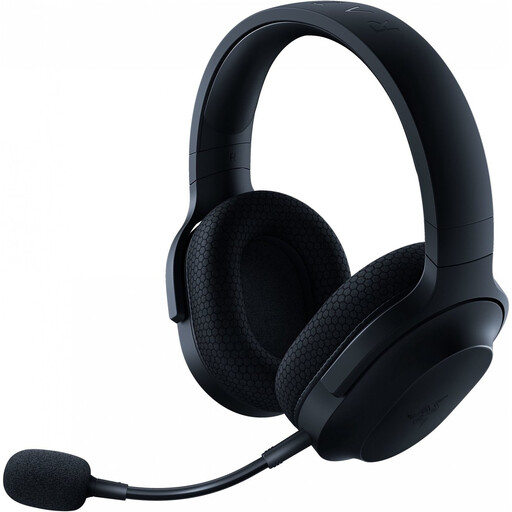
Razer Barracuda X Wireless, black
A wireless option to consider if you want fewer audio cables on your desk.
The product information lists 2.4 GHz, Bluetooth and a 3.5 mm connection. Check which connection suits your platform.
The product information lists a detachable cardioid microphone and controls on the earcup. Wireless use means you’ll need to charge it.
Joybuy
 No image available
HyperX Cloud III S Wireless
A wireless version for anyone who wants fewer audio cables and whose device is covered by the stated platform list.
HyperX lists 2.4 GHz, Bluetooth and a detachable 10 mm boom microphone. The product name lists PC, PS5, PS4, Switch and mobile; check compatibility with your exact setup.
HyperX quotes up to 120 hours over 2.4 GHz and up to 200 hours over Bluetooth. These are manufacturer figures; battery life depends on how you use it. You’ll still need to recharge it.
Joybuy
 No image available
Logitech G G432 7.1 Surround Sound
A wired option to consider if you want a cable connection and the sockets are compatible with your device.
The product information lists a 3.5 mm connection and USB DAC, plus a flip-up microphone that mutes when raised.
According to the product information, the 7.1 feature requires Logitech G HUB. Check whether the software is available on your platform; the label doesn’t guarantee better positional audio.
Joybuy
 No image available
HyperX Cloud III, black
A wired option for anyone who doesn’t want to use a battery and whose device has a compatible connection.
HyperX lists 3.5 mm, USB-C and USB-A for this model. The product name lists PC, PS5 and Xbox Series X|S; check which connections and chat features work with your own devices.
The cable will stay on your desk while you play, so allow room for it to run past your input devices.
Joybuy
Frequently asked questions
Do I need 7.1 surround sound to call out enemy positions?
No. A 7.1 label alone doesn’t prove that you’ll be better at pinpointing enemy positions in your game. A stereo headset may also be suitable; your experience will depend in part on the game, software, platform and audio settings.
How do I set up the microphone for short call-outs?
Position a boom microphone by the corner of your mouth, select it as the input device in your chat app, then make a short recording to check your voice level and mute function. Logitech recommends this positioning for the PRO X. SteelSeries explains that ChatMix depends on the selected audio endpoints.
What should I bear in mind with a wireless headset?
Plan when you’ll charge it and keep the receiver somewhere you won’t lose it. HyperX quotes up to 120 hours over 2.4 GHz and up to 200 hours over Bluetooth for the Cloud III S; these are manufacturer figures, not a guarantee of how long it will last for you.
What are my rights when I buy a headset online in the Netherlands?
According to ACM ConsuWijzer, online purchases generally come with a 14-day cooling-off period after delivery, subject to statutory exceptions. You’re also covered by the statutory guarantee if the product doesn’t perform as you could reasonably expect under normal use; the retailer is then responsible for providing an appropriate solution at no cost. Don’t assume that every headset has a fixed statutory guarantee period of exactly two years.
How can I reduce the risk of hearing damage from listening at high volumes for too long?
Keep the volume moderate and take listening breaks. The World Health Organization highlights that both sound level and duration of exposure matter.


