
Players who want to pick up audio cues
You want to distinguish footsteps and other in-game sounds while practising, without assuming a headset will improve your aim. This need is reflected in information from HyperX and Razer about their headsets.


Choose a headset that works with your PC or console and lets you hear in-game sounds at a comfortable volume. For long practice sessions, a comfortable fit matters too. Wired gaming means you won’t need to recharge, while wireless gives you more freedom to move but requires a suitable connection and a charged battery. A headset won’t reduce screen glare or improve your aim by itself.
You want to distinguish footsteps and other in-game sounds while practising, without assuming a headset will improve your aim. This need is reflected in information from HyperX and Razer about their headsets.
You’re looking for a comfortable fit and a pleasant listening volume. Fit is personal; VeiligheidNL points out that well-fitting headphones can help you avoid turning the volume up unnecessarily.
You want to match the connection, console version and chat option to the devices you actually use. This matters when considering HyperX’s connection options and SteelSeries’ model variants.
Start by checking that the connection and features work with your PC or console. Then consider the fit and whether you’d rather play wired or wirelessly.
| What matters | What to look for when buying | Who should prioritise this? |
|---|---|---|
| Picking up in-game sounds | Check which audio modes work on your platform and, if possible, try the settings in the game you play. | If I want to pick up footsteps and other in-game cues, I look for clear sound without having to keep turning up the volume. Around 31% of consumers put game audio first. |
| Comfort and listening volume | Consider the fit, adjustability and ear cushion material; keep the volume at a comfortable level. | For long practice sessions, I want a headset that fits well and stays comfortable. Around 25% of consumers prioritise wearing comfort above all else. |
| Connection and team chat | Check the exact headset variant, the connections for audio and microphone, and whether you need a receiver. | If I play on a specific console or chat with teammates, I want to make sure the connection and microphone work with my device. Around 25% of consumers prioritise compatibility and team chat. |
| Freedom to move and running costs | For wireless use, check that you have the right receiver and bear in mind that you’ll need to recharge the headset; consider any extra warranty separately. | If I want to play without a cable, I weigh the freedom to move against recharging and additional costs. Around 19% of consumers consider this the most important factor. |
A headset won’t change the light coming into your room or the reflections on your screen. Arboportaal’s advice for screen-based workstations includes adjusting the screen position if light is causing distracting reflections.
If bright light is affecting your vision, start by adjusting your screen setup or window coverings. Then choose a headset to suit your audio needs.
Razer states that the advertised 7.1 feature on the BlackShark V2 X is only available on Windows 11. So this isn’t a universal console feature.
Check which features work on your platform and try the audio in your own game, rather than relying on a surround sound label alone.
SteelSeries distinguishes between Xbox compatibility for the Nova 7, 7P and 7X series. Don’t assume this information applies to another version, such as the Gen 2, without checking.
Check the full model name and supported connection for your console before ordering.
According to the Dutch government, your statutory rights for a faulty product are separate from any additional warranty. The Dutch government also states that the Netherlands has no fixed statutory warranty period.
Check what additional rights an extra warranty actually provides. If your product is faulty, contact the retailer.
The wired Cloud III is worth considering if you want a choice of connections and a detachable microphone.
The wired BlackShark V2 X is an option if you’re looking for a 3.5 mm connection and closed-back earcups.
The Arctis Nova 7 Wireless Gen 2 is worth considering if you want to combine game audio via a USB-C receiver with mobile audio over Bluetooth.
The GXT 491 Fayzo is a wireless option with a USB receiver and Bluetooth.
Below you’ll find wired and wireless gaming headsets for different devices and chat needs. Before buying, check that the connection and version are right for your PC or console.
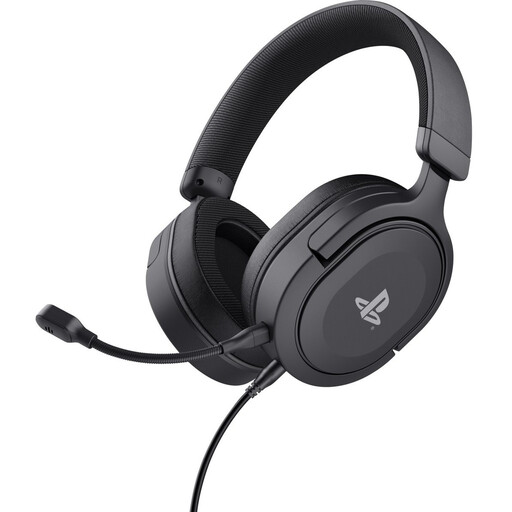 No image available
Suitable if you’re looking for a wired headset with a detachable microphone for PS5 or PS4.
The product information lists a 3.5 mm connection, 50 mm drivers and a weight of 253 g.
This is a wired headset; check that the connection is right for your device.
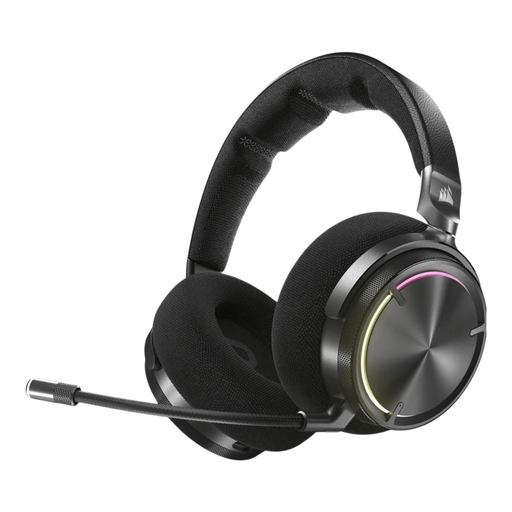 No image available
Suitable if you want to game wirelessly on PC, PS4 or PS5 and use Bluetooth with a mobile device.
The product information lists RF wireless, Bluetooth, closed-back over-ear earcups and a rechargeable battery.
The headset needs recharging when used wirelessly; check that the connection works with your device.
 No image available
Suitable if you want to game wirelessly via a USB receiver and are looking for a flexible microphone with mute and volume controls.
The product information lists 2.4 GHz, Bluetooth and a claimed battery life of up to 70 hours over 2.4 GHz.
The product information lists use on PC, PlayStation or Switch via a USB receiver. The headset has a rechargeable battery.
 No image available
Suitable if you want a wireless headset with a flip-to-mute microphone.
The product information lists 2.4 GHz, Bluetooth and 50 mm drivers. For Xbox, it specifies a connection via the wireless USB receiver.
Check that the Xbox version and connection are right for your device.
 No image available
Suitable if you want to game wirelessly on Xbox, PC or Switch in docked mode and are looking for a flip-to-mute microphone.
The product information lists 2.4 GHz via a USB receiver, Bluetooth and 40 mm drivers.
The headset has a rechargeable battery; check that the USB receiver suits the way you plan to use it.
No, a headset won’t change the light coming into your room. If reflections are getting in the way, try moving the screen in relation to the window or using window coverings. This is a practical application of Arboportaal’s advice for screen-based workstations, not a proven way to improve your aim.
First, choose a connection that suits your device and headset version. On a Windows PC, you can then try the audio settings in your own game. SteelSeries says Sonar is compatible with Windows 10 and later; compare settings without continually turning up the volume.
Look for ear cushions that fit well and keep the volume at a comfortable level. VeiligheidNL explains that a good seal can reduce background noise, making it less necessary to turn the volume up.
Not to get your statutory rights if a product is faulty. According to the Dutch government, there is no fixed statutory warranty period in the Netherlands; judge an additional warranty by the rights it actually provides. If a product is faulty, contact the retailer.
For many distance purchases from a business, the Dutch government says you have a 14-day cooling-off period. Check the terms and any exceptions that apply to your order; a retailer’s voluntary extended returns policy is different from the statutory cooling-off period.