First, choose a headset whose audio and microphone both work with your gaming device. A wired, closed-back headset may suit a fixed gaming setup where you don’t want to worry about charging. Wireless gaming gives you more freedom to move, but you’ll need a compatible receiver and time to recharge. Test team chat and the sound your roommate can hear separately: ear cup isolation, microphone noise reduction and sound leakage are different things.
Who is this buying guide for?
Team player in a shared room
You want to give clear, concise instructions and benefit from an easy-to-reach mute control and a test call with normal room noise. HyperX lists a mute indicator for the wired Cloud III, while Discord describes noise filtering for certain background sounds.
Player who is considerate of their roommate
You want to hear game audio through a headset and pay attention both to what you can still hear from the room and what your roommate can hear outside the headset. Razer describes passive isolation for the BlackShark V2 X, while EPOS mentions an acoustic seal for the H6PRO Closed.
Player who enjoys long ranked sessions
You’re looking for a headset that fits well and stays comfortable during longer matches, and works with your gaming device. HyperX lists memory foam for the wired Cloud III; make sure you check the fit and the connection you need, too.
What should you look for when buying?
Wired and closed-back
Choose this if: you play in one place, don’t want to recharge your headset and your device has a compatible connection.
The trade-off: the cable can get in the way. A closed-back design or a directional microphone doesn’t guarantee that room noise will stay out of team chat.
Wireless via a gaming receiver
Choose this if: you want to avoid cables and your gaming device supports the receiver. SteelSeries says the Arctis Nova 7 Wireless Gen 2 can play game audio via USB-C at the same time as Bluetooth audio from a second device.
The trade-off: check the platform variant and microphone routing, and make sure charging fits your gaming routine. Hearing two audio sources at once doesn’t automatically mean the microphone sends audio to both.
Open-back ear cups
Choose this if: you deliberately want to hear more of your surroundings and don’t mind sound leaking to your roommate. EPOS describes the open H6PRO variant as suitable for quiet environments or players who want to stay aware of their surroundings.
The trade-off: this option is less suitable if you want to block out room noise. Check how much sound can be heard in your own room.
| What to consider |
What to check when buying |
Who should pay extra attention? |
| Clear team chat |
Position the microphone properly and test a call or recording with normal room noise. Try the mute control, too. |
If I want to give my team quick instructions, I need them to hear me clearly despite the room noise. Around 31% of consumers put clear team chat at the top of their list when buying. |
| Room noise and sound leakage |
Check how the ear cups fit and ask your roommate to listen while you play at your usual volume. |
If I want fewer distractions and don’t want to disturb my roommate unnecessarily, I need to consider both what I can hear and what can be heard outside the headset. Around 25% of consumers prioritise room noise and sound leakage. |
| Fit during long matches |
Try the headset for an extended period, wearing your glasses if needed, and check for pressure around your ears and headband. |
For long ranked matches, I want a headset that stays comfortable. The materials alone don’t tell me how it will feel on my head. Around 25% of consumers put comfort ahead of the other considerations. |
| Connection and freedom to move |
Check the right port, microphone support and, for wireless models, the receiver and charging requirements. |
If I want to play wirelessly or would rather not recharge a headset battery, the connection needs to suit my device and gaming routine. Around 19% of consumers put connection or freedom to move first. |
Common pitfalls
-
Assuming noise reduction solves every sound problem
Ear cup isolation, what the microphone picks up and how much sound leaks out are separate features. Discord describes Krisp primarily as a filter for background noise that isn’t a human voice.
Assess your listening experience, a team call and the sound heard outside the headset separately. Test the microphone in the room where you play.
-
Assuming similar model names mean the same version
The wired HyperX Cloud III and wireless Cloud III S have different connections. Confusing the two could mean the connection isn’t right for your device, or that you need to factor in charging.
Check the full model name and connection on the product page and packaging.
-
Assuming you automatically need an extended warranty
According to the Dutch Government, there is no fixed statutory warranty period for all products in the Netherlands. Your legal rights if a product is faulty are separate from any manufacturer’s warranty.
Compare the terms of an extended warranty service with your existing rights against the retailer, and check what extra cover it provides.
Brands worth comparing
HyperX
The wired Cloud III is worth considering for a fixed gaming setup and its range of listed connection options.
- HyperX lists memory foam, a 10 mm microphone and a mute indicator for the wired Cloud III.
- Check the fit and connection for yourself. The Cloud III S Wireless is a different version.
Razer
The wired BlackShark V2 X is worth considering if closed-back ear cups and an adjustable boom microphone matter to you.
- Razer describes passive isolation and a cardioid pickup pattern for this model.
- These manufacturer claims aren’t independent measurements of sound leakage or how clearly you’ll be heard in your room. Test the headset in your own setup.
SteelSeries
The Arctis Nova 7 Wireless Gen 2 is worth considering if you want to play wirelessly while listening to audio from a second device.
- SteelSeries lists simultaneous audio via 2.4 GHz and Bluetooth, as well as a stated battery life of more than 50 hours.
- Check the platform variant and microphone routing. The stated battery life hasn’t been measured in your specific circumstances.
Logitech G
According to Logitech G, the PRO X 2 LIGHTSPEED offers wireless, Bluetooth and 3.5 mm connection options.
- Logitech G lists a cardioid microphone and a choice of ear pad materials for this model.
- Check which connection and fit work for your gaming device and how you play. The listed options don’t tell you which will work best for you.
EPOS
The H6PRO Closed is a wired, closed-back version with a detachable microphone that flips up to mute.
- EPOS lists an acoustic seal for the H6PRO Closed, plus separate cables for PC and console.
- Check availability and support for the exact Closed version. Features of the open H6PRO variant don’t automatically apply to this model.
Gaming headsets at Joybuy
This selection includes wired gaming headsets with a 3.5 mm connection and wireless models for ranked games in a shared room. Check that each model’s audio and microphone work with your gaming device.
 No image available
Turtle Beach Recon 70 Wired Gaming Headset, Green Camo
Worth a look if you’re after a wired headset and want to be able to mute the microphone when you take a break.
Wired, with a 3.5 mm connection and flip-to-mute microphone. Check that your device supports audio and microphone input through this connection.
View at Joybuy
 No image available
HyperX Cloud III S Wireless Gaming Headset
A good fit if you want to play without a cable and easy access to the mute control matters. Check device compatibility and remember that you’ll need to recharge it.
The product listing mentions 2.4 GHz and Bluetooth, a detachable 10 mm boom microphone and memory foam ear cushions. Stated battery life varies by connection.
View at Joybuy
 No image available
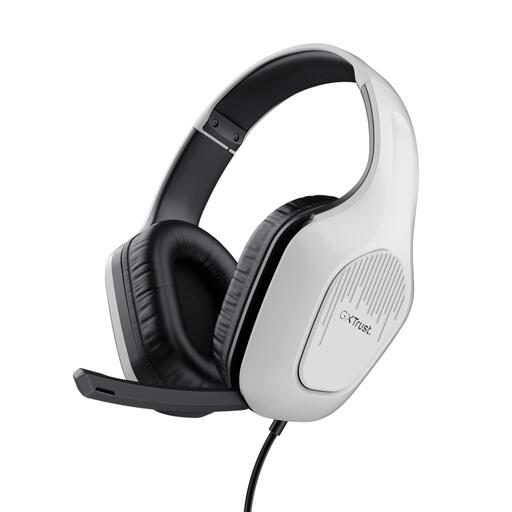
Trust GXT 415W Zirox Wired Gaming Headset, White
An option if you want to play wired and a mute control for when you take a break is important to you.
White version with a wired 3.5 mm connection. Check that your gaming device supports audio and microphone input through this connection.
View at Joybuy
 No image available
Trust GXT 491 Fayzo Wireless Gaming Headset, Black
Worth considering if you want to play wirelessly and use audio from a second device while gaming. Check that the connections work with your devices.
The product description lists simultaneous use of a 2.4 GHz receiver and Bluetooth. Wireless use requires charging.
View at Joybuy
 No image available
Razer BlackShark V2 X 7.1 Wired Gaming Headset, Black
A good fit if you’re looking for a wired headset. Test the microphone and ear cup isolation separately in your own room.
Wired version with a 3.5 mm connection. Check that this connection supports both audio and microphone input on your gaming device.
View at Joybuy
Frequently asked questions
Will microphone noise reduction block out my roommate’s voice?
Not automatically. Discord describes Krisp primarily as a filter for background noise that isn’t a human voice. Test a call with normal room noise and position the microphone properly before relying on a filter.
How do I set up my headset for a team call?
First, check that the connection you’ve chosen supports both audio and the microphone. Then select the headset as the input and output device in your chat app, position the boom microphone and make a test recording. In Discord, you can enable Krisp under Voice & Video if you wish.
How can I manage the volume during long listening sessions?
In 2019, the World Health Organization advised using personal audio devices at less than 60% of the maximum volume. This setting doesn’t guarantee the same sound level on every device.
Who should I contact about a faulty headset bought in the Netherlands?
Contact the retailer if your headset is faulty. According to the Dutch Government, you’re entitled to a product that works properly, and the retailer must provide a solution if there’s a fault. There is no fixed statutory warranty period for all products in the Netherlands.
What product rules apply to a wireless headset?
Radio equipment placed on the EU market must meet product requirements. The Dutch Authority for Digital Infrastructure outlines the relevant obligations. Equipment that meets all applicable requirements receives a CE mark. Check the information for the exact version you’re considering.


