What should you look for?
Wired headset
A good choice if: you play on a compatible device and don’t want to charge a headset battery.
Trade-off: a cable limits how freely you can move and won’t keep your voice out of the bedroom. HyperX and Trust describe wired models with microphone controls; check the connection on the version you choose.
Wireless headset
A good choice if: you want more freedom to move around while commentating.
Trade-off: you need to choose the right platform version and dongle, and charge the headset. SteelSeries specifically lists simultaneous game audio and Bluetooth for the Arctis Nova 7X Gen 2; this is not a standard feature of all wireless headsets.
As a guide to choosing a headset for commentary in a shared bedroom, first decide which microphone controls and connections you need. Then consider fit, listening volume and your surroundings.
| Buying concern |
What should you check? |
Who does this matter to? |
| Clear commentary |
Microphone placement, mute controls and the input sensitivity or push-to-talk settings in the chat software you use. |
If I want to be clear while playing, I look at the microphone and want to know how to mute it quickly. Around 29% of consumers say clear commentary is their top priority. |
| Being considerate of the person sharing your room |
Check what you hear through the earcups, and bear in mind that your voice will still be audible in the room. |
If someone next to me is sleeping or working, I want to hear game audio through a headset without forgetting that my voice can still be heard in the room. Around 23% of consumers say being considerate of the person sharing their room comes first. |
| Fit and listening volume |
Check the fit and adjustability; keep the volume moderate and take listening breaks. |
For longer sessions, I want a comfortable headset that doesn’t make me keep turning up the volume. Around 18% of consumers put wearing and listening comfort first. The World Health Organization identifies both volume and listening duration as relevant factors. |
| Platform and connection |
Check the full model version, connection or dongle, and any software features against your PC or console. |
If I commentate on my own PC or console, I want to know in advance whether the microphone and features I want will work with it. Around 18% of consumers say platform compatibility is their top priority. |
| Cost and everyday use |
Compare the included connection and terms of use; wired use doesn’t require a headset battery, while wireless use means charging. |
If I want to keep things simple, I weigh up plugging in and charging alongside my budget. Around 12% of consumers put affordability and ease of use first. |
Joybuy product picks
This selection from Joybuy includes wired models and a wireless headset, so you can weigh up a reliable connection against freedom of movement. Check that the connection and platform support on each version are right for your device.
 No image available
JBL Quantum 300 Hybrid Wired Over-Ear Gaming Headset with Flip-Up Mic - Black
Wired over-ear version with a flip-up microphone, as stated in the product name. Check that the connection is right for your device and find out how to mute the microphone.
View at Joybuy
 No image available
Skullcandy SLYR Pro Multi-Platform Gaming Wired Over-Ear - Digi-Hype, Black/Red
Wired over-ear version. Compare the full platform specifications and check the microphone controls before choosing.
View at Joybuy
 No image available
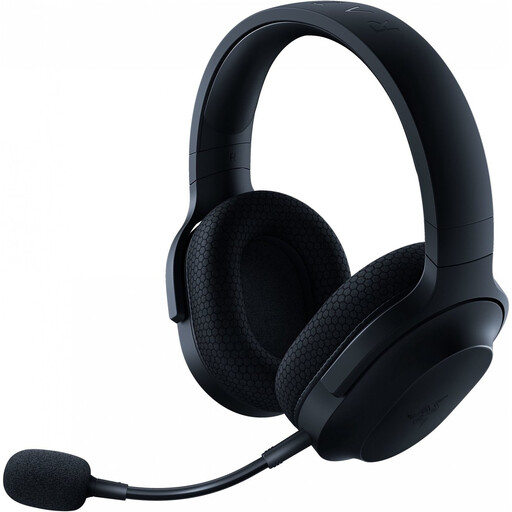
Razer Barracuda X Wireless Headset - Black
Wireless version for anyone who wants more freedom to move while playing. Check platform compatibility and remember that it will need charging.
View at Joybuy
 No image available
Razer BlackShark V2 X 7.1 Wired Gaming Headset - Black
Razer describes the BlackShark V2 X as having closed-back earcups and a cardioid microphone. This doesn’t mean the person sharing your room won’t hear your voice; also check how the 7.1 feature works on your platform.
View at Joybuy
 No image available
HyperX Cloud III Gaming Headset - PC, PS5, Xbox Series X|S - Black
HyperX lists 3.5mm, USB-A and USB-C connections and microphone muting for the wired Cloud III. Check which connection and features your device supports; the product information lists DTS Spatial Audio for PC.
View at Joybuy
Frequently asked questions
Can a headset stop the person sharing my room from hearing my game commentary?
No. Passive isolation from the earcups affects the sound coming through the headset to you; microphone noise reduction affects the sound sent to your teammates. Neither will mute your voice in the bedroom. If needed, agree with the person sharing your room on when you’ll be commentating out loud.
How should I set up Discord if background noise is being picked up?
Under Voice & Video, choose push-to-talk if needed, or adjust the input sensitivity for voice activity. Discord also offers Krisp for non-human background noise, among other things; don’t treat it as a guarantee against the sound of a second speaker.
Will a wireless SteelSeries Nova 5 work with Xbox automatically?
No. Check the full version: SteelSeries specifically lists the Nova 5X for Xbox. Before buying, also check the corresponding dongle and your console’s compatibility.
How can I avoid turning the volume up in a noisy room?
First, check the fit, keep the volume moderate and take listening breaks. The World Health Organization recommends lower volume and regular breaks as ways to listen more safely; both sound level and duration of exposure matter.
What are my rights in the Netherlands if a headset bought online is disappointing or faulty?
For an online purchase, ACM ConsuWijzer says you generally have a 14-day cooling-off period from delivery, subject to legal exceptions. If a product is faulty, the seller is responsible for the statutory guarantee; the appropriate solution depends on the fault and the circumstances.


