What should you look for?
Start with sound leakage and fit, then assess the microphone and team chat. Finally, check the connection and features for your platform.
RTINGS notes that closed-back headphones generally leak less sound than open-back models, but the amount of leakage can vary between models. The World Health Organization stresses that both volume and listening time matter for safe listening.
| What to consider |
What to check before buying |
Who should pay particular attention? |
| Sound leakage and isolation |
Check for a closed-back design, how the earcups fit around your ears, and independent sound leakage measurements if available. |
If I’m playing while someone else is asleep in the same room, I want to limit leakage without turning up the volume. Around 28% of consumers prioritise sound leakage. |
| Microphone and team chat |
Look for the microphone’s position, an easy-to-reach mute control and the option to assess a recording with background conversation. |
During team chats, I want to be heard clearly when someone is talking beside me, and to be able to mute the microphone quickly. Around 22% of consumers prioritise the microphone and team chat. |
| How clearly you can hear in-game sounds |
Check whether game and chat volumes can be adjusted separately, and whether audio features work on your PC or console. |
In ranked matches, I want to distinguish relevant in-game sounds from team chat without constantly turning up the overall volume. Around 22% of consumers prioritise in-game sounds. |
| Comfort |
Assess the space for your ears, the pressure from the headband and the ear cushion material. |
For longer sessions, I want to avoid pressure or heat distracting me. Around 17% of consumers prioritise comfort. |
| Connection and platform features |
Check the exact version, available ports, microphone support and any platform limitations. |
If I play on my own console or PC, I want to know in advance whether both the audio and microphone will work. Around 11% of consumers prioritise platform compatibility. |
Gaming headsets on Joybuy
This selection includes wired and wireless gaming headsets. Before buying, check which connection, microphone features and platform support are right for your PC or console.
 No image available
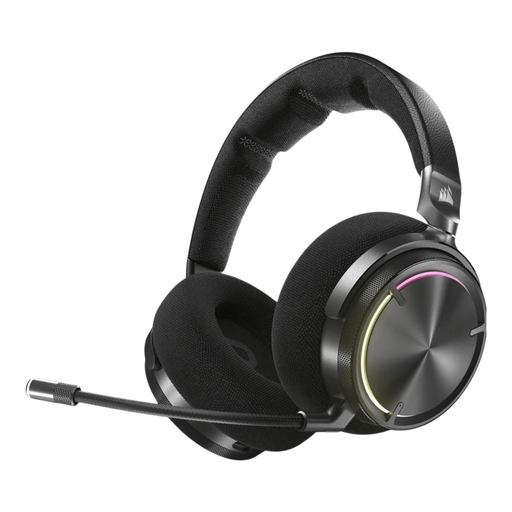
Corsair VIRTUOSO MAX Wireless Gaming Headset - Carbon
The product information lists a closed-back over-ear design and a mute control; check the fit and support for your platform.
Joybuy
 No image available
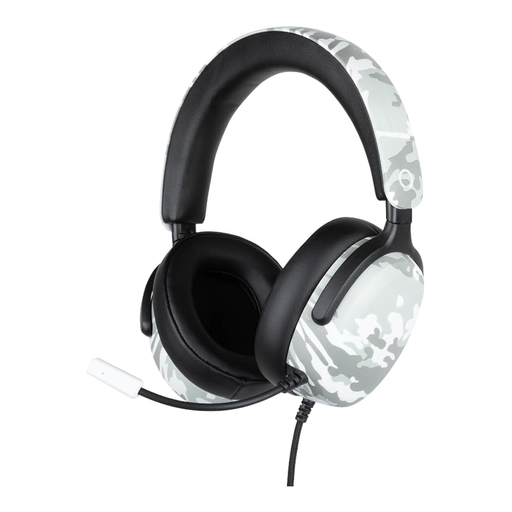
Konix Nexus wired over-ear gaming headset, camouflage, 40 mm drivers, 1.5 m cable
The product information lists a 3.5 mm connection and flexible microphone; check that both audio and microphone work with your console or PC.
The product name lists 40 mm drivers and a 1.5 m cable.
Joybuy
 No image available
JBL Quantum 120 wired multiplatform gaming headset, black
The product information lists a wired 3.5 mm connection and a microphone mute control; check compatibility with your specific device.
Joybuy
 No image available
Skullcandy Slyr Pro Multi-Platform Gaming Wired Over-Ear, Black Digi-Hype - Black/Red
The product information lists microphone controls and a mute button; check whether the stated platform and software features are available on your device.
Joybuy
 No image available
HyperX Cloud III S wireless gaming headset, black and red
This wireless version could suit you if you want to play without a cable; check which connection and mute features work on your platform.
Joybuy
Frequently asked questions
Should I choose an open-back or closed-back headset for a shared bedroom?
If you want to limit how much game audio your roommate can hear, a closed-back headset is a sensible first choice. RTINGS notes that closed-back models can still leak sound, so pay attention to the specific model and fit.
Will a noise-cancelling microphone make the room quieter?
No. Microphone processing doesn’t affect how much sound leaks from the earcups. Compare microphone recordings and sound leakage separately, and check how the microphone performs with background conversation.
How do I connect a wireless headset to my PS5?
First, check the instructions for the exact headset. PlayStation explains how to connect compatible wireless models using a USB adaptor and refers users to the manufacturer’s instructions for third-party headsets; this doesn’t confirm that every model is compatible.
Will turning up the volume help me hear footsteps?
Turning up the volume isn’t a good go-to solution. The World Health Organization says that both volume and listening time matter, and gives an average of 80 dB for up to 40 hours a week as an example of safe listening; this isn’t a guaranteed safe volume setting for every headset.
What if the headset isn’t comfortable at home or breaks early?
For online consumer purchases in the Netherlands, there is generally a 14-day cooling-off period from delivery, with some exceptions. Your statutory guarantee for a faulty product depends on what you could reasonably expect with normal use; according to ACM ConsuWijzer, the seller is responsible. A two-year commercial warranty period isn’t automatically the limit of your statutory rights.


