First, choose a headset with a connection and microphone that work with your PC or console. Then compare sound settings and comfort. In a shared bedroom, well-fitting earcups can help you avoid turning up the volume to drown out background noise, advises VeiligheidNL. A mute button is handy for team chat, but it won’t stop your housemate hearing you speak. Wired gaming doesn’t require a battery, while with wireless models you should also check the receiver, platform version and charging requirements.
Who is this headset guide for?
Player practising to hear footsteps
You want to pick out the direction and detail of in-game sounds without constantly turning up the volume. Check which sound settings are available on your platform. SteelSeries lists game profiles for the Arctis Nova 5, but features like these don’t in themselves prove that you’ll play better.
Team player with a housemate
You need clear team chat and an easy-to-reach mute control. A headset won’t automatically stop your housemate hearing you when you speak aloud.
Player who switches between devices
You want to check in advance which connection, receiver and microphone features work with your PC or console. For wireless headsets, check the full model name: SteelSeries specifies that the Nova 5X is for Xbox.
What should you look for?
| What to consider |
What should you check? |
Who is this most important for? |
| Positional game audio |
Check which equaliser or spatial audio features work on your device, and whether you can hear the detail at a sensible volume. |
If I want to practise hearing footsteps, I need to pick out in-game detail without turning up the volume. Around 29% of consumers put positional game audio first. |
| Team chat and a quieter room |
Check the microphone position, how easy the mute control is to reach, and how the earcups fit. |
When I’m talking to teammates in a shared room, I want to be able to mute quickly and avoid drowning out background noise by turning up the volume. Around 29% of consumers prioritise team chat and consideration for their housemate. |
| Compatibility |
Note your device and available port, then check game audio, chat and any software features separately. |
If I switch between devices, I want to make sure both the sound and microphone work with my PC or console. Around 24% of consumers give compatibility top priority. |
| Comfort |
Look for adjustability and ear cushions; try the fit for yourself if possible. |
For repeated or longer practice sessions, I want a headset that feels comfortable on my head. Around 18% of consumers put comfort first. |
Pitfalls to avoid when choosing
-
Confusing noise cancellation with speaking quietly
Earcups that block out background noise and a microphone that aims to reduce background noise serve different purposes. Neither will make your voice inaudible in the room.
Check the fit, microphone type and mute control separately. If needed, agree on quieter times for chat with your housemate.
-
Assuming a wireless model name means it’s the right version for your console
SteelSeries specifies that the Nova 5X is for Xbox; the name Nova 5 alone doesn’t confirm that it’s the right version.
Before buying, compare the full model name and receiver with your console. If the connection isn’t compatible, you may need an additional adapter.
-
Assuming Bluetooth and 2.4 GHz mean you can hear both at once
SteelSeries describes switching between the connections on the Nova 5. This doesn’t mean both audio sources play at the same time.
If you need game audio and phone audio at once, check that this feature is explicitly confirmed for the exact model.
Brands to compare
Razer
The wired BlackShark V2 X is worth considering if you’re looking for closed-back earcups, a flexible boom microphone and a 3.5mm connection.
- Razer describes this model as having passive noise isolation and a cardioid microphone.
- According to Razer, the listed 7.1 feature is available on Windows 11 only. The manufacturer’s descriptions aren’t measurements of performance in your bedroom.
HyperX
The wired Cloud III is an option to compare if you’re looking for a choice of connections and a mute control.
- HyperX lists 3.5 mm, USB-A and USB-C connections, memory foam and a microphone with a mute indicator.
- Check which features work with the connection and platform you use. The material description doesn’t guarantee a comfortable fit for everyone.
SteelSeries
The wireless Arctis Nova 5 is worth considering if you want to compare game profiles and a USB-C receiver.
- SteelSeries lists switching between 2.4 GHz and Bluetooth, and a stated battery life of 60 hours.
- Switching isn’t the same as playing two audio sources at once. SteelSeries specifies the Nova 5X for Xbox, so check the version carefully.
Sony
The INZONE H5 is a wireless option for PC and PS5, with a listed wired 3.5mm connection as well.
- Sony lists a weight of 260 g and spatial audio features. INZONE Hub on PC is relevant for Sony 360 Spatial Sound settings.
- The product specifications and manufacturer’s description don’t prove a competitive advantage or a good fit for every individual.
Joybuy products for gaming in a shared bedroom
This selection includes wired headsets with a 3.5mm connection and wireless models for specific devices. Check that each model’s connection and microphone are compatible with your gaming platform.
 No image available
SteelSeries Arctis Nova Pro Wireless – PlayStation Black
A good fit if you want to game wirelessly on PC or PlayStation and are happy to use a base station.
The product description lists a wireless connection via a base station for PC and PlayStation, game presets, 7.1 spatial audio and a microphone with a mute control. Active noise cancellation is also listed.
View at Joybuy
 No image available
Turtle Beach Airlite Fit – Wired 3.5 mm, Black/White
A good fit if you play on a compatible Switch system and want to be able to mute the microphone.
Wired, with a 3.5mm connection. The product description lists Switch, Switch Lite and Switch OLED, 40mm speakers and a flip-up microphone that mutes when raised.
View at Joybuy
 No image available
Turtle Beach Recon 70 – Green Camo, 3.5 mm
A good fit if you want to compare a wired headset with a microphone mute function for one of the listed gaming platforms.
The product description lists a 3.5mm connection and compatibility with PC, PS5, Switch 2 and Xbox Series X|S. The microphone flips up to mute, and the ear cushions are described as providing passive noise isolation.
Keep the cable clear of your movement area.
View at Joybuy
 No image available
Turtle Beach Stealth 500 – Xbox, Wireless, Black
A good fit if you want to game wirelessly on Xbox and can use a USB receiver.
The product description lists a 2.4GHz connection via USB receiver, Bluetooth, equaliser settings and a flip-up microphone that mutes when raised. Listed devices include Xbox, PC, Switch 2 and mobile devices.
The headset has a rechargeable battery; the USB receiver is required for the 2.4GHz connection.
View at Joybuy
 No image available
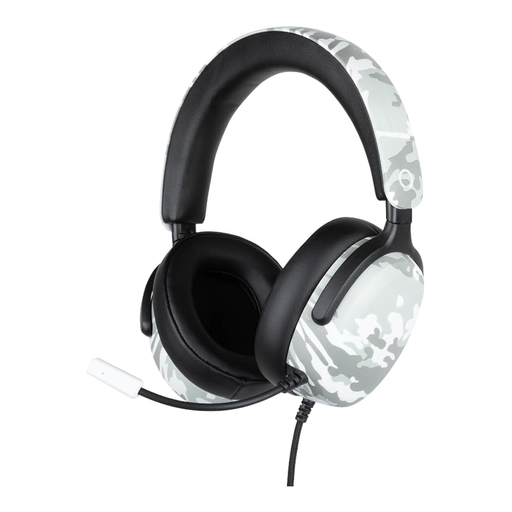
Konix Nexus – Wired 3.5 mm, 40 mm, Camouflage Pattern
A good fit if you’re looking for a wired 3.5mm headset with a microphone for one of the listed consoles.
The product description lists compatibility with PS5, Switch 2 and Xbox Series X|S, 40mm speakers, a microphone and a 1.5 m cable. The volume control is on the earcup.
View at Joybuy
Frequently asked questions
Should I turn on surround sound to hear movement more clearly?
Not necessarily. Try the setting in your own game at a sensible volume, and check that it’s available on your platform. Razer says the BlackShark V2 X’s 7.1 feature is available on Windows 11 only; that specification doesn’t prove better performance.
How can I stop myself from constantly turning up the game volume?
Adjust the earcups so they fit well and keep the listening volume moderate. VeiligheidNL recommends well-fitting headphones, which can make you less likely to turn up the volume. Use mute when you don’t need team chat, and agree with your housemate on when it’s OK to speak aloud.
What if I’m unhappy with a headset bought online, or it develops a fault?
For online purchases from a business, you’ll often have a 14-day cooling-off period, according to the Dutch government; check whether this applies to your purchase. If a product is faulty, you can hold the seller responsible for your right to a product that works properly. The Netherlands has no set statutory warranty period.
Which product regulation applies to a wireless headset in the Netherlands?
Radio equipment must meet the applicable requirements. The Dutch Authority for Digital Infrastructure states that manufacturers affix the CE mark when radio equipment meets all the requirements. Check the product and conformity information for the specific item; this alone doesn’t say whether a separately offered product complies.


