Who is this guide for?

Player with a roommate

You want to hear the game through a headset rather than room speakers, while being mindful of how loud your own conversations are. Tweakers via NU.nl highlights this as something to consider if you don’t want to disturb the people you live with.

Voice chat host

You want to be able to mute your microphone quickly during a group game. Check where the controls are; HyperX and Sony describe models with mic mute controls.

Player using multiple devices

You switch between a PC and consoles and want to check in advance whether the connection or exact wireless model variant works with each device. HyperX lists several connections for the Cloud III; SteelSeries distinguishes between the Nova 5 models.

What should you look for?

What to consider What to look for Who is this important for?
Sound in a shared room Check the fit and volume controls; avoid using room speakers and take breaks during long sessions. If I’m playing next to someone, I want to hear the game without filling the room with sound from speakers. Around 28% of consumers prioritise limiting the amount of game sound in the room.
Voice chat controls Check that the mute control is easy to reach and test the microphone in your own chat app. If I’m hosting a group game, I want to be able to mute the microphone quickly and check the chat audio beforehand. Around 22% of consumers prioritise voice chat controls.
Connection and model variant Check the exact device connection and full model name; SteelSeries lists the Nova 5X as the suitable Nova 5 variant for wireless Xbox use. When I play on different devices, I want to avoid finding out that a connection or a very similar model name isn’t compatible with my console. Around 22% of consumers prioritise compatibility with their intended platform.
Comfort during longer sessions Consider the fit, headband and ear cushions; the material alone can’t guarantee a comfortable fit for you. If I want to play for longer, I want a headset that feels comfortable, not just one that looks suitable on paper. Around 17% of consumers prioritise comfort during longer sessions.
Freedom to move and connection A wired headset limits your movement; for wireless use, check the connection and remember that you’ll need to charge it. If I want to get up while hosting, I don’t want a cable in the way, but I’ll need to manage a battery and possibly a dongle. Around 11% of consumers prioritise freedom to move.

Avoiding common buying mistakes

  • Assuming every Nova 5 works wirelessly with Xbox

    SteelSeries says the Nova 5X is the Nova 5 variant for Xbox. According to SteelSeries, a separate 5X dongle won’t make the Nova 5 or 5P compatible.

    Check the full model name and the device you intend to use before buying.

  • Confusing mic mute with keeping the bedroom quiet

    A mute button mutes your microphone in chat, but it won’t stop your roommate from hearing your voice directly.

    Use the mute function when you’re not speaking and agree with your roommate on when to use voice chat.

  • Treating manufacturers’ battery-life claims as guaranteed play time

    The stated battery life for the SteelSeries Nova 5, Sony PULSE Elite and Logitech G PRO X 2 LIGHTSPEED comes from the manufacturers and hasn’t been measured under the same conditions for comparison.

    Charge a wireless headset before use; choose a wired one if you don’t want to manage a battery.

  • Confusing an extra warranty package with your statutory rights

    The Dutch government says that in the Netherlands you’re entitled to a product that works properly, and there is no fixed statutory warranty period that applies to all products.

    Check what additional rights a paid package offers and compare them with your existing statutory rights.

Brands to compare

HyperX

The wired Cloud III is an option if its connections are compatible with your devices.

  • HyperX lists 3.5 mm, USB-C and USB-A connections for the Cloud III, as well as mic mute.
  • The cable limits your movement; check which connections and features work with each device.

SteelSeries

The Arctis Nova 5 family offers a wireless option; for Xbox, it’s important to choose the exact variant.

  • SteelSeries lists 2.4GHz and Bluetooth for the Nova 5 and gives it a battery life of 60 hours.
  • According to SteelSeries, the Nova 5 and 5P aren’t compatible with Xbox; the brand recommends the Nova 5X for Xbox.

PlayStation

The PULSE Elite is designed for use with a PS5 and compatible PlayStation Link devices.

  • Sony says a PlayStation Link USB adapter for PS5 and computers is included, and that you can play audio simultaneously via PlayStation Link and Bluetooth.
  • Sony gives the battery life as up to 30 hours. Check support for each device; this information doesn’t confirm Xbox compatibility.

Logitech G

The PRO X 2 LIGHTSPEED is a wireless model worth comparing if battery life and ear cushion material matter to you.

  • Logitech lists a detachable microphone, imitation leather or velour ear cushions and a battery life of up to 50 hours.
  • The battery life and comfort descriptions come from the manufacturer; check that the connection works with your platform.

Razer

The wired Kraken V4 X is an option if the USB connections listed are compatible with your setup.

  • Razer lists a USB-C cable with USB-A support and a retractable microphone.
  • Check platform features and fit separately; the sound isolation and voice quality descriptions are manufacturer claims.

Joybuy headsets for this situation

This selection includes wired and wireless gaming headsets for games nights in a shared room. Check the connection, platform variant and microphone controls for each model.

JBL Quantum 300 wired over-ear gaming headset with flip-up microphone

JBL Quantum 300 wired gaming headset

A wired option for consumers who want to be able to mute the microphone during voice chat.

The product name specifies an over-ear design and a flip-up microphone. The cable limits your movement.

Joybuy

Turtle Beach Stealth 600 Gen 3 Xbox wireless gaming headset

Turtle Beach Stealth 600 Gen 3 Xbox Wireless

A wireless option for consumers who want to mute the microphone during voice chat without opening a menu.

The product name lists Xbox Series X|S, Xbox One, PS5, PS4, PC, Switch 2, Steam Deck and mobile. Wireless use means managing the battery and receiver; check the connection for each device.

Joybuy

HyperX Cloud III S wireless gaming headset

HyperX Cloud III S Wireless

A wireless option for consumers who want to be able to mute the microphone on the headset during group chat.

The product name lists PC, PS5, PS4, Switch and mobile. Wireless use means managing the battery; check the connection for each device.

Joybuy
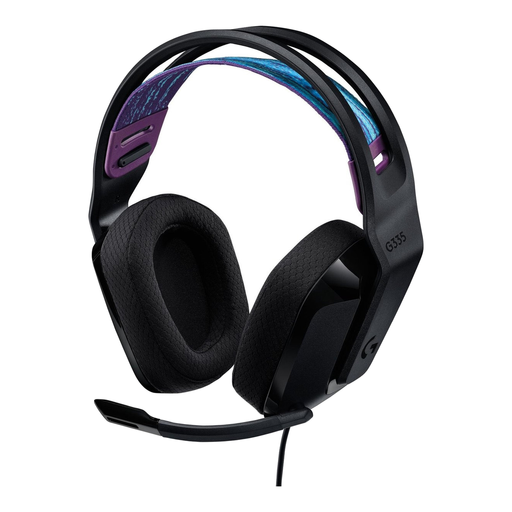
Logitech G G335 gaming headset

Logitech G G335 gaming headset

A wired option for consumers who want to be able to mute the microphone during voice chat.

Before buying, check that the connection is compatible with the PC or console you want to play on. The cable limits your movement.

Joybuy
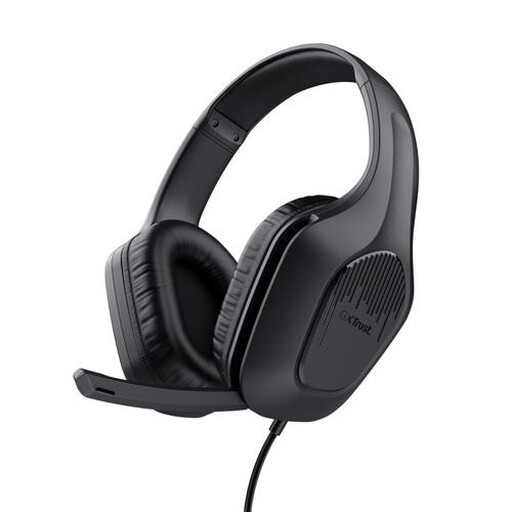
Trust GXT 415 Zirox wired over-ear gaming headset

Trust GXT 415 Zirox wired gaming headset

A wired option for consumers who want to be able to mute the microphone during voice chat.

The product name specifies 50 mm drivers and an over-ear design. Check the connection for your device; the cable limits your movement.

Joybuy

Frequently asked questions

Will a gaming headset make a games night quiet enough for someone sleeping in the same room?

Not by itself: you’ll hear the game through the headset instead of room speakers, but people in the room will still hear your voice. Agree on when voice chat is appropriate and keep the listening volume down.

How do I connect a headset when guests are playing on different consoles?

Check the connection and full model variant for each device. HyperX lists 3.5 mm, USB-C and USB-A for the wired Cloud III; for wireless Xbox use in the Nova 5 family, SteelSeries lists the Nova 5X. Test the audio and microphone before games night.

What can I do if a Nova 5X won’t connect wirelessly?

SteelSeries recommends connecting the dongle directly, checking that it’s set to the mode for your platform and pairing it again if needed. According to SteelSeries, the dongle should be in Xbox mode when used with Xbox.

How can I reduce the risk of hearing damage during a long session?

According to the World Health Organization, both volume and duration of exposure matter. Keep the volume low and take breaks; don’t rely on a fixed volume level as if it were automatically safe for every headset and listener.

Should I buy an extra warranty package?

Not to get your statutory rights to a product that works properly: according to the Dutch government, the retailer is your point of contact if a product is faulty. Check what additional rights a paid package offers; there is no fixed statutory warranty period for all products in the Netherlands.

Do I have a cooling-off period when I buy a headset online?

According to the Dutch government, when you buy online from a business, you’re entitled to a 14-day cooling-off period in many cases. Check the terms of your specific purchase; this doesn’t necessarily apply to a purchase from a private individual.
