
Raid player with a roommate
You talk with your team for extended periods while someone else is in the same bedroom. You want to stay clear and easy to understand, while also being considerate about how much game audio they can hear.


Start with a headset that works with your PC or console and lets you adjust the microphone and hear your own voice. A closed-back over-ear headset can reduce the amount of game audio your roommate hears, but it won’t dampen your own voice. So test your chat at a normal speaking volume too. Fit and the choice between wired and wireless will help you decide which type suits the way you play.
You talk with your team for extended periods while someone else is in the same bedroom. You want to stay clear and easy to understand, while also being considerate about how much game audio they can hear.
You want to speak softly without background noise unnecessarily activating your microphone. Mic positioning, sidetone and chat settings can all make a difference. Discord Support explains how to adjust voice activation sensitivity for a quiet speaking voice and background noise.
You wear your headset for long periods or switch between PC and console. Fit, connectivity and support for your platform all help determine whether a model is practical for you.
First, check that the microphone and connection work with your device. Then consider whether your team can hear you clearly at a normal speaking volume, and how much game audio your roommate can hear.
| What to consider | What should you check? | Who is this important for? |
|---|---|---|
| Clear team chat | Check the microphone boom, mute controls and chat app settings. Test whether your quiet instructions come through when speaking at your normal volume. | I want to speak calmly during a raid without background noise activating the chat. Around 33% of consumers put clear team chat first. |
| Sound leakage | Look for closed-back ear cups, a good fit around the ear cushions and how much game audio can be heard outside the headset at a normal listening volume. | I want to avoid disturbing my roommate with audible game sound. Around 27% of consumers give limiting sound leakage top priority. |
| Comfort during long sessions | Consider the pressure from the headband and ear cushions, adjustability and space around your ears. Comfort is personal. | When I play a long raid, I want my headset to feel comfortable without unnecessary pressure or heat. Around 20% of consumers put wearing comfort first. |
| Platform and connection | Check that both audio and microphone work with your specific PC or console via your chosen connection or wireless dongle. | I want to be sure the microphone and audio work with my gaming platform, and choose wired or wireless to suit how I play. Around 20% of consumers put platform and connection first. |
The percentages are a general estimate for this specific scenario of raiding in a shared bedroom, not the results of a Dutch survey. A noise-cancelling headset does not guarantee that your roommate’s voice will be removed from the chat. Discord Support describes Krisp primarily as a filter for background noise that isn’t human speech. So test the microphone and chat settings in your own situation. If your headset supports sidetone, it lets you hear your own voice in the ear cups and can help you keep an eye on your speaking volume.
A wired headset can be a practical choice if you play in one place and have a suitable connection. You won’t need to charge a wireless battery, but the cable will limit your movement. Wireless can give you more freedom to move, provided your device supports the required connection and you keep the headset charged. SteelSeries lists 2.4GHz gaming and switching to Bluetooth for the Arctis Nova 5. Check the exact platform variant, as the manufacturer specifically lists the Nova 5X for Xbox.
Sound-isolating ear cups, microphone filters and the sound of your own voice in the room are different things. Less game audio leaking out doesn’t mean your team won’t hear your roommate.
Check sound leakage and microphone pick-up separately. Test the headset with your chat app, at your normal speaking volume and in your bedroom environment.
SteelSeries specifically lists the Nova 5X for Xbox. Logitech says that certain G432 features, including DTS Headphone:X 2.0 and EQ presets, require Windows and G HUB, so don’t assume these features are available on PS5.
Before buying, check the full model number, your platform and which features are available on it.
Quoted battery life is a manufacturer’s figure and doesn’t automatically tell you how long the headset will last with your settings. Fit also varies from person to person.
Try the headband and ear cushions for yourself, and remember to factor in charging if you choose a wireless headset.
The wired Cloud III is worth a look if you want a visible mute indicator and a choice of connections.
The Arctis Nova 5 series is a wireless option if you want to switch between a gaming connection and Bluetooth.
The wired G432 and wireless G733 offer different connection options.
The wired Quantum 200 is an option if you’re looking for a flip-up microphone and a 3.5mm connection.
The wired BlackShark V2 X is worth comparing if microphone design and passive noise isolation matter to you.
This selection includes wired and wireless gaming headsets with microphones, for anyone weighing up connection type, mute controls or freedom of movement for raid sessions.
 No image available
A wireless option worth considering if you want freedom to move while gaming and a physical mute control is important to you.
The product description lists closed-back ear cups, a wireless connection via a USB-A base station and a flexible microphone with a mute button. Compatibility is listed for Windows PC and PlayStation; Xbox isn’t mentioned.
 No image available
A wireless option if you want to use Bluetooth as well as gaming via a USB receiver.
The product description lists 2.4GHz via the included USB-A receiver, Bluetooth, a flexible microphone and physical mute controls. Battery life is listed at up to 70 hours; actual use time may depend on your settings. NVIDIA Broadcast noise cancellation is only listed for devices with a compatible NVIDIA GeForce RTX graphics card.
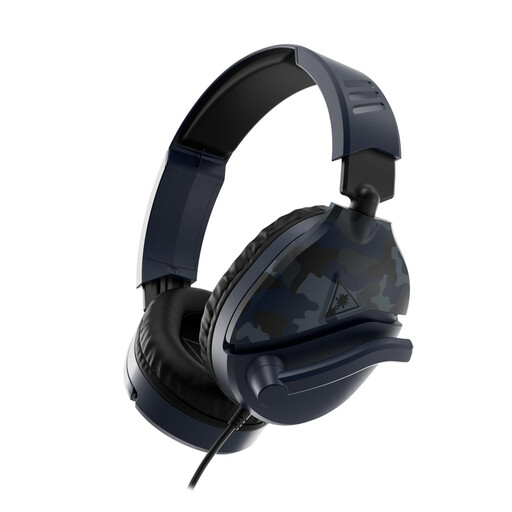 No image available
A wired option if you want to mute the microphone by flipping up its boom.
The product description lists a 3.5mm connection, compatibility with PC, consoles and mobile devices, and a microphone boom that flips up to mute. It also mentions a lightweight design and synthetic leather ear cushions.
 No image available
A wired option if you’re looking for a detachable microphone boom and a 3.5mm connection.
The product description lists compatibility with Windows, Mac, PlayStation, Xbox and Nintendo Switch. Microphone noise cancellation is linked to JBL QuantumENGINE; breathable fabric ear cushions and a silicone headband are also mentioned.
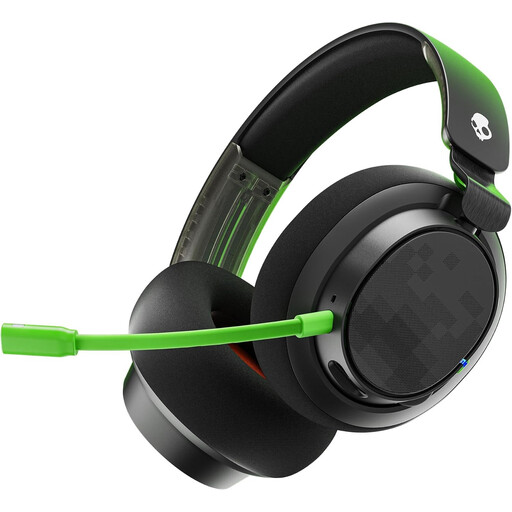 No image available
A wired option worth considering if a prominent mute button and soft ear cushions for long sessions matter to you.
The product description lists 3.5mm and USB connections, support for multiple platforms and soft memory foam ear cushions. A microphone and mute button are also mentioned.
There’s no guarantee. Discord Support describes Krisp primarily as a filter for background noise that isn’t human speech. So test it with your chat app, microphone position and someone talking in the same room. Also check that quiet instructions come through.
If your headset supports sidetone, you can use it to hear your own voice through the headset. SteelSeries Support describes an adjustable slider in the Companion app for Arctis models that support the feature. Check whether your model has it, and speak at a normal volume.
First, check that the connection and platform variant are right for your device. Then check the selected microphone, mute setting and input sensitivity in your chat app. Discord Support describes separate settings for push-to-talk and voice activation.
When you buy from a business online, you’re entitled to a 14-day cooling-off period in many cases, subject to applicable exceptions. According to the Dutch government, you’re also entitled to a product that meets legal standards; there is no fixed statutory warranty period in the Netherlands. Any additional paid warranty does not replace these rights.