What should you look for when choosing?
In a shared bedroom, it’s worth assessing the fit and how much sound your roommate can hear separately. A close-fitting earcup doesn’t prove that no sound leaks out.
| What to consider |
What should you check? |
Who is this most important for? |
| Keeping things quiet for your roommate |
Check the fit and test the headset in the room at your normal gaming volume. Don’t assume it won’t leak sound just because it claims to provide isolation. |
If someone else is asleep or needs peace and quiet, I want to play without disturbing them unnecessarily. Around 28% of consumers prioritise keeping things quiet for their roommate. |
| Comfort |
Look for adjustability and comfortable ear cushions; if possible, try the headset during a typical gaming session. |
I don’t want unnecessary pressure on my head or ears during a long puzzle session. Around 22% of consumers give long-lasting comfort top priority. |
| Connection |
Compare your device’s connections with those of the exact headset model, and check that the features you want work with it. |
If I switch between PC and console, I want to know in advance which connections and features work with each device. Around 22% of consumers prioritise compatibility. |
| Story audio at a comfortable volume |
Check the volume controls and any equaliser settings on your platform. Start quietly and don’t automatically turn the volume up. |
I want to follow dialogue and puzzle sounds without turning the volume up unnecessarily. Around 17% of consumers prioritise clear story audio at a moderate volume. |
| Features you’ll use |
Decide whether you need voice chat, microphone muting or wireless use, and check which features work with your devices. |
If I usually play alone, I don’t want chat features I won’t use or a battery to charge. Around 11% of consumers prioritise simplicity and only the features they need. |
Gaming headsets at Joybuy
This selection includes wired and wireless gaming headsets for use with compatible PCs and games consoles.
 No image available
JBL Quantum 300 Hybrid Wired Over-Ear Gaming Headset
A wired over-ear option if your device supports the connection you choose; the product name mentions a flip-up microphone.
Joybuy
 No image available
Turtle Beach Stealth 500 Xbox Wireless Gaming Headset
A wireless option with a flip-up microphone; the product name lists Xbox Series X|S, Xbox One, PC, Switch 2 and mobile. Check that the connection works with your device.
Joybuy
 No image available
Turtle Beach Airlite Fit Wired Gaming Headset, Blue/Red
A wired option if your device has a 3.5 mm connection; the product name lists Nintendo Switch, PC and mobile, among others, and mentions a flip-up microphone.
Joybuy
 No image available
JBL Quantum 120 Wired Multiplatform Gaming Headset
A wired multiplatform option if your device supports the connection; the product name mentions a detachable microphone.
Joybuy
 No image available
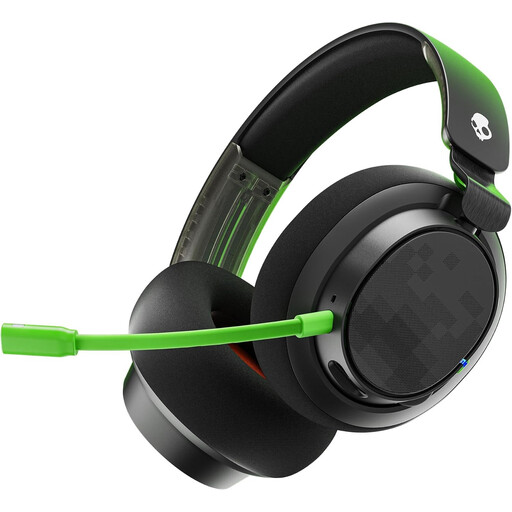
Skullcandy SLYR Pro Xbox Wired Over-Ear, Black/Green
A wired over-ear option for anyone who wants to check that the connection works with their Xbox gaming device.
Joybuy
Frequently asked questions
Is noise cancelling enough to stop me disturbing my roommate?
No. Razer’s description of passive isolation refers to the outside noise the wearer hears; it doesn’t establish how much sound leaks out to a roommate. Check the fit and test it in the room at your normal gaming volume.
How should I set up a headset for a long puzzle session?
Start at a low volume and adjust the headband and ear cushions for a good fit. Thuisarts also advises keeping the volume down when gaming and using a volume limiter if your device has one.
What should I check about the connection and fit?
Check that your device supports the 3.5 mm, USB or wireless connection you’ve chosen, then adjust the headband and ear cushions to fit. If you have a wired headset, protect the cable from wear and tear too.
What are my rights when shopping online in the Netherlands?
According to the Dutch government, consumers buying from a business at a distance are entitled to a 14-day cooling-off period in many cases. Check the seller’s returns information before buying. Your statutory rights, for example if a product is faulty, are not the same as a voluntary protection plan.
Does a wireless headset need a CE mark to be sold in the Netherlands?
Radio equipment covered by the applicable EU rules must meet conformity requirements and carry a CE mark. Check the specific model; a CE mark isn’t an independent performance test. This framework is based on EU rules for radio equipment and the European Union’s guidance on CE marking.


