Who is this relevant to?

Players who enjoy long RPG sessions

You spend a long time playing at a desk and want a comfortable headset that doesn’t let unnecessary noise out into the room. Fit is personal, so check the pressure and ear cushions where possible. HyperX lists memory foam for the Cloud III.

Players who use voice chat

You often play with others and want a microphone that suits your setup, with a mute control that’s easy to reach. Check the microphone and controls on the specific version.

Players who switch between devices

You might use a PC, console or phone, for example. Check the connections and make sure the features you rely on are available on every platform you use.

What should you look for?

Wired

Best for: Playing mainly in one spot and avoiding the need to charge a battery. According to HyperX, the Cloud III has a 3.5 mm connection, a USB-C connection and a USB-A connection.

Trade-off: The cable limits your freedom to move, so check which connection your device uses too.

Wireless via a USB receiver

Best for: Playing without a headset cable, provided your PC or console supports the receiver for that specific headset.

Trade-off: You’ll need to factor in charging and receiver compatibility.

Wireless, with Bluetooth as an extra option

Best for: Using the same headset with a phone as well, for example. The SteelSeries Arctis Nova 5 can switch between 2.4 GHz and Bluetooth.

Trade-off: According to SteelSeries, only one of these connections can be active at a time on the Arctis Nova 5.

What to consider What should you look for? Who is this important for?
Comfort Check the adjustability and pressure around your ears and glasses; fit is personal. If I’m playing at my desk for a long time, I want my headset to stay comfortable. Around 33% of consumers say comfort is their top priority.
Connection and platform Check the connection or receiver for your device and which additional features work with it. When I connect my PC or console, I want to know that the headset and the features I use will work with it. Around 27% of consumers put platform compatibility first.
Microphone and mute Check that there’s a microphone and an easy-to-reach mute control; check whether any filters work on your platform. During RPG sessions with others, I want to be able to talk and mute quickly when needed. Around 20% of consumers make voice chat their top purchase priority.
Freedom to move and charging Check the connection type, receiver and stated battery life for the exact version. If I want to sit in my chair without a cable, I need to decide whether charging is acceptable to me. Around 20% of consumers prioritise wireless freedom to move.

Common pitfalls

  • Assuming ‘Bluetooth and 2.4 GHz’ means you can listen to both at once

    On the SteelSeries Arctis Nova 5, this combination lets you switch between connections; according to SteelSeries, only one is active at a time.

    If you want to hear your phone while gaming, check whether the headset lets you switch between sources or play audio from both at the same time.

  • Assuming surround sound features work on every platform

    A software feature described for PC isn’t proof that it works in the same way on a console. HyperX lists DTS Spatial Audio for the Cloud III when used with a PC.

    Check how the feature works on your platform, and assess the connection and fit separately.

  • Confusing a manufacturer’s warranty with your statutory rights

    A manufacturer’s warranty is separate from your statutory rights. According to the Dutch government, the Netherlands has no fixed statutory warranty period.

    Keep your proof of purchase and contact the retailer if the product is faulty.

Brands to consider

HyperX

The wired Cloud III is worth considering if you value multiple physical connections more than wireless freedom to move.

  • For the Cloud III, HyperX lists a 3.5 mm connection, a USB-C connection and a USB-A connection, as well as memory foam and a 10 mm microphone.
  • These specifications alone don’t tell you how the headset will fit or sound to you. Check which features work on your platform too.

SteelSeries

The Arctis Nova 5 is worth considering if you want to switch between a gaming device and a Bluetooth device.

  • SteelSeries lists 2.4 GHz, Bluetooth and a stated battery life of 60 hours for this model.
  • According to SteelSeries, the Nova 5 can only use one of these connections at a time.

Logitech G

The G733 and G435 offer different wireless options; check the microphone and platform support for each model.

  • Logitech G lists a battery life of over 29 hours for the G733, depending on use. For the G435, the brand lists LIGHTSPEED, Bluetooth and 18 hours of use.
  • These details apply to the models listed and not automatically to other headsets from the brand.

Razer

The wired BlackShark V2 X is worth comparing if you’re looking for a microphone and passive noise isolation.

  • Razer describes this model as having a cardioid microphone and passive noise isolation.
  • These are Razer’s descriptions and don’t prove that the headset will isolate noise or sound better than other models in your room.

Gaming headsets at Joybuy

This selection includes wired models for a fixed desk setup and wireless headsets for playing without a headset cable. Check the connection and platform support for each model.

SteelSeries Arctis Nova Pro Wireless for PlayStation, black

SteelSeries Arctis Nova Pro Wireless – PlayStation Black

A wireless option worth considering if you play on PlayStation, PC or Switch and can use a USB base station.

The product description lists a USB base station, Bluetooth and two interchangeable batteries. The wireless gaming connection uses the included base station.

The description also mentions active noise cancellation and a microphone that mutes when you flip it up.

View at Joybuy

JBL Quantum 300 wired gaming headset with flip-up microphone

JBL Quantum 300

A wired option worth considering if you play at your desk and want a flip-up microphone.

The product description lists a 3.5 mm connection, a USB audio adapter and a directional microphone.

JBL QuantumSURROUND is listed for PC in the product description. It also mentions a lightweight headband and memory foam ear cushions.

View at Joybuy
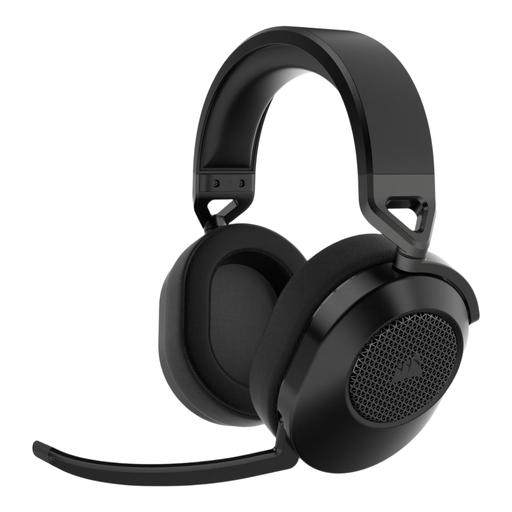
Corsair HS65 Wireless gaming headset, Carbon

Corsair HS65 Wireless – Carbon

A wireless option worth considering if you want to game without a headset cable and the listed connection suits your device.

The product description lists 2.4 GHz via USB-A, Bluetooth 5.2 and a stated battery life of up to 24 hours.

The description lists support for PC, Mac, PS5, PS4 and mobile devices, a mute function and memory foam ear cushions. The stated weight is 275 g.

View at Joybuy

Razer BlackShark V2 X 7.1 wired gaming headset

Razer BlackShark V2 X 7.1 Wired

A wired option worth considering if you’re looking for a 3.5 mm connection, a microphone and a mute button.

The product description lists a cardioid microphone, passive noise isolation and memory foam ear cushions. The stated weight is 240 g.

View at Joybuy

HyperX Cloud III gaming headset for PC, PS5 and Xbox Series X|S, black

HyperX Cloud III – PC, PS5, Xbox Series X|S – Black

A wired option worth considering if you want several physical connections and a microphone with a mute indicator.

The product description lists 3.5 mm, USB-A and USB-C connections, with memory foam in the headband and ear cushions.

DTS Spatial Audio is listed for PC in the description; this feature isn’t automatically available on every platform.

View at Joybuy

Frequently asked questions

What should you check before connecting a gaming headset to a console?

Check that the connection or USB receiver is compatible with your exact console model, and find out which additional features work on that platform. Device compatibility doesn’t automatically mean that all software features are available.

Can the SteelSeries Arctis Nova 5 play game audio over 2.4 GHz and phone audio over Bluetooth at the same time?

No. According to SteelSeries, you can switch between the connections, but only one is active at a time.

How can you keep the volume at a comfortable level during a long RPG session?

The World Health Organization advises keeping the volume low and taking regular breaks. For volume controls, it recommends not going above 60% of the maximum; this percentage doesn’t mean that every headset produces the same sound level at that setting.

Is the statutory warranty on a headset in the Netherlands always exactly two years?

No. According to the Dutch government, the Netherlands has no fixed statutory warranty period; you’re entitled to a product that meets what you could reasonably expect. A manufacturer’s warranty is separate from this.

Can you return a headset bought online?

In many cases, purchases made at a distance come with a statutory 14-day cooling-off period, according to the Dutch government. Check the applicable terms and exceptions before buying; a longer returns period offered by a shop is a separate commitment.
