What should you look for when choosing?
First check the connection on your playback device and the distance to your seat. Then compare familiar replay clips and consider how comfortable the headset will be during longer sessions.
| What to consider |
What should you check? |
Who is this important for? |
| Audio details |
Compare the same clip at the same volume in stereo and, if your device supports it, with 3D audio. |
I want to compare subtle sounds in recurring match clips without relying solely on a surround sound claim. Within this set of priorities, around 33% of consumers put audio detail first. |
| Connection and platform |
Check the available port, the exact headset model and whether the software features you want work on your system. |
I want replay audio and any features I need to work on the PC or console I’m watching on. Within this set of priorities, around 27% of consumers put connection and platform support first. |
| Distance from your seat |
Measure the cable route or check that the wireless receiver is compatible with your console or PC. |
I want to watch the big screen from my seat without an awkwardly placed cable getting in the way. Within this set of priorities, around 20% of consumers prioritise freedom to move while sitting away from the screen. |
| Comfort |
Look for adjustability and comfortable ear cushions. If possible, try the headset during a longer session. |
I want to analyse several clips without the headset becoming uncomfortable. Within this set of priorities, around 20% of consumers prioritise comfort when watching replays repeatedly or for long periods. |
Headsets at Joybuy
This selection includes wired and wireless headsets for watching replays. Check that each model’s connection is compatible with your playback device.
 No image available
Turtle Beach Stealth 600 Gen 3 Xbox, black
A wireless option for an Xbox setup. If you need to replace the transmitter, check that it matches your platform version.
2.4GHz audio and Bluetooth. The product description lists a flip-up microphone and game and chat volume controls.
The product description lists a 10-band equaliser, 50mm drivers and a stated battery life of up to 80 hours.
Turtle Beach Support says the Xbox Black version needs a compatible transmitter, which isn’t interchangeable with PC or PlayStation transmitters.
View on Joybuy
 No image available
HyperX Cloud III S Wireless
A wireless option for the PC, PS5, PS4 and Switch devices listed in the product name. Check support for the features you want to use.
The product description lists 2.4GHz, Bluetooth, volume control and a detachable microphone.
Stated battery life: up to 120 hours via 2,4 GHz and up to 200 hours via Bluetooth. The description lists 53mm drivers and memory foam ear cushions.
The product description lists DTS Spatial Audio for PC. Don’t assume the same feature is available on other platforms.
View on Joybuy
 No image available
Razer BlackShark V2 X 7.1 Wired
A wired option if your playback device has a 3,5mm connection and the 1,3 m cable reaches your seat.
The product description lists 50mm drivers, volume control and a microphone mute button.
According to the product description, the 7.1 feature requires Razer software and an activation code.
View on Joybuy
 No image available
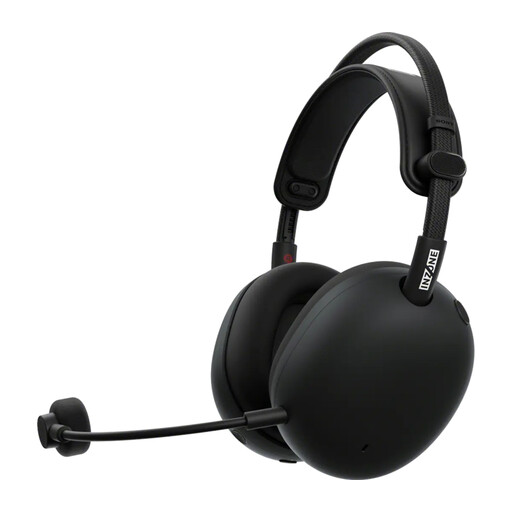
Sony PlayStation INZONE H9 II, black
A wireless option for PS5 or PC. The product description lists a USB-C dongle for these systems.
The description lists 2.4GHz, Bluetooth and a battery life of up to 30 hours.
The stated weight is approximately 260 grams.
View on Joybuy
 No image available
Trust GXT 498W Forta, white
A wired option for PS5 or PS4. The product description lists a 3,5mm cable for use with a controller.
The stated cable length is 1,2 m and the weight is 253 grams. The description lists 50mm drivers and on-earcup controls.
The product description lists 3D audio on PS5. Check the settings on your own playback device.
View on Joybuy
Frequently asked questions
Should I connect the headset to the TV or the console?
Start with the device playing the replay and check which audio output you want to use. On PS5, you can choose the output device via Settings > Sound. A compatible headset may use a different connection from the TV’s HDMI connection. Check the connection options separately for a PC, TV or other console model.
Can I set up 3D audio for replays on PS5?
Yes. PlayStation offers a personalised 3D audio profile and headphone presets on PS5. Compare the same clip to see whether the setting is useful for analysing your replays. The feature doesn’t guarantee that every sound will be easier to assess.
How can I avoid connection problems after replacing a wireless transmitter?
Check the exact headset model and platform, and, where required, the colour of the replacement transmitter. For example, Turtle Beach Support says the Stealth 600 Gen 3 Xbox Black needs a compatible Xbox Black transmitter and won’t pair with the PC or PlayStation transmitter from that generation.
How can I listen safely during long analysis sessions?
Keep the volume moderate and take regular breaks. The World Health Organization gives the example of a maximum of 40 hours per week at an average of 80 dB, or four hours at 90 dB. Safe listening time decreases as the volume rises. This is general listening guidance, not a set maximum for a specific headset model.
Am I entitled to exactly two years’ legal warranty on a headset in the Netherlands?
No. According to the Dutch government, there is no fixed period for the legal warranty in the Netherlands: you’re entitled to a product that lasts as long as you can reasonably expect it to. If a product is faulty, contact the seller. The manufacturer’s warranty is separate.


