If you’re training with audio cues, start by choosing a wired connection or a gaming dongle that works with your device. Then consider comfort, the microphone and any other features. RTINGS.com discusses wired connections and wireless gaming transmitters as options to consider, but a headset won’t remove reflections from your screen or demonstrably improve your reaction time.
Who is a gaming headset for reaction training suitable for?
Players who train with audio cues
You want to hear footsteps and other in-game cues in time. Choose a connection that works with your device; there’s no proven improvement to your personal reaction time. RTINGS.com highlights connectivity and the positioning of in-game cues as factors to consider.
Players in a bright or noisy room
You’re looking for a comfortable fit and don’t want to compensate for background noise by continually turning up the volume. VeiligheidNL advises choosing headphones or ear cushions that fit well. To tackle screen reflections, adjust your screen position and lighting rather than changing your headset.
Players who use multiple devices
You might switch between a PC, console and phone, and want to know which connections and features work with each device. Check the exact model variant: according to SteelSeries Support, only the Nova 5X works with Xbox.
What should you look for in a headset for reaction training?
The right choice mainly depends on your gaming device, the connection you want and what you need most during training.
| Factor to consider |
What to look for |
Who is this important for? |
| Hearing in-game cues |
Compare a wired connection with a compatible gaming dongle, and check which connection and device any latency figures apply to. |
If I want to hear audio cues in time, I choose a connection supported by my device. Around 36% of consumers put in-game cues first. |
| Comfort and distractions |
Consider how the ear cushions feel during a typical session. Assess screen reflections separately by checking the position of your screen and light sources. |
If I want a comfortable headset and don’t want background noise to make me turn up the volume, I look at the fit and seal. Around 29% of consumers give this top priority. |
| Device compatibility |
Check the exact model variant, connection, dongle, and support for game audio and the microphone on your device. |
If I switch between PC and console, I want to make sure the version I choose works with my gaming device. Around 21% of consumers put compatibility first. |
| Team communication |
Check that a microphone is included, works with your platform and is easy to mute. |
If I talk to teammates during multiplayer training, a usable microphone is part of my decision. Around 14% of consumers prioritise team communication over the other factors. |
Common mistakes when choosing a gaming headset
-
Buying a headset to fix screen reflections
An audio product won’t change the light in your room. Reflections can make the screen harder to see.
First, check the position of your screen and the light sources. Then decide separately whether you need a different headset for audio cues.
-
Treating Bluetooth, a gaming dongle and a wired connection as equivalent
Connectivity and device support vary between options. Bluetooth isn’t automatically the lowest-latency connection.
Check which connection any latency figures are based on, and choose one that your device supports for training.
-
Relying on the product family name alone for Xbox compatibility
According to SteelSeries Support, only the Nova 5X in the Nova 5 family works with Xbox; the Nova 5 and Nova 5P aren’t compatible.
Before buying, check the full model name and the included dongle.
-
Assuming a two-year manufacturer’s warranty is the full legal guarantee
ACM ConsuWijzer explains that statutory warranty in the Netherlands doesn’t have a general fixed duration of exactly two years.
Keep your proof of purchase and contact the seller if the product develops a fault during normal use.
Gaming headset brands to compare
HyperX
The wired Cloud III is worth comparing if you’re looking for a microphone and several connection options.
- HyperX lists a 10 mm microphone and 3.5mm, USB-C and USB-A connections for the Cloud III.
- It’s a wired headset. The manufacturer’s claims about comfort and call clarity aren’t a personal fit or performance test.
SteelSeries
The Arctis Nova 5 family is worth considering if you want to switch between a gaming dongle and Bluetooth.
- SteelSeries lists a USB-C dongle and two wireless modes for the Nova 5.
- According to SteelSeries Support, only the Nova 5X works with Xbox. The family name alone isn’t enough to confirm compatibility.
Razer
According to Razer, the Barracuda X (2022) offers several connection options for gaming and other uses.
- Razer lists a USB-C gaming dongle, Bluetooth and a wired 3.5mm connection for this model.
- The stated battery life and weight are manufacturer specifications; they don’t guarantee a particular battery life or level of comfort in every situation.
Logitech G
The PRO X 2 LIGHTSPEED is a wireless option to compare if Bluetooth and a 3.5mm connection are also important to you.
- Logitech G lists interchangeable ear cushion types and up to 50 hours of use per charge for this model.
- The manufacturer’s claim that there’s no latency isn’t an independent latency measurement.
Audeze
The Maxwell 2 is a wireless model to compare, provided you choose the right PlayStation or Xbox version.
- Audeze lists 90 mm planar drivers and separate console variants.
- RTINGS.com notes the weight as a trade-off compared with a lighter alternative. The model specifications and brand claims alone don’t tell you how it will fit you personally.
Gaming headsets at Joybuy
This selection includes wired headsets and wireless models with a gaming connection. Check that each model’s connection and features suit your device.
 No image available
SteelSeries Arctis Nova Pro Wireless PlayStation Black
A wireless base station connection and microphone may be useful if you also need to communicate with your team while gaming.
The product information lists 7.1 surround sound, a retractable microphone and interchangeable batteries. Check whether the PlayStation version is compatible with your other devices.
Joybuy
 No image available
JBL Quantum 300
This wired headset could suit you if you want to use a microphone while gaming and need a 3.5mm connection or USB audio adapter.
The product information lists 50 mm drivers and a flip-up microphone. According to the same information, QuantumSURROUND is only available on PC.
Joybuy
 No image available
Turtle Beach Stealth 500 Xbox
A wireless Xbox headset to compare if you want to use a dongle connection while gaming.
The product information lists a 2.4 GHz USB dongle and Bluetooth as separate modes, along with a flip-up microphone with a mute function. Check that it’s supported by your device.
Joybuy
 No image available
Turtle Beach Airlite Fit 3.5mm Blue/Red
A wired option to consider if your device has a 3.5mm connection and you want to talk while gaming.
The product information lists 40 mm speakers and a flip-up microphone that mutes when raised. The product name mentions Switch, PC and mobile; check the connection your device needs.
Joybuy
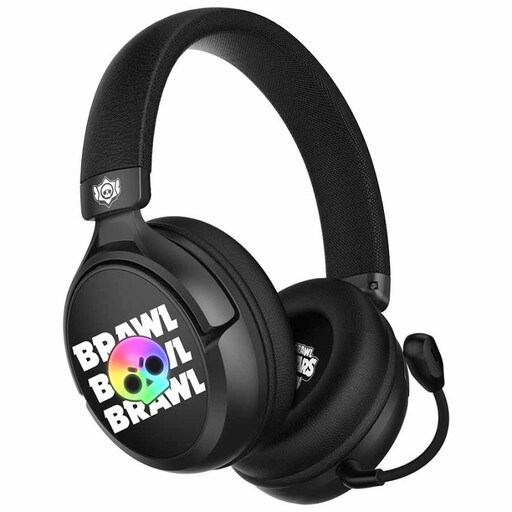 No image available
Subsonic SS Brawl Stars wired gaming headset
The product name describes a wired headset for PS5, PS4, PC, Xbox and Switch. Check that the connection and microphone features suit your device.
Joybuy
Frequently asked questions about gaming headsets for reaction training
Can a gaming headset reduce glare on your screen?
No, a headset won’t change the light falling on your screen. Adjust the screen position and check whether windows or lamps are causing reflections. According to guidance from the US Occupational Safety and Health Administration, bright light can make the screen harder to see.
How do I connect a wireless headset for reaction training?
Use the gaming connection and dongle supported by the manufacturer for your device. SteelSeries Support recommends selecting the correct mode for Xbox or other devices with the Nova 5X; also check that the version is compatible with your platform.
Can I simply turn up the volume to hear cues more clearly?
Don’t make listening at high volume for long periods part of your training routine. VeiligheidNL advises checking the fit of your headphones or ear cushions, so background noise is less likely to make you turn up the volume.
What if a headset I bought online doesn’t fit well or breaks quickly?
For a standard online consumer purchase in the Netherlands, you generally have up to 14 days after delivery to change your mind. ACM ConsuWijzer advises checking which exceptions apply to your specific purchase. If a product breaks during normal use, the seller is responsible under the statutory guarantee. According to ACM ConsuWijzer, there’s no general fixed guarantee period of exactly two years.


