
Ranked player who uses team chat
You give and receive quick callouts during matches. Look for clear voice chat, an easy-to-reach mute control and a connection that supports the microphone too.


A wired headset suits desk-based gaming if you don't want to worry about charging. Wireless is an option if freedom of movement matters more, as long as the receiver works with your device and the headset is compatible with your platform. Whichever you choose, look for clear team chat, an easy-to-reach mute control and a comfortable fit for longer sessions.
You give and receive quick callouts during matches. Look for clear voice chat, an easy-to-reach mute control and a connection that supports the microphone too.
You play for longer sessions, with room noise and the effect of your gaming on housemates both worth considering. Fit, earcup seal and sensible listening volume all matter.
You might use a PC and another gaming device, for example. Check in advance which cable, USB connection or wireless receiver works with each device.
Start with the connection and support for your gaming device. Then compare the microphone controls and fit. Choose wireless mainly if freedom of movement is important to you.
| What to consider | What to check when buying | Who it matters to |
|---|---|---|
| Clear team chat | Check the mute control and whether the microphone works through the connection you plan to use. Test voice chat at your usual speaking volume. | If I'm giving quick callouts during ranked matches, I want to be easy to understand and able to mute quickly. Around 36% of consumers prioritise clear team communication. |
| Comfort and room noise | Consider the over-ear fit, cushion material and adjustability. VeiligheidNL notes that a good seal can help you avoid having to turn the volume up to drown out background noise. | For longer sessions, I want a headset that feels comfortable and means I don't have to keep turning up the volume. Around 29% of consumers prioritise comfort and managing room noise. |
| Connection and compatibility | Make a note of the ports on your device and check separately that audio, the microphone and any software features will work with them. | If I want to use a headset with several devices, I want to know that both the sound and microphone work with each one. Around 21% of consumers consider compatibility their main priority. |
| Freedom of movement without a cable | Check that the wireless receiver works with your gaming device and whether the connection modes you want can be used at the same time or only switched between. | If I regularly get up from my desk, I don't want a cable to restrict my movement, and I'm happy to charge the headset and check the connection. Around 14% of consumers prioritise freedom of movement. |
The seal around the earcups affects the sound reaching your ears; microphone specifications describe a different feature. Neither guarantees that speaking won't disturb your housemates.
Check the fit and microphone controls separately, and test voice chat in the room where you play.
Features can depend on the model, connection and platform. Corsair requires the included USB adapter and iCUE on PC or Mac for Dolby Audio and SoundID on the HS65 SURROUND. Razer specifies Windows 11 for the BlackShark V2 X's 7.1 feature.
Check the requirements for the exact model and your device before factoring in a software feature.
Wired and wireless versions can differ, and model variants may support different platforms.
Compare the full model name, connection, included accessories and version on the product page and packaging.
ACM ConsuWijzer explains that Dutch law does not specify a fixed two-year period for the legal guarantee. A manufacturer's warranty is separate from your statutory rights.
If a product is faulty, contact the seller and check what an optional service plan actually adds.
The wired Cloud III is worth considering if you want multiple connection options and a detachable microphone with a mute indicator.
The BlackShark V2 X is a wired option to compare if you're looking for a closed-back over-ear design and an adjustable boom microphone.
The HS65 SURROUND is a wired option if flip-to-mute and adjustable audio on PC or Mac are important to you.
The Arctis Nova 5 Wireless is worth a look if freedom of movement and switching between a gaming connection and Bluetooth are important to you.
The PRO X 2 LIGHTSPEED is a wireless option to compare if you also want a wired connection and a choice of ear cushion materials.
This Joybuy selection includes wired headsets for desk use and wireless models for anyone who wants more freedom of movement. Compare each model's microphone controls, connections and support for your gaming device.
 No image available
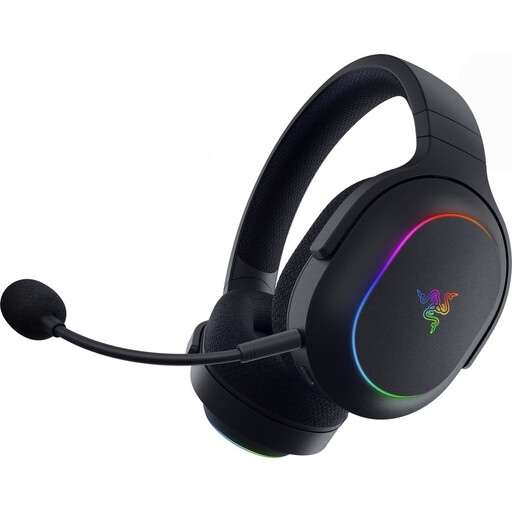
A good fit if you want to play wirelessly and quickly mute the microphone during team chat.
The product description lists 2.4 GHz, Bluetooth, a flip-to-mute microphone and separate game and chat controls. The title lists Xbox Series X|S, Xbox One, PS5, PS4, PC, Switch 2, Steam Deck and mobile; check compatibility with your device.
 No image available
A wireless option to compare if you want to switch between devices and have a mute control on the headset.
The product description lists 2.4 GHz, Bluetooth, a detachable cardioid microphone and a mute button. Check which connection mode works with your gaming device.
 No image available
A good fit if you want a wired headset for desk-based gaming with a microphone mute button.
The product description lists a 3.5 mm connection, cardioid microphone, mute button and volume control. Razer says the 7.1 feature is only available on Windows 11.
 No image available
A wired option to compare if you want a visible microphone mute indicator and several connection options.
The product description lists 3.5 mm, USB-A and USB-C, a detachable microphone and an LED mute indicator. The title lists PC, PS5 and Xbox Series X|S; check which connection suits your device.
 No image available
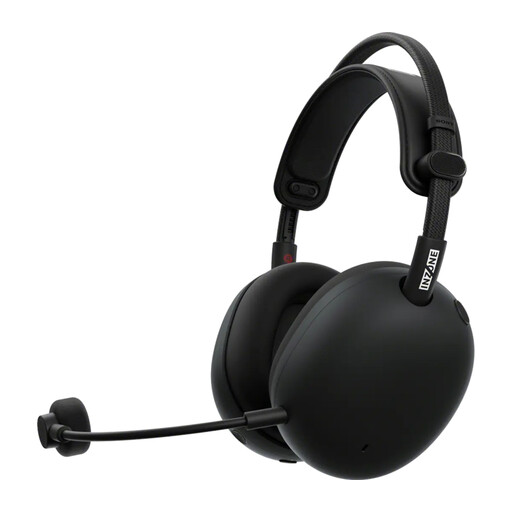
A wireless model to consider if team chat and a USB-C dongle connection are important to you.
The product description lists a cardioid boom microphone, 2.4 GHz via USB-C dongle and Bluetooth. Check that it works with your device and confirm the exact features of this version.
No, 7.1 surround isn't a general requirement when buying a headset. First check that you can hear voice chat and game audio clearly on your device. Corsair requires the USB adapter and iCUE on PC or Mac for Dolby Audio on the HS65 SURROUND; Razer specifies Windows 11 for the BlackShark V2 X's 7.1 feature.
Select the audio output and microphone you want to use on your device, check the mute control and make a test recording at your usual speaking volume. Make sure the ear cushions fit well without turning the volume up unnecessarily. VeiligheidNL recommends a good seal as a way to avoid having to turn the volume up to drown out background noise.
According to ACM ConsuWijzer, online purchases generally come with a statutory cooling-off period of up to 14 days after delivery. Conditions and exceptions apply to unpacking and trying out a product, so check the rules for your specific purchase and don't assume you can use it without limits.
It depends on the headset and version. Check that the included receiver works with your gaming device and whether the headset switches between Bluetooth and the gaming connection or plays both audio sources at the same time.
The Rijksinspectie Digitale Infrastructuur states that electrical, electronic and radio equipment placed on the market must comply with the relevant European rules and carry the required CE marking. This is a product requirement; check the product information for the specific item on offer.