Start with the device you play on: a headset connected to a controller works differently from a wireless headset that uses a receiver or a supported console connection. Then choose based on clear team chat, fit and the distance to your setup. With wireless models, always check the exact platform version, as models in the same range don’t necessarily have the same connection options.
Who is this choice relevant to?
Playing away from the console
If you play on a big screen, first check how game audio and team chat reach the headset: via the controller, a receiver or a supported console connection. PlayStation Support describes a USB adapter for supported wireless headsets; Microsoft mentions a 3.5mm connection on the Xbox controller.
Ranked team player
If you use voice chat during matches, check the microphone controls and make sure chat works on your platform and in your game. Microsoft and HyperX describe different models with a controller or headset connection.
Long-session player
Pay particular attention to fit and whether you’ll need to interrupt a session to recharge. SteelSeries, Microsoft and HyperX mention model-specific features such as ear cushion materials or a battery; fit is personal, so you’ll need to judge it for yourself.
What should you look for when choosing?
First, check which device runs the game and how the headset connects to it. Then compare the team chat controls, fit, and the practical differences between a wired and wireless connection.
| What to consider |
What to look for |
Who should pay extra attention? |
| Connection and platform |
Check the exact platform version and how it connects to your controller or gaming system. |
If I play some distance from my screen, I want to know in advance what the audio and microphone connect to. Around 33% of consumers prioritise compatibility and connection above all else. |
| Team chat |
Check the microphone controls and whether voice chat works on your platform and in your game. |
In ranked matches, I want to hear my team and control the microphone easily. Around 27% of consumers prioritise team communication. |
| Comfort |
Check the materials used for the ear cushions and headband, and decide for yourself whether the fit feels comfortable. |
For longer sessions, I want a comfortable headset without having to rely solely on the product description to work that out. Around 20% of consumers make fit their top priority. |
| Connection and ease of use |
Compare a wired connection with the receiver, pairing and charging requirements of a wireless model. |
If I want to keep connection or charging steps to a minimum, I’ll weigh up those practical requirements before choosing a version. Around 20% of consumers prioritise ease of connection. |
Buying mistakes to avoid
-
Choosing a headset based on the screen instead of the gaming system
The screen doesn’t automatically determine how game audio and chat reach your headset. A controller connection, USB receiver and direct console connection are different options.
Make a note of the device and controller you use, then compare their connections with the full model version and your seating distance.
-
Treating platform versions with almost identical names as the same product
Manufacturers may offer separate versions for PlayStation and Xbox, for example. The product family name alone won’t tell you which connection or features your version has.
Check the full model name and platform version, then compare the stated connection method with your gaming system.
-
Assuming a battery or sound claim proves the headset is right for you
A stated battery life or audio feature doesn’t, on its own, tell you whether the fit is comfortable, team chat works or the headset connects to your platform.
Check the platform, microphone connection and fit first. Treat the manufacturer’s claims as information about that specific version, not a guarantee of how it will work for you.
Brands to compare
Microsoft Xbox
The Xbox Stereo Headset and Xbox Wireless Headset illustrate two different connection options; the features described apply to the models named.
- Microsoft describes the Stereo Headset as connecting to the Xbox controller via 3.5mm, with no headset battery required.
- For the Xbox Wireless Headset, Microsoft mentions direct console pairing and a rechargeable battery. Check which connection option suits your model.
SteelSeries
The Arctis Nova 7X is an example of a version that SteelSeries says is designed for several gaming systems.
- SteelSeries lists a USB-C dongle for Xbox, PC and PlayStation with the Nova 7X, as well as the option to mix in Bluetooth audio from another device.
- These connection details apply to the 7X version and not necessarily to every Arctis Nova 7.
HyperX
The wired Cloud III is an example of a model with several stated connection options.
- HyperX lists 3.5mm, USB-C and USB-A connection options for the Cloud III, along with memory foam ear cushions and a 10mm microphone.
- The wireless Cloud III S is a different product with different connection options, so check the full model name.
Turtle Beach
The Stealth 600 Gen 3 is a wireless range whose connection and compatibility should be checked for each platform version.
- Turtle Beach lists 2.4GHz and Bluetooth 5.2 for the range, with switching between the connections.
- The manufacturer directs you to the specifications for each model for full compatibility; don’t assume every version works in the same way.
Razer
The BlackShark V3 Pro shows why the platform version matters when comparing a wireless headset.
- Razer offers separate BlackShark V3 Pro versions for PlayStation and Xbox.
- Don’t assume they have the same connections or features just because they share a model name; check the version you want.
Headsets on Joybuy
These Joybuy products include wired headsets for a compatible controller or PC, and wireless versions for specific gaming systems. Compare the listed version and connection option with your own equipment.
 No image available
SteelSeries Arctis Nova Pro Wireless, PlayStation version
For wireless gaming on PlayStation or PC if a USB base station suits your setup.
The product information lists a USB-A connection, a retractable, muteable microphone, two interchangeable batteries and memory foam ear cushions. Keep the volume at a sensible level during longer listening sessions.
View on Joybuy
 No image available
Turtle Beach Atlas 200 PC
A wired option for PC if the listed 3.5mm connection or USB adapter suits your setup.
The product information lists a flip-to-mute microphone and memory foam ear cushions. Bear the cable in mind while you play.
View on Joybuy
 No image available
Turtle Beach Recon 70, PlayStation version
A wired option if the 3.5mm connection works with the controller or device you play on.
The product information lists a flip-to-mute microphone, a padded headband and synthetic leather ear cushions. The cable may get in the way while you play.
View on Joybuy
 No image available
Turtle Beach Stealth 600 Gen 3, Xbox version
For wireless use with Xbox via the USB receiver listed in the product information.
The description lists Bluetooth, a flip-up microphone, separate game and chat volume controls, and a stated battery life of up to 80 hours. Check the compatibility of the exact version before relying on it with other devices.
View on Joybuy
 No image available
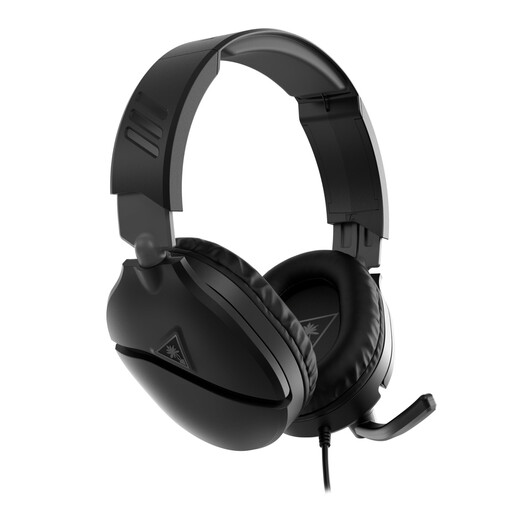
Turtle Beach Recon 70, Xbox version
A wired option if the 3.5mm connection works with your controller or device.
The product information lists a flip-to-mute microphone and a volume wheel. Bear the cable in mind and avoid listening at a high volume for extended periods.
View on Joybuy
Frequently asked questions
Should I connect the headset to the big screen or to my gaming system?
Choose based on the device running the game and chat. Microsoft describes a 3.5mm connection to the Xbox controller; PlayStation Support mentions a USB adapter connected to the system for supported wireless headsets. Check which audio and microphone connections your headset and device support.
Can I use any Bluetooth gaming headset for game audio and team chat on my console?
No. Don’t assume you can based on Bluetooth support alone. Microsoft describes the Xbox Wireless Headset as pairing directly with the Xbox console, and lists Bluetooth for PC or mobile. Check how the exact version connects to your console.
What can I do if a wireless headset won’t pair?
Follow the setup instructions for the exact version. For supported wireless headsets, PlayStation Support recommends connecting the supplied USB adapter, charging the headset and switching it on again, among other steps.
What are the returns and warranty rules for online purchases in the Netherlands?
For online consumer purchases, you generally have 14 days to change your mind, subject to applicable exceptions and conditions set out by the Dutch government. There is no fixed general time limit for the statutory warranty in the Netherlands; if a product is faulty, you can contact the seller.
How can I avoid continually turning the volume up during ranked matches?
Keep the volume at a sensible level and use a volume limiter if one is available. In 2021, VeiligheidNL reported that 26% of respondents in a study of young people who game listened at a high volume, defined as 70% or higher. This figure describes those respondents, not gaming headset buyers.


