What should you look for when buying?
Start with the microphone connection and platform compatibility. Then compare wired use, freedom of movement and fit.
| What to consider |
What should you check? |
Who should pay particular attention? |
| Being heard in team chat |
Check that there’s a microphone and an easy-to-reach mute control. Make a test recording using your normal speaking voice, game audio and the sounds in your room. |
When I give quick instructions during a raid, I want my team-mates to hear me clearly. Around 33% of consumers put clear team chat at the top of their list. |
| Game and chat connections |
Compare your gaming platform and chat app with the exact variant, connection and microphone setup. |
I want to know in advance that both the game audio and my voice will work with my devices. Around 27% of consumers give platform compatibility top priority. |
| Fit during long raids |
Check the headband and ear cushions, and try the fit with glasses on if you wear them. |
During long sessions, I want a headset that feels comfortable and stays in place. Around 27% of consumers put long-lasting comfort first. |
| Wired or wireless |
Wired use means having a cable; wireless use requires a suitable connection and charging. |
If a cable gets in my way while I’m playing, freedom of movement matters more than charging. Around 13% of consumers choose freedom of movement as their main reason for buying. |
Headsets for raid chat
This selection includes wireless versions for platforms such as Xbox, as well as wired headsets for several of the gaming platforms listed. Check the exact connection for each model and make sure its microphone setup works with your chat app.
 Image unavailable
Turtle Beach Stealth 600 Gen 3 Xbox, purple
A wireless Xbox version worth considering if you want a flip-to-mute microphone for raid chat.
The product information lists a USB transmitter, 2.4GHz connection and USB-C charging. The title also mentions PS, PC, Steam Deck and mobile; check the connection for the device you use for chat.
The product description says the over-ear design and ProSpecs ear cushions are suitable for people who wear glasses.
Joybuy
 Image unavailable
Turtle Beach Stealth 500 Xbox, black
A wireless Xbox version for anyone looking for a flip-up microphone and a wireless connection while gaming.
The product description lists a 2.4GHz transmitter, Bluetooth and USB-C charging. The title mentions Xbox Series X|S, Xbox One, PC, Switch 2 and mobile; check the connection required by your chat app.
The description mentions a floating headband and memory foam ear cushions.
Joybuy
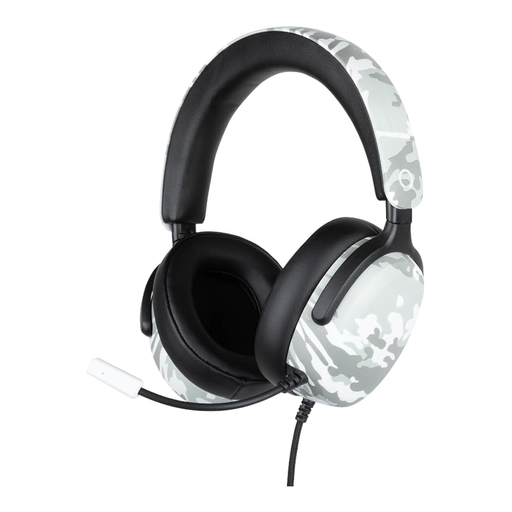 Image unavailable
Konix Nexus wired gaming headset, camouflage
A wired option if you want to use a 3.5mm connection for team chat and don’t want to charge a battery.
The product information lists a flexible microphone, volume wheel and 1.5 m cable. The title mentions 40 mm drivers and compatibility with PS5, Switch 2 and Xbox Series X|S; check that the microphone works through the connection you plan to use.
The headset has an over-ear design and soft ear cushions.
Joybuy
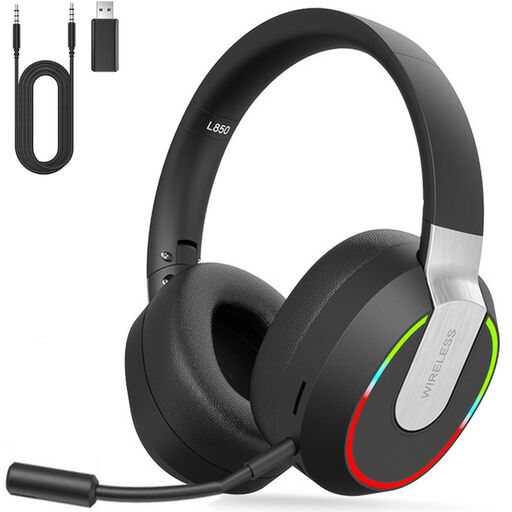 Image unavailable
2.4GHz wireless gaming headset for PC, PS4, PS5, Mac and Switch
A wireless option to consider if you’re looking for a headset with a detachable microphone for team communication.
The product description lists 2.4GHz, Bluetooth and a wired mode, as well as an adjustable headband and soft ear cushions.
According to the description, Bluetooth doesn’t connect directly to PS4, PS5 or PC; check the alternative connection method listed for your device.
Joybuy
 Image unavailable
Skullcandy Slyr Pro wired gaming headset, black and red
A wired headset worth considering if you want a microphone and mute and volume controls for team chat.
The product description lists USB-C and 3.5mm connections, along with memory foam ear cushions.
The title describes this version as wired; check which connection your gaming platform and chat app require.
Joybuy
Frequently asked questions
Can I connect a gaming headset to a console via Bluetooth?
Don’t assume you can just because Bluetooth is supported. Check the exact console, headset version and connection method required. For example, PlayStation says supported wireless headsets connect via a USB adapter.
How do I connect a SteelSeries Nova 7X to Xbox?
For the Nova 7X, SteelSeries says to connect the 2.4GHz dongle using the USB-A cable and set the switch to Xbox mode. For other platforms and generations, follow the instructions for your exact version.
Can I hear audio from my phone and talk through game chat during a raid?
According to SteelSeries, the Arctis Nova 7 can play 2.4GHz audio and Bluetooth audio at the same time, but the microphone doesn’t transmit to both sources simultaneously. Test which app receives your voice.
How can I avoid continually turning up the volume during long sessions?
Set the volume carefully and consider how long you listen for. In 2021, VeiligheidNL reported that 26% of the young gamers surveyed played at a high volume, defined as 70% or above; this figure isn’t about headset buyers. In 2025, the WHO published recommendations for safer listening while gaming.
What are my returns and warranty rights when buying online in the Netherlands?
According to ACM ConsuWijzer, online purchases usually come with a statutory 14-day cooling-off period from the date of delivery, although you should check for exceptions that apply to your purchase. The statutory guarantee is separate from any stated manufacturer’s warranty period. What you can expect in terms of a product’s lifespan depends on the product and the circumstances.


