
Vandaag of morgen in huis

Kwaliteit gegarandeerd

Welkomstaanbiedingen ontgrendelen: GRATIS bezorging | Tot 80% korting | Gratis 30 dagen JoyPlus-proefperiode
Download de app
A gaming headset for PS5 needs to do more than simply play game audio. During a long gaming session, you do not want tight earcups, a cable that is too short or teammates who can barely hear you. Yet many differences between models only become apparent after you have connected the headset.
The main pitfalls are usually:
For a straightforward connection to PS5 and PS4, a 3.5 mm jack is practical. You will usually connect the headset to the controller. It works without a battery, additional software or a wireless receiver. Do check the cable length: 1.2 metres is suitable for connecting to the controller, but less convenient if you want to run the cable directly to the console.
A USB headset may offer additional features, such as virtual surround sound, equaliser settings or lighting. Check in advance that the console and the chat audio you want to use are supported.
A wireless gaming headset generally works via a 2.4 GHz dongle, Bluetooth or a proprietary platform connection. Pay attention to the difference: Bluetooth is convenient for mobile devices, but a dongle connection is often the better choice for gaming when low latency matters. Also check the stated battery life and how the headset is charged.
A gaming headset with microphone is particularly useful for multiplayer games. Check the following:
A noise-cancelling microphone can reduce background noise, but performance varies from one model and environment to another. Treat these features as product specifications rather than a guarantee that you will be clearly heard in every situation.
Weight matters during long gaming sessions. Models weighing around 240 to 300 grams feel more comfortable to wear for many users than heavier headsets, but the headband and clamping force also play a role.
An over-ear gaming headset usually fully encloses your ears. This can reduce ambient noise and prevents the ear from being pressed continuously against the edge of the earcup. Faux leather is easy to clean, while memory foam often moulds more softly around your head. However, a closed design can feel warmer in hot weather.
Also check whether the earcups swivel, whether the headband is adjustable and whether the microphone can be moved out of the way when you are not using chat.
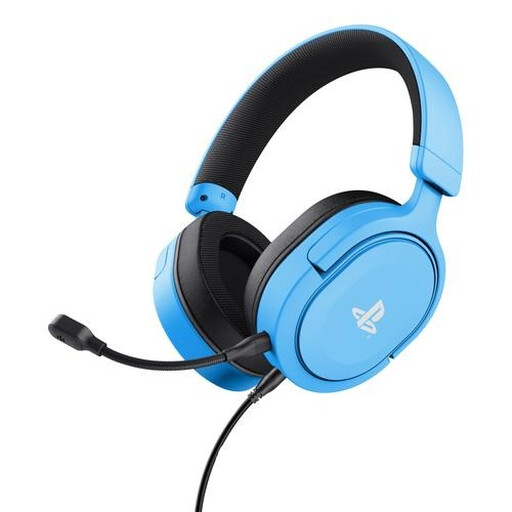
Why it suits this profile: This wired PlayStation 5 headset uses a detachable 1.2-metre cable and also works with PS4 and devices with a 3.5 mm connection. This keeps installation simple.
There is no battery to charge, and the volume and microphone mute controls are located on the earcup. The product information states stereo with 3D audio on PS5, not genuine surround sound.
50 mm drivers, detachable microphone, swivel earcups and a weight of 253 grams.
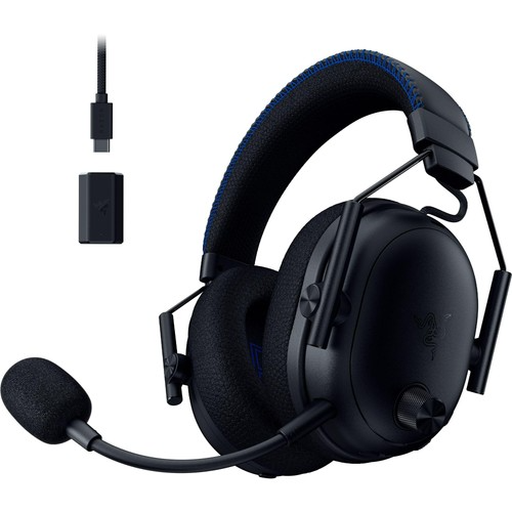
Why it suits this profile: For players who want to combine wireless freedom and comprehensive specifications with use on PlayStation and PC.
The stated connection is wireless via 2.4 GHz and Bluetooth. Before buying, check which receiver and features you will use with your PS5 setup.
50 mm drivers, detachable microphone and a stated battery life of up to 70 hours.
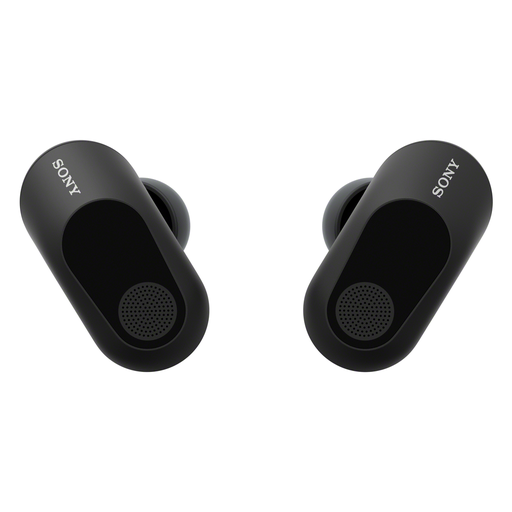
Why it suits this profile: Suitable for gamers who do not want an over-ear headset and are looking for compact wireless gaming earbuds for PS5 and other devices.
The USB-C dongle is designed for low latency; the product information states less than 30 ms. However, you will need to take charging and the in-ear fit into account.
Bluetooth 5.3, active noise cancellation, microphone and a stated battery life of 12 hours via the dongle.

Why it suits this profile: A practical gaming headset for PC, PS4, Xbox One, Switch and devices with a 3.5 mm connection.
The 7.1 feature is activated through Razer software. Check the software requirements in advance; a simple analogue connection will not automatically provide the same feature.
50 mm drivers, a weight of 240 grams and a cardioid microphone with mute control.
We have put together a complete, up-to-date list of products that fully meet these strict selection criteria and the applicable European safety regulations.
This depends on the connection and the stated compatibility. A headset with a 3.5 mm jack will often work with multiple devices that have a suitable headphone connection. For USB and wireless models, you should check the platform list. A gaming headset for PC and console will not necessarily support every function across all devices.
A wired gaming headset does not have a battery and is generally ready to use straight away. A wireless model gives you greater freedom of movement, but needs to be charged and may require a USB dongle. Choose wired for simplicity and a fixed setup; choose wireless when playing without cables matters more to you.
Its lifespan depends on cable strain, hinges, ear cushions, battery use and storage. Never pull a cable out of the controller by the cord, and do not leave a wireless model completely discharged for long periods. Clean the ear cushions with a soft, slightly damp cloth according to the product instructions, and listen at a safe volume. This helps to limit wear and tear, but does not guarantee a fixed service life.
