
Vandaag of morgen in huis

Kwaliteit gegarandeerd

Welkomstaanbiedingen ontgrendelen: GRATIS bezorging | Tot 80% korting | Gratis 30 dagen JoyPlus-proefperiode
Download de app
A gaming headset needs to do more than play game audio. You want to hear your teammates clearly, have a microphone that does not constantly cause distractions, and enjoy ear cushions that remain comfortable even after a long session. Yet many purchasing decisions are more complicated than they appear. Marketing terms such as “surround sound”, “noise cancelling” and “wireless” do not always tell the full story.
The most important question is therefore not which headset looks the most eye-catching, but which connections, features and level of comfort suit the way you use it.
A 7.1 surround sound headset may use virtual software processing, a USB sound card or specific PC software. This does not automatically mean that every feature is available on PS5, Xbox or Nintendo Switch. For example, the Logitech G432 uses a USB DAC and software for its surround features. With the Razer BlackShark V2 X, the 7.1 feature is linked to software and an activation code according to the product information.
So check:
When a gaming headset is described as having noise cancelling, this may refer to the microphone rather than active noise cancellation for your ears. According to its specifications, the Trust Ayda has a noise-cancelling microphone and a USB connection. This makes it particularly suitable for online conversations and PC use, but not automatically for console gaming.
Pay attention to the difference between:
A 3.5mm connection is often practical for a PS5 gaming headset, Xbox gaming headset or Nintendo Switch gaming headset. However, PCs with separate audio and microphone ports may require a splitter. A USB headset, meanwhile, will not work without a suitable USB port or adapter.
Do not just look for “multi-platform” in the title. Check the included cables, adapters and exact compatibility list.
A wired gaming headset using 3.5mm does not require a battery and is generally ready to use straight away. This is useful if you switch between console and PC. Models such as the Trust GXT 415 Zirox and Logitech G G335 use this connection.
A wireless gaming headset gives you greater freedom of movement, but you need to consider:
According to the product information, the HyperX Cloud III S supports 2.4GHz wireless and Bluetooth. The stated battery life varies depending on the connection mode and usage conditions. Always check the specifications of the version you are buying.
For online multiplayer, a clear microphone is more important than extra lighting. Look out for:
Brands may base sound or quality claims on their own research. According to HyperX’s product description, the Cloud III S’s 10mm microphone is designed for clear voice communication. This is a product claim made by the brand; your actual experience may vary depending on your surroundings, device and settings.
A comfortable gaming headset is usually an over-ear gaming headset with soft ear cushions and an adjustable headband. Check the weight, too. The specifications state that the Trust GXT 415 Zirox weighs 244 grams, the Logitech G G335 240 grams and the HyperX Cloud III S 340 grams.
Also consider:
A low weight does not benefit everyone equally: the fit, head size and heat build-up also play a part.

Why it suits this profile: A straightforward model for gamers who want to play on PC, PlayStation, Xbox or Nintendo Switch without a battery or complicated set-up.
The product specifications clearly state that this is a wired stereo headset, without a virtual 7.1 feature or active noise cancellation.
50mm drivers, over-ear ear cushions, a weight of 244 grams, a fixed 2-metre cable and a fold-up microphone.

Why it suits this profile: Designed for players who use multiple platforms and value memory foam, multiple connections and immersive audio.
The compatibility list includes PC, PS5, Xbox, Switch, Mac and mobile devices. The included USB and 3.5mm connections make it less dependent on a single device.
53mm drivers, a detachable microphone, USB-C, USB-A and 3.5mm connections, plus DTS Headphone:X 2.0 according to the product details.
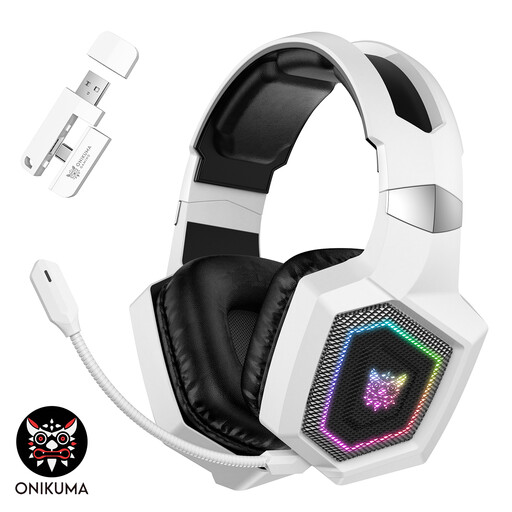
Why it suits this profile: For streamers and players who value wireless freedom, RGB lighting and multiple connection options.
The product information lists 2.4GHz, Bluetooth and a wired Type-C mode separately. According to this information, Bluetooth is not directly supported on PS5 and PS4.
Triple-mode connectivity, a detachable microphone, RGB lighting and a stated battery life of up to 40 hours via 2.4GHz without lighting.
We have put together a complete, up-to-date list of products that fully meet these strict selection criteria and the applicable European safety regulations.
That depends on the connection and the model. A headset with a 3.5mm jack will often work through the controller or console connection. For Xbox models, check that the controller and headset use the same connection. USB and wireless models may require a specific dongle or platform support.
A wired headset does not have a battery that needs charging or replacing. A wireless model gives you greater freedom of movement, but you need to consider charging and possible compatibility limitations. For many casual gamers, wired is practical; for streamers or players who move around freely, wireless may be more appealing.
Its lifespan depends on cable use, hinges, the microphone arm, ear cushions and storage. Do not pull on the cable, store the headset in a dry place and clean the cushions with a soft, dry cloth. With intensive use, replaceable ear cushions and a detachable microphone can be useful. Also keep the volume at a moderate level and take regular breaks.
