Who is this important for?

Players who enjoy long sessions

You play lengthy story missions and want your headset to stay comfortable without charging interrupting your session. Materials and stated battery life can help you compare models, but they don’t necessarily determine how a headset will fit you.

Players who switch between platforms

You want game audio and, if needed, the microphone to work with your PC or console. A wireless mode on one platform doesn’t prove that the same headset will work in the same way on another.

Players who care about atmosphere and dialogue

You want to follow ambient sounds and spoken directions clearly. Spatial audio is most relevant when your platform and game support the feature.

What should you look for when buying?

Wired

Best for: anyone who wants to play without relying on a headset battery and has a compatible port on their device.

Bear in mind: you’ll have a cable, and features may vary by platform and the connection you use.

Wireless

Best for: anyone who wants freedom to move and chooses a headset that works with the right console or dongle.

Bear in mind: battery life and the connection required for your specific platform.

What to consider What to look for Who is this important for?
Platform and connection Check the exact version, whether you need a 3.5mm or USB connection, and whether the microphone works in that mode. If you switch between PC and console, you’ll want to make sure game audio and chat work on your devices. Around 36% of consumers put the right platform connection first.
Comfort Compare the weight, adjustability and ear cushions; try the fit for yourself where possible. For long quests, you’ll want a comfortable headset that won’t interrupt your gaming session. Around 29% of consumers prioritise comfort during long sessions.
Game audio Check the audio settings and whether your game and platform support spatial audio. If you want to follow the atmosphere and dialogue in open-world missions, focus on the audio features your game actually supports. Around 21% of consumers put game audio ahead of other requirements.
Voice chat Check the microphone controls and whether chat works through the connection you plan to use. When playing with others, you’ll want to mute the microphone easily and chat clearly. Around 14% of consumers make voice chat their top buying priority.

Common pitfalls

  • Assuming wireless means universal compatibility

    Headsets use different connections and their features can vary by platform. So a wireless headset isn’t automatically suitable for your console or preferred way of playing.

    Before you buy, compare the full model name, platform version and connection supported by your device.

  • Assuming spatial audio is an advantage in every game

    Spatial audio availability depends on the platform and game. Sony specifies that the 3D audio mentioned for PULSE Elite on PS5 is for games that support the feature.

    Check that your game and platform support it, and first choose a connection and fit that suit the way you play.

  • Confusing the manufacturer’s warranty with your statutory rights

    In the Netherlands, there is no fixed statutory warranty period. If a product doesn’t meet the expectations you had when buying it, the retailer is your point of contact for your statutory rights, as explained by the Dutch government.

    If you’re considering an additional cover plan, check exactly what it adds. Any claim under your statutory rights should be made to the retailer.

Brands to consider

PlayStation

Relevant for PS5 players who want to use PlayStation Link and are interested in 3D audio in supported games.

  • For PULSE Elite, Sony lists planar magnetic drivers, a retractable microphone and up to 30 hours of battery life.
  • The stated battery life is a manufacturer figure; 3D audio depends on the game supporting it.

Xbox

The wireless Xbox Wireless Headset and wired Xbox Stereo Headset are different options, each with its own connections and features.

  • Microsoft lists up to 20 hours of battery life for the wireless headset, along with simultaneous connection to a console and phone.
  • The wired stereo headset uses the 3.5mm socket on an Xbox controller and doesn’t need a battery; features vary by model.

HyperX

The wired Cloud III is an option if you’re looking for connection options across several of the gaming platforms listed.

  • For the Cloud III, HyperX lists memory foam, a microphone and 3.5mm, USB-C and USB-A connection options.
  • These features don’t automatically apply to the separate wireless Cloud III versions; fit is still a personal preference.

SteelSeries

According to SteelSeries, the Arctis Nova 7P Wireless is designed for wireless use with PlayStation, PC and Switch.

  • For the Nova 7P version reviewed, SteelSeries lists a USB-C dongle, simultaneous 2.4GHz game audio and Bluetooth audio, and up to 38 hours of battery life.
  • Check the generation and platform version: these details don’t automatically apply to the Nova 7P Gen 2 or an Xbox version.

Logitech G

According to Logitech, the G435 LIGHTSPEED is a lightweight wireless option for PC and PlayStation 4/5, among other platforms.

  • Logitech lists a weight of 165 g, integrated beamforming microphones and 18 hours of use.
  • The LIGHTSPEED connection described is for PC, Mac and PlayStation 4/5; don’t assume this means it supports Xbox in the same mode.

Turtle Beach

The Stealth 600 Gen 3 comes in platform-specific versions for wireless gaming; choose the one that suits your intended device.

  • Turtle Beach lists 2.4GHz, Bluetooth 5.2, a flip-to-mute microphone and up to 80 hours of battery life.
  • These are manufacturer figures; check the platform version and consider the stated battery life in relation to how you use the headset.

Joybuy products

This selection from Joybuy includes wired headsets with connections such as 3.5mm or USB, as well as wireless models with a receiver for specific devices. Always check that the connection and microphone mode on the exact version suit your PC or console.

Trust GXT 498W Forta wired gaming headset, white

Trust GXT 498W Forta, wired, white

Best for anyone who wants to play on PS5 or PS4 using a wired connection and a detachable microphone.

3.5mm connection; volume and microphone mute controls; 50mm drivers. The description mentions soft ear cushions, a padded headband and rotating ear cups.

View at Joybuy

Turtle Beach Stealth 600 Gen 3 Xbox wireless gaming headset

Turtle Beach Stealth 600 Gen 3 Xbox

Best for anyone who wants to game wirelessly on Xbox and flip the microphone up to mute it when playing with others.

The description lists 2.4GHz via a USB receiver for Xbox and a flip-to-mute microphone. Check which connection and features are available for each device.

View at Joybuy
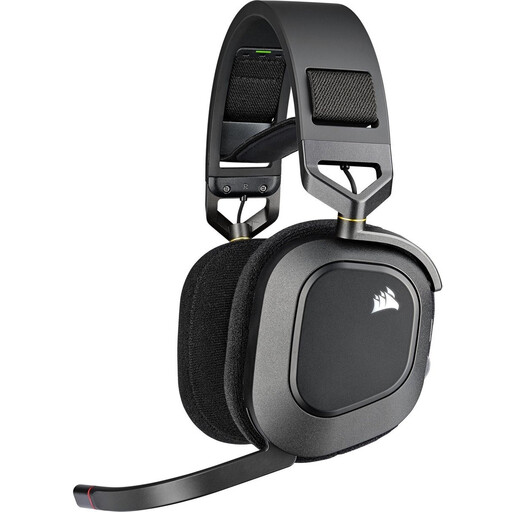
Corsair HS80 RGB Wireless gaming headset, Carbon

Corsair HS80 RGB Wireless, Carbon

Best for anyone who wants to play wirelessly on one of the PC or PlayStation platforms listed and is looking for a flip-to-mute microphone.

The description lists a USB receiver, audio customisation via iCUE and a floating headband with memory foam ear cushions. Dolby Atmos is listed for PC.

View at Joybuy

Razer BlackShark V2 X 7.1 wired gaming headset

Razer BlackShark V2 X 7.1, wired

Best for anyone who wants to game using a wired connection on a device with a 3.5mm socket, and use a microphone with a mute button.

The description lists support for PC, PS4, Xbox One and Nintendo Switch, among other platforms, plus a cardioid microphone and 7.1 software on PC. Memory foam ear cushions are also mentioned.

View at Joybuy

HyperX Cloud III wired gaming headset, black and red

HyperX Cloud III, wired, black and red

Best for anyone looking for a wired headset for the listed PC, PS5 or Xbox Series X|S version.

3.5mm, USB-A and USB-C connection options; detachable microphone with mute function; DTS Headphone:X 2.0 virtual surround sound. The description mentions memory foam in the headband and ear cushions.

View at Joybuy

Frequently asked questions

Will a wireless gaming headset work with both PS5 and Xbox?

Not simply because it says ‘wireless’ or ‘Bluetooth’. Check the exact version and connection mode: Sony describes PlayStation Link for PULSE Elite, while Microsoft describes direct wireless pairing with Xbox consoles for the Xbox Wireless Headset.

How do I set up a headset for an open-world game?

Use the connection specified by the manufacturer for your platform, then check the game and chat volumes. For PULSE Elite, Sony describes equaliser, sidetone and 3D audio settings on PS5 or through the PlayStation Link PC driver. The settings available therefore depend on the device you’re using.

What should I consider if I’m listening for a long time?

Keep the volume at a reasonable level and take listening time into account too. The World Health Organization notes that the level, duration and frequency of exposure to loud sounds all affect the risk of hearing damage.

Do I need an additional warranty plan?

No. You don’t need an additional plan to have statutory rights when buying as a consumer. There is no fixed statutory warranty period in the Netherlands; for a faulty product, the retailer is your point of contact, according to the Dutch government. Consider an additional plan based on what it offers on top of that protection.

What rules apply when buying a gaming headset online in the Netherlands?

When you buy online from a business, you’ll often have 14 days to change your mind. The Dutch government lists exceptions and distinguishes these purchases from buying from a private seller. The Dutch Authority for Digital Infrastructure states that electrical and electronic equipment, including headphones, must carry the correct CE marking. A mention on a web page doesn’t confirm that an individual item carries that marking.
