What should you look for when buying?
First, check that the connection works with your gaming platform. Then consider sound and comfort; choose wireless mainly if running a cable from where you sit would be awkward.
| What to consider |
What should you check? |
Who is this important for? |
| Connection to your platform |
Check the exact headset version and whether audio and the microphone work through the connection you want to use. |
If I play on several systems, I want to be sure this particular version works with my console or PC. Around 28% of consumers prioritise platform compatibility. |
| Clarity of game sounds |
Compare clarity and direction; check which audio settings your platform offers. |
I want to follow voices and clues in a mystery game clearly, rather than relying on a surround-sound label alone. Around 22% of consumers put game audio first. |
| Freedom to move around from the sofa |
Check whether a cable will reach your controller, or whether you need a compatible receiver or direct pairing. |
When I sit further from the screen, I want to play without a cable running to the console getting in the way. Around 22% of consumers make freedom of movement their top consideration. |
| Comfort |
Consider the headband, ear cushions and fit; try the headset on if you can. |
For longer sessions, a comfortable fit matters most to me, even if I’m less concerned about other features. Around 17% of consumers prioritise comfort. |
| Voice chat |
Check the microphone, mute controls and chat features for your platform and connection. |
If I play with others, I want to hear them and make sure they can hear me clearly. Around 11% of consumers put voice chat ahead of other buying considerations. |
Headsets for this gaming setup
This selection includes wired and wireless options. Check that the connection for each headset and version suits your platform and gaming setup.
 No image available
SteelSeries Arctis Nova Pro Wireless, PlayStation, black
A wireless option for a PlayStation setup; check that the connection and controls suit the way you’ll use it.
The product information lists a USB connection, game and chat volume controls, and a microphone with a mute control.
Joybuy
 No image available
Turtle Beach Stealth 600 Gen 3, Xbox
A wireless option if you’re looking for a headset with microphone controls; check the connection for every device you plan to use.
The product name lists Xbox, PS5, PS4, PC, Switch 2, Steam Deck and mobile. The product information lists a USB receiver, Bluetooth and a flip-to-mute microphone.
Joybuy
 No image available
HyperX Cloud III S Wireless
A wireless option for the platforms HyperX lists for this version, including PC and PS5. According to HyperX, this headset is not compatible with Xbox.
The product information lists 2.4GHz and Bluetooth, USB-A and USB-C connections, and a detachable microphone with a mute indicator.
HyperX quotes up to 120 hours of use in 2.4GHz mode and up to 200 hours via Bluetooth.
Joybuy
 No image available
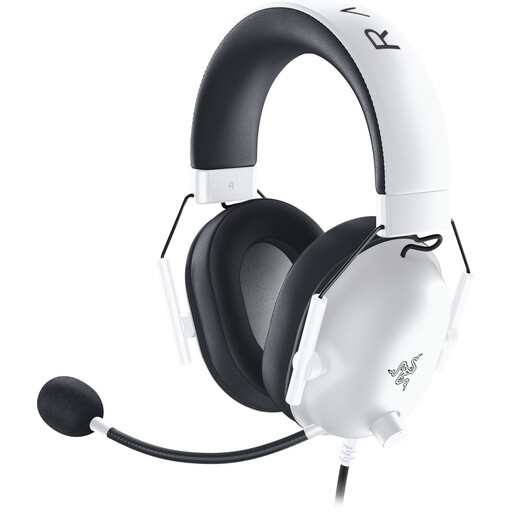
Razer BlackShark V2 X (Xbox Licensed), white
A wired option for use with a compatible 3.5mm socket; check the connection on your controller or device.
The product information lists a 3.5mm connection and a microphone with controls on the headset.
Joybuy
 No image available
HyperX Cloud III, PC, PS5 and Xbox Series X|S, black
A wired headset for anyone planning to use the listed platforms; check which connection suits your device.
HyperX lists 3.5mm, USB-A and USB-C connections. The product information also lists a microphone with a mute control.
Joybuy
Frequently asked questions
Should I connect the headset to my big TV, console or controller?
First, decide which device needs to handle the game audio and, if needed, the microphone. Xbox describes both direct wireless pairing with supported consoles and a 3.5mm connection on compatible controllers. For other setups, check which connections the headset and device support.
How can I compare stereo and 3D audio on a PS5?
On a PS5, you can compare stereo and 3D audio for headphones. PlayStation Support lists the settings under Settings > Sound > 3D Audio (Headphones), where you can choose a profile or preset.
Will a standard Bluetooth headset connect directly to PS5 or Xbox?
Don’t assume it will: the connection depends on the platform and headset. Sony says that PS5 doesn’t support a direct Bluetooth audio connection; Xbox describes options including Xbox Wireless and 3.5mm via a compatible controller. Check the connection for your exact model.
What should I check if I lose the receiver for my SteelSeries headset?
Check the exact headset model before choosing a replacement receiver. SteelSeries says its wireless receivers are model-specific, and that a different dongle won’t add Xbox support to an unsupported headset version.
What are my rights when buying online or if a product is faulty in the Netherlands?
When you buy online from a business, you generally have a 14-day cooling-off period, although there are exceptions. The Dutch government says there is no fixed statutory warranty period; if a product develops a fault, contact the seller. An optional paid warranty doesn’t replace these rights.


