First, choose a headset variant that supports both game audio and the microphone on your gaming device. A wired headset is practical if you play in one place, while a wireless one gives you more freedom to move but needs charging and a compatible connection. Also check the fit, and which chat and audio features work on your platform.
Who is this guide for?
Player on multiple systems
You might switch between PC and console, for example, and want to check in advance that your chosen headset variant supports voice chat on each device. HyperX and SteelSeries list different connections and platform variants, so check compatibility with your specific set-up.
PC player who stays in one place
You play at a desk and prioritise adjustable microphone features and easy controls over freedom of movement. Logitech says Blue VO!CE and DTS Headphone:X 2.0 are available on the wired G PRO X only when used with G HUB on PC.
Player who enjoys long sessions
You want the fit, ear cushions and listening volume to remain comfortable during longer sessions. A stated battery life doesn’t tell you whether a headset fits your head well. HyperX lists memory foam for the Cloud III, while PlayStation gives the PULSE Elite a battery life of up to 30 hours.
What should you look for when choosing?
First, check that your device supports your chosen connection and microphone. Then compare voice controls and fit with the audio features and freedom of movement you need while playing.
| What to consider |
What should you check? |
Who is this important for? |
| Connection and compatibility |
Check the full model variant, connections or dongle, and support for both game audio and chat through the microphone. HyperX lists 3.5 mm, USB-A and USB-C for the wired Cloud III; SteelSeries specifically lists Xbox compatibility for the Nova 5X. |
If I switch between PC and console, I want to know in advance whether my microphone will work with the device I’m using. Around 25% of consumers prioritise compatibility with their gaming device. |
| Microphone and mute controls |
Check the microphone type and mute controls on the variant, and whether any voice filters work on your platform. HyperX lists an LED mute indicator for the Cloud III; Logitech limits Blue VO!CE on the wired G PRO X to PC with G HUB. |
If I often talk to teammates, I want to be heard clearly and be able to mute the microphone quickly. Around 25% of consumers give lobby chat and microphone controls top priority. |
| Comfort |
Compare the listed materials and adjustability, and if possible try the headset with glasses or during a longer session. HyperX lists memory foam; Logitech says the wired G PRO X comes with ear cushions in either faux leather or breathable velour. |
If I spend a long time in a lobby, I want the headset to feel comfortable without assuming that the materials alone guarantee a good fit. Around 20% of consumers focus mainly on comfort during longer sessions. |
| Game audio and audio features |
Check that the feature you want works on your platform and in your game. Logitech lists DTS Headphone:X 2.0 for the wired G PRO X only on PC with G HUB; PlayStation says 3D audio on the PULSE Elite works with PS5 games that support it. |
If game audio matters to me, I want to use features that actually work with my device and games. Around 15% of consumers make game audio and related features their main priority. |
| Freedom of movement and charging |
For wireless models, check the connection, adapter and charging requirements. SteelSeries says you can switch between 2.4 GHz and Bluetooth on the Nova 5X; PlayStation lists simultaneous Link and Bluetooth audio for the PULSE Elite. |
If I want to get up from my desk while playing, I don’t want to be tied to a cable, but I’ll bear charging in mind. Around 15% of consumers put wireless freedom of movement at the top of their list. |
Common buying mistakes
-
Assuming every Nova 5 variant supports Xbox
SteelSeries specifically lists Xbox compatibility for the Nova 5X. So the name of a headset range alone doesn’t confirm that every variant will work with your console.
Before you buy, compare the full model name with the device you play on.
-
Expecting PC features to work on a console
Logitech says Blue VO!CE and DTS Headphone:X 2.0 on the wired G PRO X require a PC with G HUB, so these features aren’t necessarily available on a console.
Check which features work on your platform rather than assuming you’ll get the full list of PC features.
-
Treating a stated battery life or feature as a real-world test
A manufacturer’s specifications don’t tell you how the microphone sounds in your gaming set-up, how long the battery lasts with your settings, or how the headset fits your head.
Check the conditions behind the specifications and, if possible, try the fit and record your voice in your own set-up.
Brands to consider
HyperX
The wired Cloud III is worth considering if you want several connection options and on-headset volume and microphone mute controls.
- HyperX says the Cloud III has a microphone with an LED mute indicator, plus memory foam in the headband and ear cushions.
- The listed connections don’t guarantee that every device will support chat through the microphone on every connection, so check your set-up.
Logitech G
The wired G PRO X is a good option if you want to adjust voice filters on PC using G HUB.
- Logitech lists ear cushions in two finishes: faux leather and breathable velour.
- Logitech says Blue VO!CE and DTS Headphone:X 2.0 are available only on PC through G HUB.
SteelSeries
The Arctis Nova 5X Wireless is worth considering if you’re looking at a wireless headset for PC and Xbox, among other platforms.
- SteelSeries lists a USB-C dongle and switching between 2.4 GHz and Bluetooth.
- SteelSeries specifically lists the Nova 5X for Xbox, so check the full variant name.
PlayStation
The PULSE Elite is a wireless option designed for PS5. PlayStation says it can also connect to a compatible Windows PC or Mac using the included Link adapter.
- PlayStation lists a retractable microphone, simultaneous Link and Bluetooth audio, and a battery life of up to 30 hours.
- These are manufacturer specifications, not an independent real-world test. The listed 3D audio depends on PS5 games that support the feature.
JBL
JBL describes the Quantum 250 as a wired option for PC, Mac and consoles.
- JBL mentions multi-platform use in its product announcement.
- Check the connection and platform features for the exact variant. The listed product information isn’t an independent assessment of the microphone or comfort.
Gaming headsets at Joybuy
These models are designed for wired or wireless gaming with a microphone. Check that each model’s connection and chat features are right for your gaming device.
 No image available
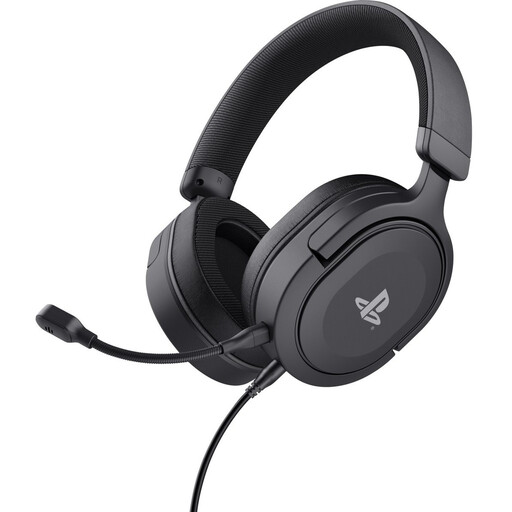
Trust GXT 498 Forta Gaming Headset, Wired, Officially Licensed for PS5, 50mm drivers
A wired choice if you play on PS5 from a fixed spot. Check that the connection also supports chat in your set-up.
The product name lists an official PS5 licence, 50mm drivers and an over-ear design.
View at Joybuy
 No image available
JBL Quantum 120 Wired Multiplatform Gaming Headset
A wired option if you’re looking for a headset for gaming on multiple platforms. Check that this variant supports microphone chat on your system.
The product name describes a black wired multi-platform gaming headset.
View at Joybuy
 No image available
Skullcandy Slyr Pro Multi-Platform Gaming Wired Over-Ear, Black/Red Digi-Hype
A wired option to compare if you play on multiple systems. Check that it works with your console, game and chat app.
The product name describes a wired over-ear headset for multiple platforms in the Black/Red Digi-Hype variant.
View at Joybuy
 No image available
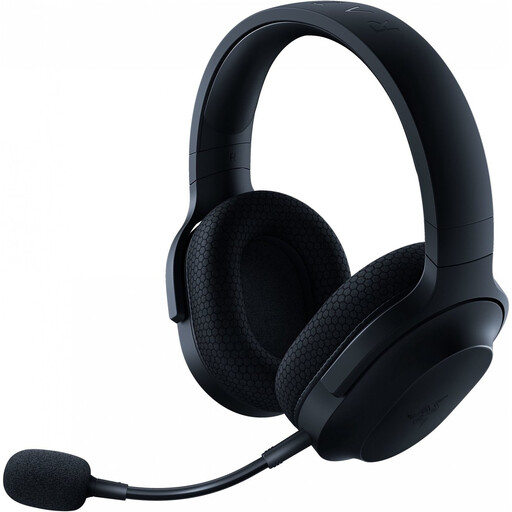
Razer Barracuda X Wireless Headset, Black
A wireless option if you want to play without a cable. Before buying, check which included connection works with your system.
The product name describes a black wireless headset.
View at Joybuy
 No image available
HyperX Cloud III S Wireless Gaming Headset
A wireless option if you want room to move while gaming. Check that the connection method and chat features work with your device.
The product name lists a detachable boom microphone, memory foam ear cushions and X Spatial Audio.
View at Joybuy
Frequently asked questions
My team can’t hear me on a Windows PC. What should I check first?
Check that the headset isn’t muted, select the intended input microphone in Windows and run a microphone test there. Also check microphone access for your game or chat app. These steps don’t confirm that every headset is compatible with every game.
How can I keep an eye on my listening volume during long sessions?
In its advice dated 6 March 2026, the World Health Organization (WHO) recommends setting your device volume to no more than 60% as a practical guideline. That percentage doesn’t measure the sound level produced by your particular headset and device combination.
If I buy online in the Netherlands, do I have a cooling-off period, and what happens if the product is faulty?
For online purchases from a business, the Dutch government says you usually have a 14-day cooling-off period, though you should check the relevant terms and exceptions. This is separate from faults: the Dutch government says there is no fixed, general statutory guarantee period in the Netherlands, and you can contact the seller about a problem with a product.


