
Vandaag of morgen in huis

Kwaliteit gegarandeerd

Welkomstaanbiedingen ontgrendelen: GRATIS bezorging | Tot 80% korting | Gratis 30 dagen JoyPlus-proefperiode
Download de app
A gaming headset with a microphone needs to do more than simply play game audio. You want to hear your teammates, come across clearly yourself and wear the headset for longer periods without constantly adjusting it. However, some marketing claims and design choices can still lead to a disappointing purchase.
A 7.1 surround sound headset often uses virtual processing via software or a USB adapter. This is different from having seven physical speakers on each side. So check:
For example, the JBL Quantum 300 uses JBL QuantumSURROUND through PC software. With the Logitech G432, the 7.1 function is linked to the USB DAC and Logitech G HUB. Without this additional step, the headset may work differently from what you expect.
The term gaming headset with noise reduction is used broadly. Soft over-ear ear cushions that partially block surrounding sounds provide passive sound isolation. This is not the same as active noise cancellation using electronic microphones.
So check the product specifications rather than relying solely on the product title. The Razer BlackShark V2 X, for example, is described as offering passive sound isolation. This can be useful in a busy room, but it will not remove every surrounding sound.
A wireless gaming headset gives you freedom of movement, but it relies on a battery, USB receiver, Bluetooth or a combination of these. Pay attention to the stated battery life and how the headset connects to your platform. Bluetooth is not suitable for the same functions on every device as a 2.4GHz receiver.
A wired headset does not need a battery, but its cable can get in the way. So check the cable length, connection type and whether you need a splitter or USB adapter.
A microphone on a gaming headset should above all be practical. A flip-to-mute microphone mutes the sound when you raise the microphone. Other models have a mute button on the ear cup or cable. A detachable microphone is useful if you also want to use the headset for music or while travelling.
A directional microphone, such as the Razer BlackShark V2 X’s cardioid microphone, is designed according to the product description to pick up sound from the front. Position the microphone approximately one to two centimetres from your mouth, as stated in the manual. Actual voice clarity also depends on your chat settings, surroundings and platform.
A 3.5mm connection often works directly through a controller or laptop. This makes a wired gaming headset suitable for multiple devices, but a splitter may be needed for a PC with separate microphone and headphone ports.
Always check whether your version is suitable for:
A product title may mention several platforms, but the functions can vary from one device to another. So check the product specifications and manual.
An over-ear gaming headset surrounds the ear. This can be comfortable during longer gaming sessions and often helps with passive sound isolation. Pay attention to the weight, shape of the ear cups, headband adjustment and cushion material.
The models in this selection weigh approximately 240 to 340 grams. You are most likely to notice the difference when playing for several hours. Memory foam can mould to the shape of your head, while synthetic leather is easy to clean but may feel warmer. A swivelling ear cup is useful when putting the headset down or storing it.

Why it suits this profile: A straightforward wired gaming headset for PC, laptop, PlayStation, Xbox and Nintendo Switch via 3.5mm.
The product specification clearly states stereo, a fixed 2-metre cable and no virtual 7.1 function. This makes it clear what to expect.
50mm drivers, over-ear ear cushions, volume control and a flip-up microphone.

Why it suits this profile: Suitable for users who want to game wirelessly via 2.4GHz or Bluetooth and value a long stated battery life.
The connection options and battery life are listed separately: up to 120 hours via 2.4GHz and up to 200 hours via Bluetooth, according to the product information.
Bluetooth 5.3, detachable microphone, 53mm drivers and memory foam ear cushions.

Why it suits this profile: A lightweight headset for gamers looking for a 3.5mm connection, microphone and virtual 7.1 option on PC.
The manual states that the 7.1 Surround Sound software must be downloaded from the Razer website. The function is therefore not presented as universal for every platform.
240 grams, 50mm TriForce drivers, cardioid microphone and compatibility with PC, PS4, Xbox One and Switch.
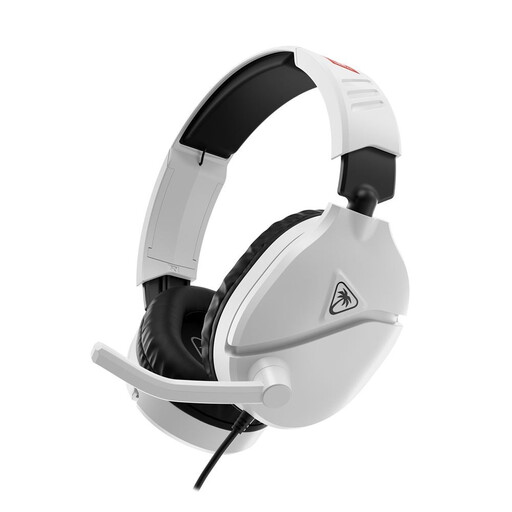
Why it suits this profile: Designed for Nintendo Switch, Switch Lite, Switch OLED and Switch 2 with a direct 3.5mm connection.
The headset works without a battery. The flip-to-mute microphone and volume control are built directly into the headset, so no additional software is required.
40mm speakers, 232 grams, over-ear ear cushions and a 1.2-metre cable.
We have put together a complete, up-to-date list of products that fully meet these strict selection criteria and the applicable European safety regulations.
That depends on the connection and platform support. A 3.5mm headset often works through the controller on PS5, PS4 and Xbox, or directly through the Nintendo Switch. A splitter, USB adapter or software may be required for PC. Check this before buying.
A wired gaming headset does not need charging and is generally easy to set up. A wireless model gives you greater freedom of movement, but you need to consider battery life, the USB receiver and Bluetooth compatibility. The best choice mainly depends on where you play and how you use the headset.
Its lifespan depends on cable use, hinges, ear cushions and storage. Do not place a wired headset down by its cable or pull on the plug. Store a wireless model in a dry place and charge it with a suitable cable. Use a moderate volume during long sessions and take regular breaks.
