
Vandaag of morgen in huis

Kwaliteit gegarandeerd

Welkomstaanbiedingen ontgrendelen: GRATIS bezorging | Tot 80% korting | Gratis 30 dagen JoyPlus-proefperiode
Download de app
A gaming headset with a microphone might seem easy to choose, until you have to consider the connection, comfort, microphone quality and compatibility. A headset that works well with a laptop won’t necessarily suit an Xbox controller or Nintendo Switch. Marketing terms such as “surround sound”, “AI microphone” and “low latency” don’t always tell you how comfortable a product will be to use every day, either.
Use this buying guide to compare the key features of wireless gaming headsets, wired gaming headsets and comfortable models for PC, PlayStation, Xbox and mobile gaming.
A gaming headset with surround sound sounds appealing for FPS games, but check how the feature works. Virtual surround sound may depend on software, a USB adapter or a specific platform. For example, the JBL Quantum 300 is listed as supporting JBL QuantumSURROUND on PC only, via JBL QuantumENGINE. So, a 3.5mm connection won’t automatically give you the same features on a console.
Check the following:
A wireless gaming headset can connect via Bluetooth, 2.4 GHz or both. Bluetooth is handy for mobile use, while a 2.4 GHz dongle is often preferred for gaming on a PC or laptop. Check whether the receiver is included and whether your console supports the connection.
A model with multiple modes, such as the ONIKUMA GT808, lists Bluetooth 5.3, 2.4 GHz and a wired mode. That gives you flexibility, but check which mode works with your device before buying.
A gaming headset with RGB can complement your desk setup, but the lighting won’t improve the microphone or sound quality. Start by checking the ear cushions, headband, weight and cable length. RGB lighting may also need a separate USB connection. On some models, USB is only for the lighting, not the audio.
For a gaming headset for PS5 or Xbox, a 3.5mm connection to the controller is often practical. According to its product specifications, the Turtle Beach Recon 70 works with PC, PS5, PS4, Xbox Series X|S, Xbox One, Nintendo Switch and mobile devices via 3.5mm.
Check whether your PC has a single combined headset socket. Older computers with separate microphone and audio sockets may need a splitter. A USB headset or USB audio adapter can offer extra software features, but it may not be as straightforward to use with every device.
For online gaming, an easy-to-reach mute function is important. A flip-to-mute microphone is muted by flipping it upwards. Other headsets have controls on the cable or earcup.
Check the following:
Manufacturers may promote features such as “clear communication” or “AI noise cancellation”. Treat these as brand claims and focus on the microphone technology, controls and connection details provided.
An over-ear gaming headset fits around your ears and can help reduce some background noise. Soft memory foam or nylon ear cushions can be comfortable during longer sessions, but fit is personal. A headband that’s too tight or warm faux leather cushions may become less comfortable over time.
Check the listed specifications. The Sony INZONE H3 is listed in the product information as weighing approximately 260 to 299 grams, depending on the version. The JBL Quantum 300 is listed at 245 grams. Weight is useful for comparison, but it isn’t the only factor: the shape of the headband and pressure around your ears matter, too.
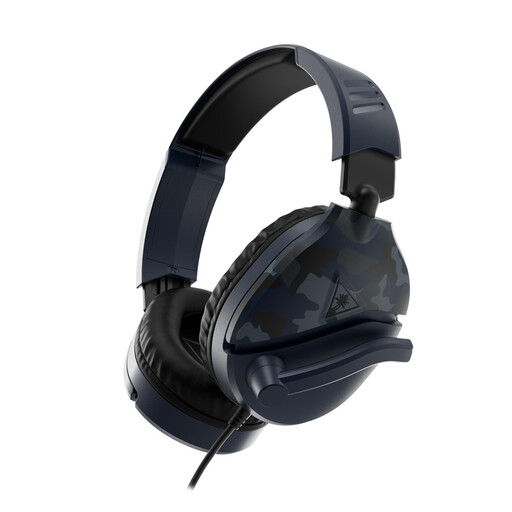
Why it suits this user: The straightforward 3.5mm connection makes this model suitable for several consoles, PCs and mobile devices, with no battery to manage.
There’s no need to worry about wireless battery life or separate surround sound software. The flip-to-mute microphone is easy to use.
40mm speakers, a 1.2-metre cable, volume control and compatibility with PC, PS5, Xbox and Switch.
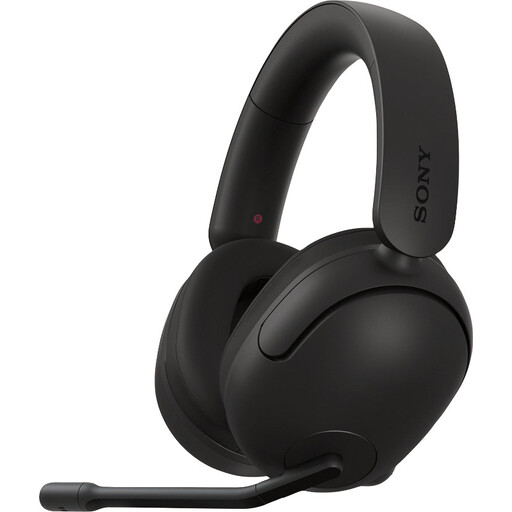
Why it suits this user: Designed for PC and PlayStation users looking for a wired headset with software settings and virtual spatial audio.
The product information clearly states that it supports PC and PlayStation, and links 360 Spatial Sound to software and the USB audio connection.
40mm drivers, an adjustable microphone, virtual 7.1 functionality according to the product description, and a wired connection that doesn’t need charging.
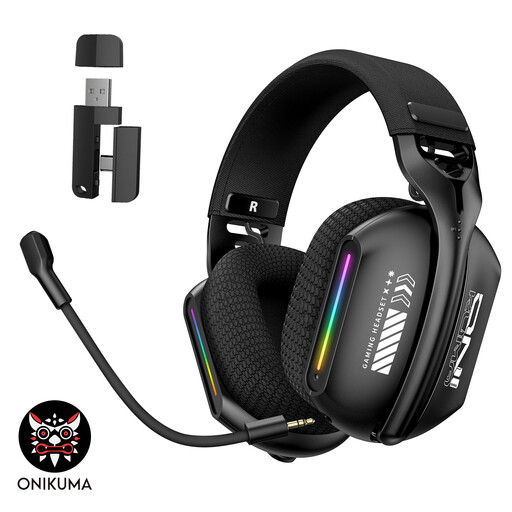
Why it suits this user: Ideal for users who want to switch between 2.4 GHz, Bluetooth 5.3 and wired mode on a PC, laptop or compatible device.
The three listed connection modes mean you’re less reliant on a single connection type. Check which modes are available for each device.
RGB lighting, an adjustable 360° microphone, memory foam ear cushions and an adjustable headband, according to the product information.
We’ve put together a complete, up-to-date list of products that meet these strict selection criteria and comply with current European safety regulations.
It depends on the connection and model. A headset with a 3.5mm plug will usually work via the controller, but always check the compatibility list for the specific model. A USB headset may offer extra features, but support can vary between platforms.
Not necessarily. Wireless gives you more freedom to move, but you’ll need to charge it and check the connection. A wired gaming headset works straight away and doesn’t need a battery. Wireless can be handy for long PC sessions, while 3.5mm is often more practical for straightforward console use.
Its lifespan depends on how you handle the cable, hinges and ear cushions, and how you store it. Don’t pull on the cable, keep the headset somewhere dry and clean the ear cushions with a soft, dry cloth. Avoid listening at high volume for long periods. Also check the warranty and availability of replacement parts before you order.
