
Home commentator with a small desk
Wants to speak clearly without a separate desktop microphone, mute the mic quickly and listen back to a test recording.


First, choose a headset with a microphone and connection that work with your recording or chat setup. Then check how your voice sounds in a test recording of the final mix. A wired headset means no battery or wireless receiver to manage, but it does leave a cable on your desk. A wireless headset removes the cable, but you’ll need to consider the receiver, charging and platform compatibility. A headset microphone saves space, but only listening back to a recording will tell you how your commentary sounds.
Wants to speak clearly without a separate desktop microphone, mute the mic quickly and listen back to a test recording.
Wants to hear match audio and chat and, if their software supports it, adjust the listening mix separately from the mix for viewers. Elgato describes separate stream and headphone mixes; OBS Project warns that duplicate audio sources can cause echo.
For longer sessions, considers personal fit, cable space or charging, and keeps the listening volume at a sensible level.
First, check that the connection and microphone work with your equipment. Then make a test recording and decide whether a cable or wireless receiver is more convenient for your desk.
| What to consider | What to look for when buying | Who is this important for? |
|---|---|---|
| Clarity | Check the microphone type and mute control; listen back to a test recording with match audio. | When I’m commentating, I want my voice to remain clear without a separate desktop microphone. Around 29% of consumers prioritise voice clarity. |
| Audio balance | Check whether your software supports monitoring and separate volume controls for the stream and headphones; watch out for duplicate audio sources. | I want to hear match audio, chat and my own voice clearly, and send a different mix to viewers if needed. Around 24% of consumers prioritise audio balance. |
| Comfort | Look for adjustability and ear cushions, and try the fit if possible. Keep the volume at a sensible level and take breaks. | During a long match, I want a headset that feels comfortable to wear without having to keep turning the volume up. Around 18% of consumers prioritise comfort. |
| Desk space and cable management | A wired headset needs room for its cable; a wireless one needs a suitable port for the receiver and somewhere to charge it. | At a small desk, I want to avoid a cable getting in the way, or not have to make room for a receiver and charging cable. Around 17% of consumers give desk space and cable management top priority. |
| Connection and platform | Compare the connection on the exact version with your device, and check that the software features you want work on your platform. | I want the microphone and headset to work with my own commentary device, including the features I actually need. Around 12% of consumers prioritise connection and platform features. |
A description of microphone processing won’t tell you how your voice will sound alongside match audio. Recording settings and the mix also play a part.
Record a short section of commentary with match audio and listen back to the final mix before going live.
Logitech G states that the wired PRO X’s Blue VO!CE and DTS Headphone:X 2.0 features are only available on PC through G HUB.
Check basic audio, the microphone and the software features you want separately for the platform you’ll be commentating on.
Wireless removes the audio cable from your desk, but the SteelSeries Arctis Nova 7 Wireless Gen 2 uses a USB-C dongle and a battery.
Check the ports and platform version, and think about where you’ll put the receiver and charging cable.
Make sure you have a free USB port and space for a charging cable.
The wired Cloud III is an option for a fixed commentary setup, with a boom microphone and a choice of connection options.
The wired Arctis Nova 1 and wireless Arctis Nova 7 Wireless Gen 2 suit different preferences for cables and audio sources.
The wired PRO X is worth considering if you want to adjust voice filters in software on a PC.
The wired BlackShark V2 X is an option with an adjustable headset microphone.
This selection includes wired gaming headsets with microphones for a fixed commentary setup, and a wireless headset for anyone looking to avoid an audio cable on their desk.
 No image available
An option for a fixed commentary setup if you’re looking for a wired connection and a microphone that mutes when flipped up.
Wired, with a 3.5 mm connection and a flip-to-mute microphone. The description mentions memory foam ear cushions.
 No image available
Suitable if you’re looking for a wired headset and want to be able to mute the microphone on the headset.
3.5 mm connection and a flip-to-mute microphone. The product name lists Nintendo Switch, Switch Lite, Switch OLED, PC and mobile; the description mentions mesh ear cushions.
 No image available
A wired option if you want to use a headset microphone while commentating instead of a separate desktop microphone.
The description mentions a detachable cardioid boom microphone and a 3.5 mm connection. Also listed: 50 mm drivers, a silicone headband and fabric ear cushions.
 No image available
A wireless option if you want to avoid having a permanent audio cable across a small desk, provided the connection and charging suit your setup.
The description lists 2.4GHz and Bluetooth, a detachable boom microphone with a mute indicator, and volume control. The stated battery life is up to 120 hours via 2.4GHz.
 No image available
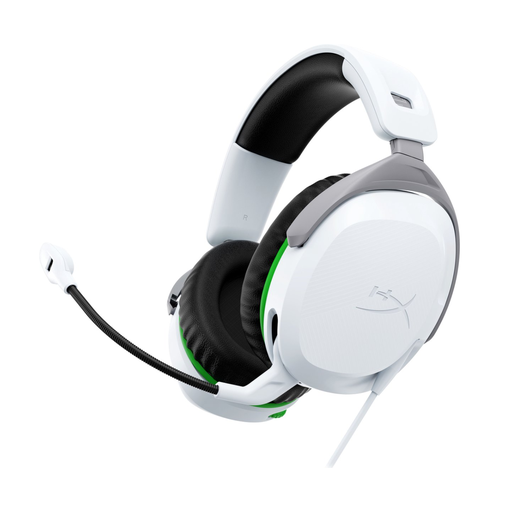
A wired option for commentary if the connection and version suit your Xbox setup.
3.5 mm connection and a flip-to-mute microphone. The description lists a weight of 275 g, memory foam ear cushions and rotating earcups.
Not necessarily: the headsets discussed have built-in microphones. Make a test recording to check how your voice, match audio and any chat sound in the final mix; product specifications alone can’t tell you that.
Check the microphone input, monitoring output and selected audio sources in OBS. OBS Project warns that selecting the same source both in a scene and in the general audio settings can cause echo.
First, check that the 5-pin end of the cable is plugged into the headset, as advised by SteelSeries Support. Then check that the correct input device is selected and, on PC, check microphone access.
Keep the volume at a sensible level and take regular breaks. The World Health Organization (WHO) points out that both sound levels and listening time affect the risk of hearing damage.
For a consumer purchase in the Netherlands, the product must meet the terms of the agreement; according to the Dutch government, the seller must provide a solution if there’s a problem. For distance purchases, you’ll often have a 14-day cooling-off period. This is separate from the question of what solution is appropriate for a faulty product; check the terms that apply to your purchase.